







Question: I need help implementing Insertionsort by using this csv file. I want to sort Pokemon orderly. MUST SORT IT BY USING CSV file. For Example
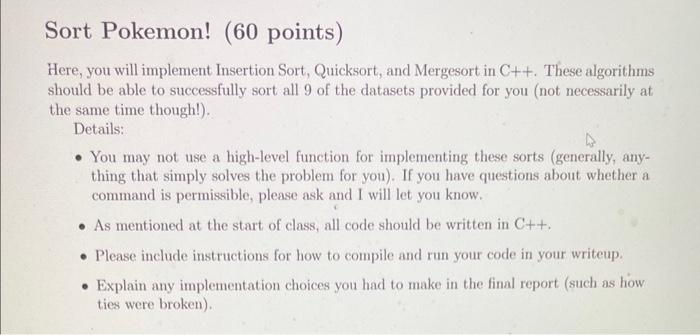
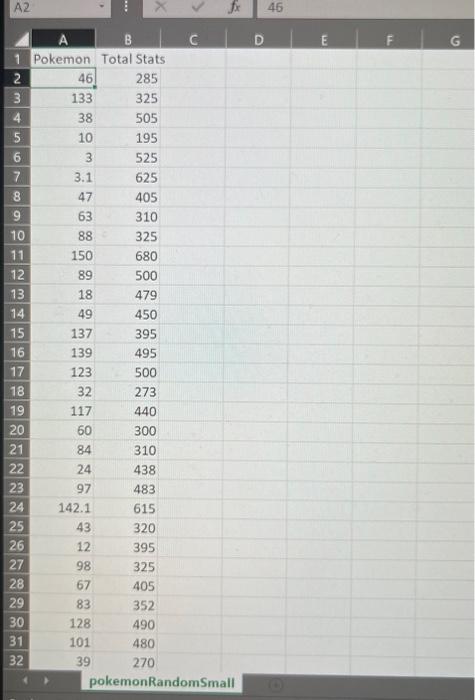
Sort Pokemon! (60 points) Here, you will implement Insertion Sort, Quicksort, and Mergesort in C++. These algorithms should be able to successfully sort all 9 of the datasets provided for you (not necessarily at the same time though!). Details: - You may not use a high-level function for implementing these sorts (generally, anything that simply solves the problem for you). If you have questions about whether a command is permissible, please ask and I will let you know. - As mentioned at the start of class, all code should be written in C++. - Please include instructions for how to compile and run your code in your writeup. - Explain any implementation choices you had to make in the final report (such as how ties were broken). 1 Pokemon Total Stats \begin{tabular}{|r|r|r|} \hline 1 & 46 \\ \hline 3 & 133 & 285 \\ \hline 4 & 38 & 505 \\ \hline 5 & 10 & 195 \\ \hline 6 & 3 & 525 \\ \hline 7 & 3.1 & 625 \\ \hline 8 & 47 & 405 \\ \hline 9 & 63 & 310 \\ \hline 10 & 88 & 325 \\ \hline 11 & 150 & 680 \\ \hline 12 & 89 & 500 \\ \hline 13 & 18 & 479 \\ \hline 14 & 49 & 450 \\ \hline 15 & 137 & 395 \\ \hline 16 & 139 & 495 \\ \hline 17 & 123 & 500 \\ \hline 18 & 32 & 273 \\ \hline 19 & 117 & 440 \\ \hline 20 & 60 & 300 \\ \hline 21 & 84 & 310 \\ \hline 22 & 24 & 438 \\ \hline 23 & 97 & 483 \\ \hline 24 & 142.1 & 615 \\ \hline 25 & 43 & 320 \\ \hline 26 & 12 & 395 \\ \hline 27 & 98 & 325 \\ \hline 28 & 67 & 405 \\ \hline 29 & 83 & 352 \\ \hline 30 & 128 & 490 \\ \hline 31 & 101 & 480 \\ \hline 32 & 39 & 270 \\ \hline & 1 & \\ \hline \end{tabular} pokemonRandomSmall
Step by Step Solution
There are 3 Steps involved in it

Get step-by-step solutions from verified subject matter experts
 Study Help