







Question: i need help implementing the dfs and bfs function along with everything else in terminal as I do not know how to could you post
i need help implementing the dfs and bfs function along with everything else in terminal as I do not know how to
could you post your terminal window and implementing it
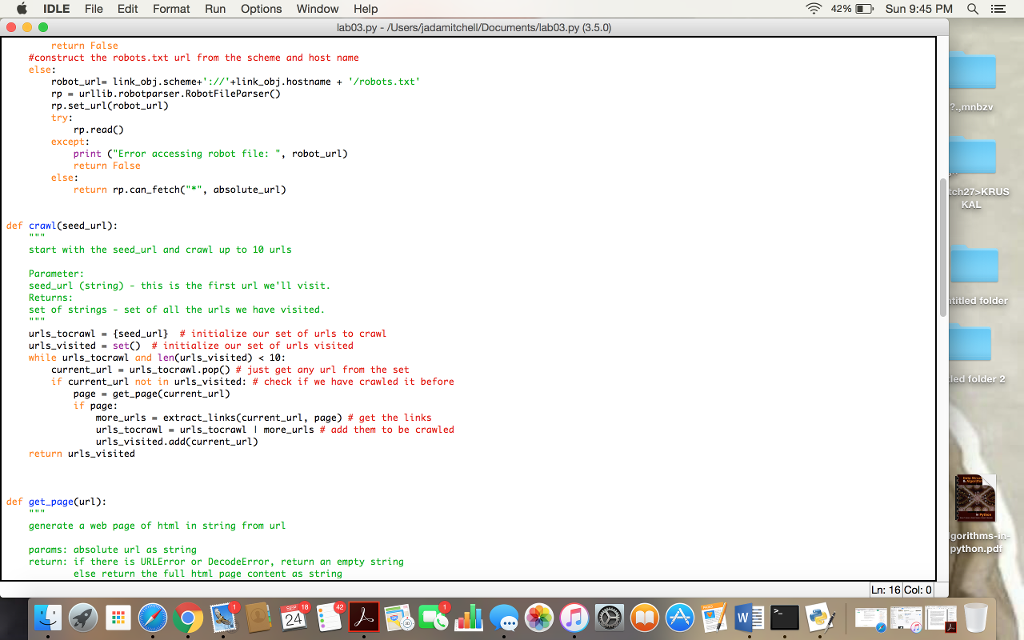
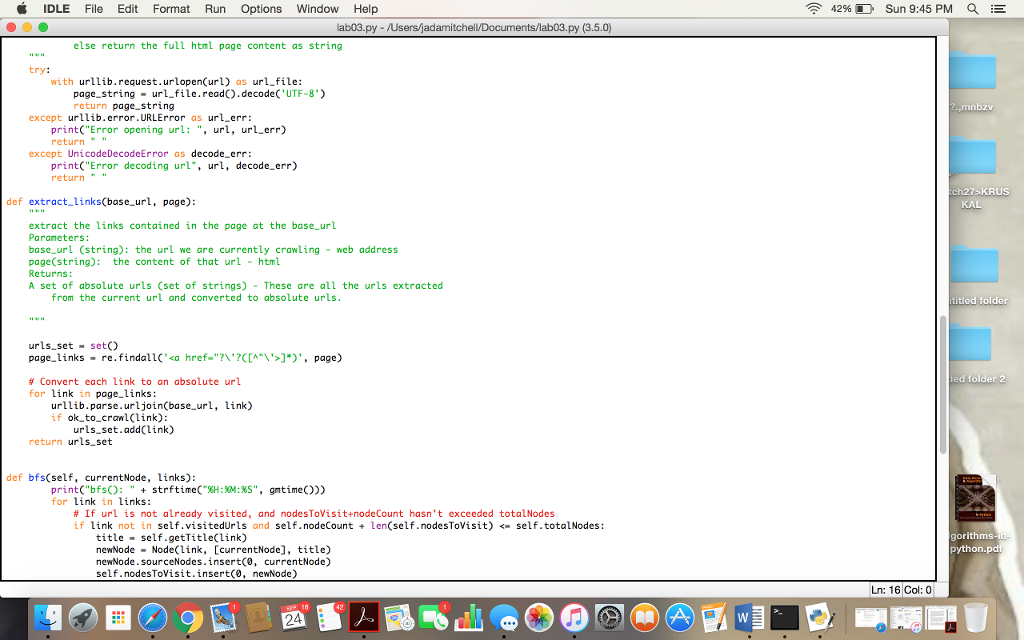
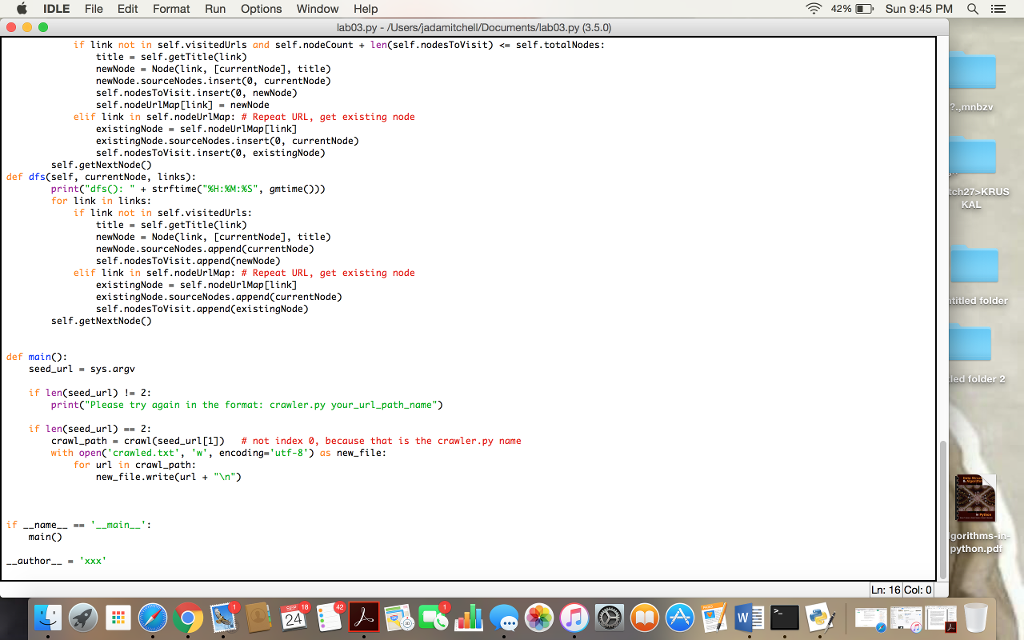
here pic of indentation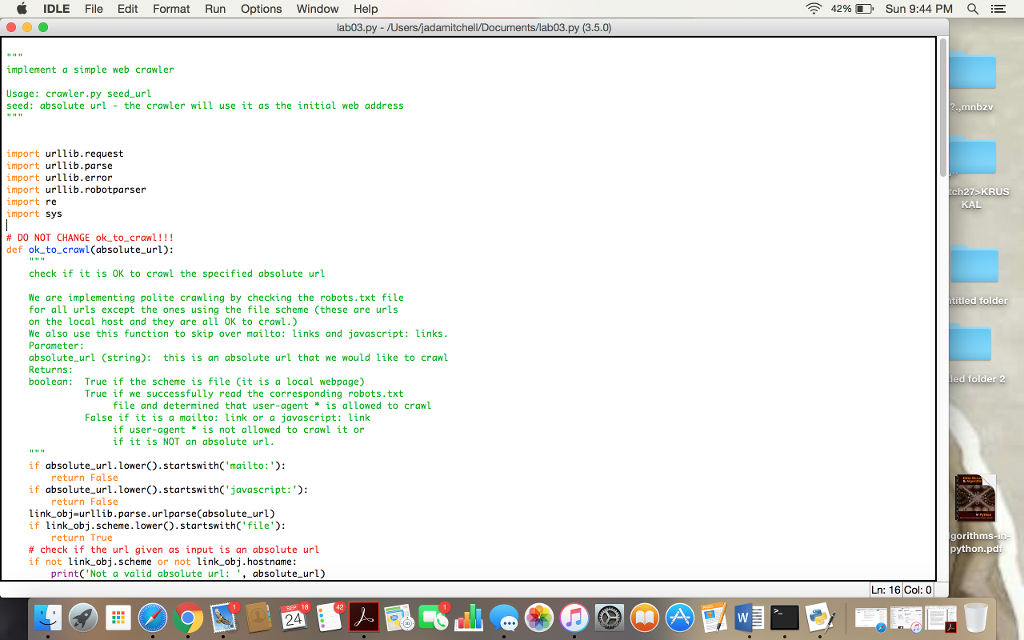
import urllib.request
import urllib.parse
import urllib.error
import urllib.robotparser
import re
import sys
# DO NOT CHANGE ok_to_crawl!!!
def ok_to_crawl(absolute_url):
"""
check if it is OK to crawl the specified absolute url
We are implementing polite crawling by checking the robots.txt file
for all urls except the ones using the file scheme (these are urls
on the local host and they are all OK to crawl.)
We also use this function to skip over mailto: links and javascript: links.
Parameter:
absolute_url (string): this is an absolute url that we would like to crawl
Returns:
boolean: True if the scheme is file (it is a local webpage)
True if we successfully read the corresponding robots.txt
file and determined that user-agent * is allowed to crawl
False if it is a mailto: link or a javascript: link
if user-agent * is not allowed to crawl it or
if it is NOT an absolute url.
"""
if absolute_url.lower().startswith('mailto:'):
return False
if absolute_url.lower().startswith('javascript:'):
return False
link_obj=urllib.parse.urlparse(absolute_url)
if link_obj.scheme.lower().startswith('file'):
return True
# check if the url given as input is an absolute url
if not link_obj.scheme or not link_obj.hostname:
print('Not a valid absolute url: ', absolute_url)
return False
#construct the robots.txt url from the scheme and host name
else:
robot_url= link_obj.scheme+'://'+link_obj.hostname + '/robots.txt'
rp = urllib.robotparser.RobotFileParser()
rp.set_url(robot_url)
try:
rp.read()
except:
print ("Error accessing robot file: ", robot_url)
return False
else:
return rp.can_fetch("*", absolute_url)
def crawl(seed_url):
"""
start with the seed_url and crawl up to 10 urls
Parameter:
seed_url (string) - this is the first url we'll visit.
Returns:
set of strings - set of all the urls we have visited.
"""
urls_tocrawl = {seed_url} # initialize our set of urls to crawl
urls_visited = set() # initialize our set of urls visited
while urls_tocrawl and len(urls_visited)
current_url = urls_tocrawl.pop() # just get any url from the set
if current_url not in urls_visited: # check if we have crawled it before
page = get_page(current_url)
if page:
more_urls = extract_links(current_url, page) # get the links
urls_tocrawl = urls_tocrawl | more_urls # add them to be crawled
urls_visited.add(current_url)
return urls_visited
def get_page(url):
"""
generate a web page of html in string from url
params: absolute url as string
return: if there is URLError or DecodeError, return an empty string
else return the full html page content as string
"""
try:
with urllib.request.urlopen(url) as url_file:
page_string = url_file.read().decode('UTF-8')
return page_string
except urllib.error.URLError as url_err:
print("Error opening url: ", url, url_err)
return " "
except UnicodeDecodeError as decode_err:
print("Error decoding url", url, decode_err)
return " "
def extract_links(base_url, page):
"""
extract the links contained in the page at the base_url
Parameters:
base_url (string): the url we are currently crawling - web address
page(string): the content of that url - html
Returns:
A set of absolute urls (set of strings) - These are all the urls extracted
from the current url and converted to absolute urls.
"""
urls_set = set()
page_links = re.findall('
if link not in self.visitedUrls and self.nodeCount + len(self.nodesToVisit)
title = self.getTitle(link)
newNode = Node(link, [currentNode], title)
newNode.sourceNodes.insert(0, currentNode)
self.nodesToVisit.insert(0, newNode)
self.nodeUrlMap[link] = newNode
elif link in self.nodeUrlMap: # Repeat URL, get existing node
existingNode = self.nodeUrlMap[link]
existingNode.sourceNodes.insert(0, currentNode)
self.nodesToVisit.insert(0, existingNode)
self.getNextNode()
def dfs(self, currentNode, links):
print("dfs(): " + strftime("%H:%M:%S", gmtime()))
for link in links:
if link not in self.visitedUrls:
title = self.getTitle(link)
newNode = Node(link, [currentNode], title)
newNode.sourceNodes.append(currentNode)
self.nodesToVisit.append(newNode)
elif link in self.nodeUrlMap: # Repeat URL, get existing node
existingNode = self.nodeUrlMap[link]
existingNode.sourceNodes.append(currentNode)
self.nodesToVisit.append(existingNode)
self.getNextNode()
def main():
seed_url = sys.argv
if len(seed_url) != 2:
print("Please try again in the format: crawler.py your_url_path_name")
if len(seed_url) == 2:
crawl_path = crawl(seed_url[1]) # not index 0, because that is the crawler.py name
with open('crawled.txt', 'w', encoding='utf-8') as new_file:
for url in crawl_path:
new_file.write(url + " ")
if __name__ == '__main__':
main()
__author__ = 'xxx'
IDLE File Edit Format Run Options window Help 4296 D Sun 9:44 PM ab03.py - /Users/jadamitchel implement a simple web crawler Usage: crawler.py seed url seed: absolute url the crawler will use it as the initial web address ,mnbzv import urllib.request import urllib.parse import urllib.error import urllib.robotparser import re import sys h27> KRUS KA # DO NOT CHANGE ok-to-crawl!! ! def ok to crawl(absolute url): check if it is OK to crawl the specified absolute url We are implementing polite crawling by checking the robots.txt file for all urls except the ones using the file scheme (these are urls on the Local host and they are all OK to crawl.) We also use this function to skip over mailto: links and javascript: links Paraneter: absolute url (string): this is an absolute url that we would like to cranl Returns: boolean: True if the scheme is file Cit is a local webpage) titled folder ed folder 2 True if we successfully read the corresponding robots.txt file and determined that user-agent is allowed to crawl False if it is a mailto: link or a javascript: link if user-agent is not allowed to crawl it or if it is NOT an absolute url if absolute url.lower.startswith('mailto: if absolute url.Lower).startswith('javascript:: link obj-urllib.parse.urlparse(absolute url) return False return False if link obj.scheme.lowerO.startswithC'file) return True orithms # check if the url given as input is an absolute url python if not link obj.scheme or not link obj.hostname: print('Not a valid absolute url: absolute url) Ln: 16 Col: 0 gr 18 IDLE File Edit Format Run Options window Help 4296 D Sun 9:44 PM ab03.py - /Users/jadamitchel implement a simple web crawler Usage: crawler.py seed url seed: absolute url the crawler will use it as the initial web address ,mnbzv import urllib.request import urllib.parse import urllib.error import urllib.robotparser import re import sys h27> KRUS KA # DO NOT CHANGE ok-to-crawl!! ! def ok to crawl(absolute url): check if it is OK to crawl the specified absolute url We are implementing polite crawling by checking the robots.txt file for all urls except the ones using the file scheme (these are urls on the Local host and they are all OK to crawl.) We also use this function to skip over mailto: links and javascript: links Paraneter: absolute url (string): this is an absolute url that we would like to cranl Returns: boolean: True if the scheme is file Cit is a local webpage) titled folder ed folder 2 True if we successfully read the corresponding robots.txt file and determined that user-agent is allowed to crawl False if it is a mailto: link or a javascript: link if user-agent is not allowed to crawl it or if it is NOT an absolute url if absolute url.lower.startswith('mailto: if absolute url.Lower).startswith('javascript:: link obj-urllib.parse.urlparse(absolute url) return False return False if link obj.scheme.lowerO.startswithC'file) return True orithms # check if the url given as input is an absolute url python if not link obj.scheme or not link obj.hostname: print('Not a valid absolute url: absolute url) Ln: 16 Col: 0 gr 18
Step by Step Solution
There are 3 Steps involved in it

Get step-by-step solutions from verified subject matter experts
 Study Help