







Question: I need help iterating through a file. I need to be able to loop through the columns and rows. Each row is for each month,
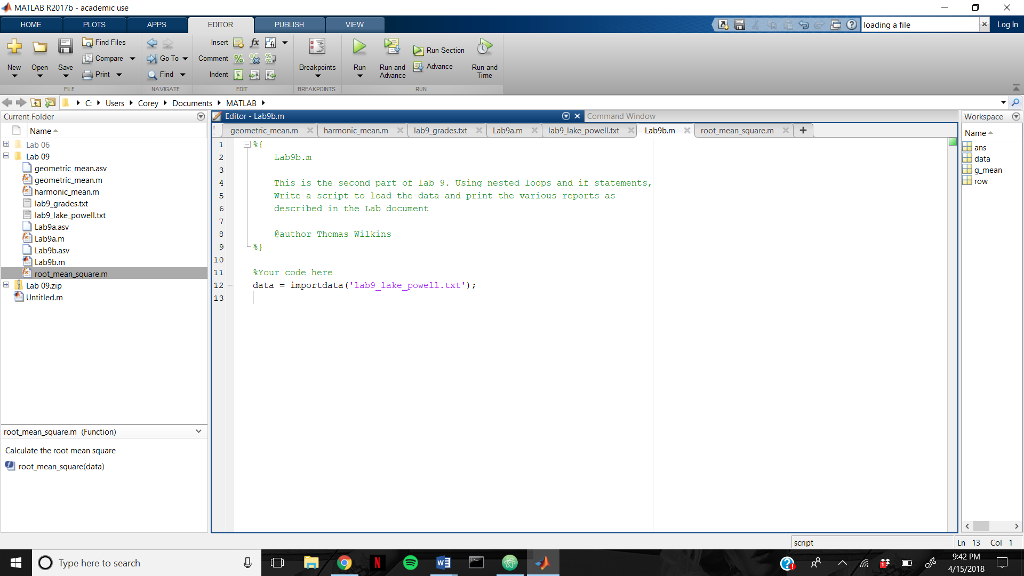
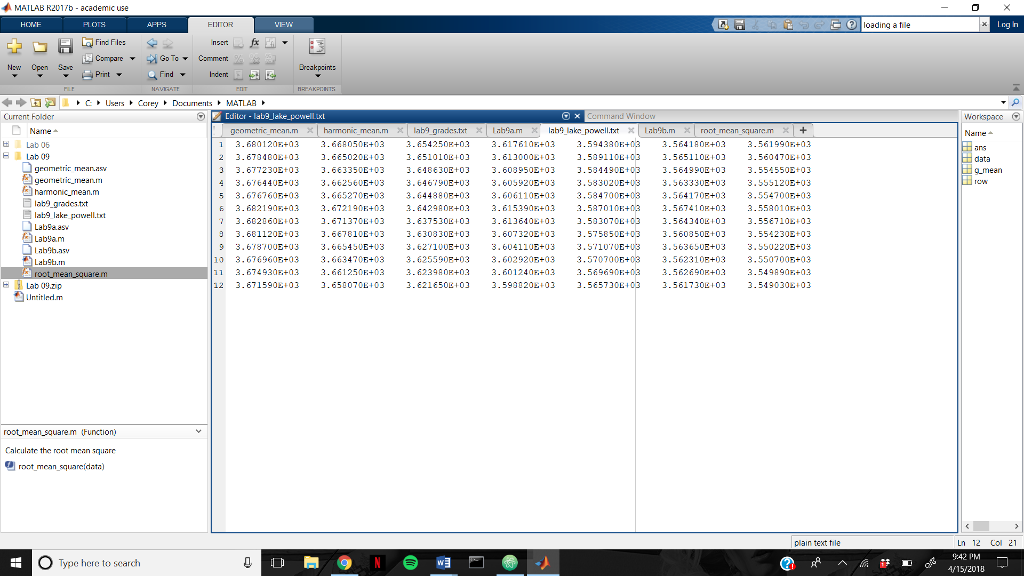
I need help iterating through a file. I need to be able to loop through the columns and rows. Each row is for each month, in which i need to find the average of all in each row. Each column is for each year, and i have to find the average of that. I also need to find the average of the entire file. I dont know how to get each row or column and need help making the nested loops and if statements like it suggests. The first picture is what it is asking me to, the second is the code, and the third is the file data i need to loop through.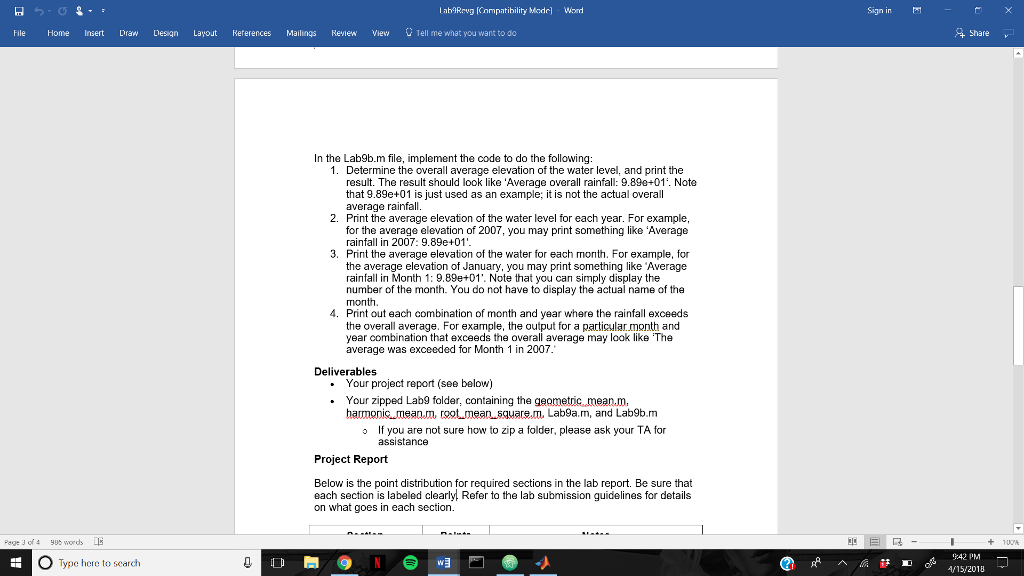
Lab9Rrvg [Compatibility Made] Wod Sign in File Home Insert Draw Design Layout References Mailings Review Viev Tell me what you want to do Share In the Lab9b.m file, implement the code to do the following: 1. Determine the overall average elevation of the water level, and print the result. The result should look like 'Average overall rainfall: 9.890+01'. Note that 9.89e+01 is just used as an example; it is not the actual overall average rainfall 2. Print the average elevation of the water level for each year. For example for the average elevation of 2007, you may print something like 'Average rainfall in 2007: 9.89e+01' 3. Print the average elevation of the water for each month. For example, for the average elevation of January, you may print something like Average rainfal in Month 1: 9.89e+01'. Note that you can simply display the number of the month. You do not have to display the actual name of the month 4. Print out each combination of month and year where the rainfall exceeds the overall average. For example, the output for a particular.month and year combination that exceeds the overall average may look like The average was exceeded for Month 1 in 2007 Deliverables . Your project report (see below) . Your zipped Lab9 folder, containing the geometic mean.m, harmonicmean.m, rgot meansquarem, Lab9a.m, and Lab9b.m If you are not sure how to zip a folder, please ask your TA for assistance o Project Report Below is the point distribution for required sections in the lab report. Be sure that each section is labeled clearly. Refer to the lab submission guidelines for details on what goes in each section Page 3 of4words E 9:42 O Type here to search Lab9Rrvg [Compatibility Made] Wod Sign in File Home Insert Draw Design Layout References Mailings Review Viev Tell me what you want to do Share In the Lab9b.m file, implement the code to do the following: 1. Determine the overall average elevation of the water level, and print the result. The result should look like 'Average overall rainfall: 9.890+01'. Note that 9.89e+01 is just used as an example; it is not the actual overall average rainfall 2. Print the average elevation of the water level for each year. For example for the average elevation of 2007, you may print something like 'Average rainfall in 2007: 9.89e+01' 3. Print the average elevation of the water for each month. For example, for the average elevation of January, you may print something like Average rainfal in Month 1: 9.89e+01'. Note that you can simply display the number of the month. You do not have to display the actual name of the month 4. Print out each combination of month and year where the rainfall exceeds the overall average. For example, the output for a particular.month and year combination that exceeds the overall average may look like The average was exceeded for Month 1 in 2007 Deliverables . Your project report (see below) . Your zipped Lab9 folder, containing the geometic mean.m, harmonicmean.m, rgot meansquarem, Lab9a.m, and Lab9b.m If you are not sure how to zip a folder, please ask your TA for assistance o Project Report Below is the point distribution for required sections in the lab report. Be sure that each section is labeled clearly. Refer to the lab submission guidelines for details on what goes in each section Page 3 of4words E 9:42 O Type here to search
Step by Step Solution
There are 3 Steps involved in it

Get step-by-step solutions from verified subject matter experts
 Study Help