







Question: I need help ONLY with PART TWO (the analysis) , I uploaded part one solution to help in the analysis part. if the picture is
 I need help ONLY with PART TWO (the analysis) , I uploaded part one solution to help in the analysis part.
if the picture is small, please save it on computer so you can ZOOM IN.
thank you
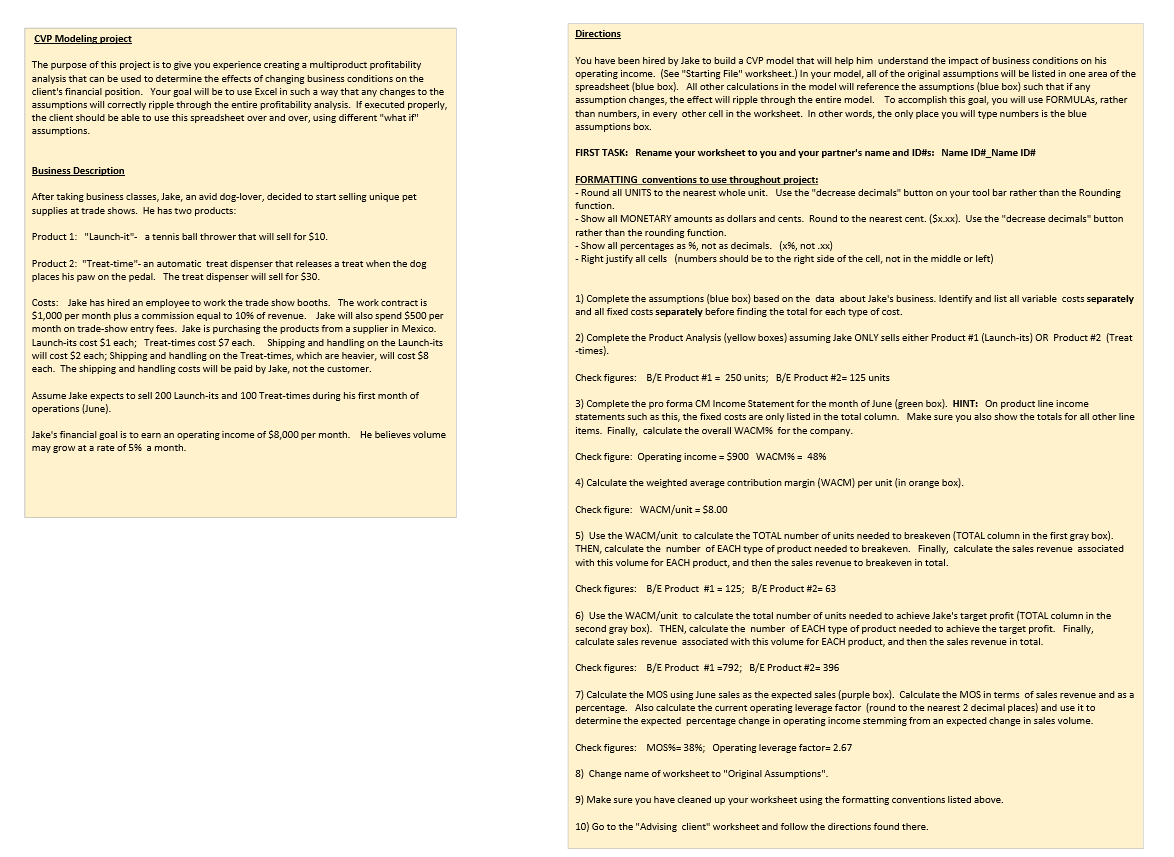
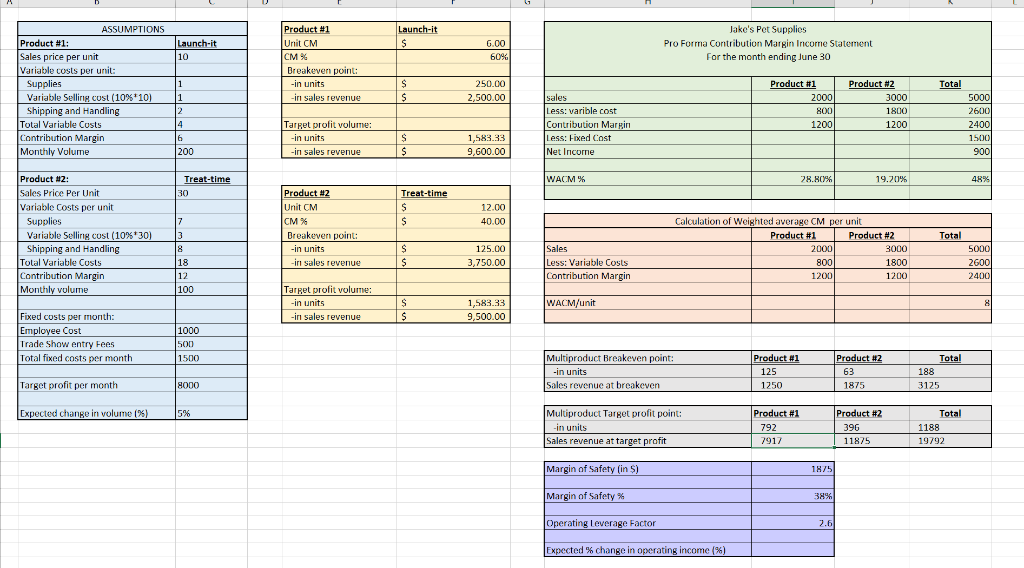
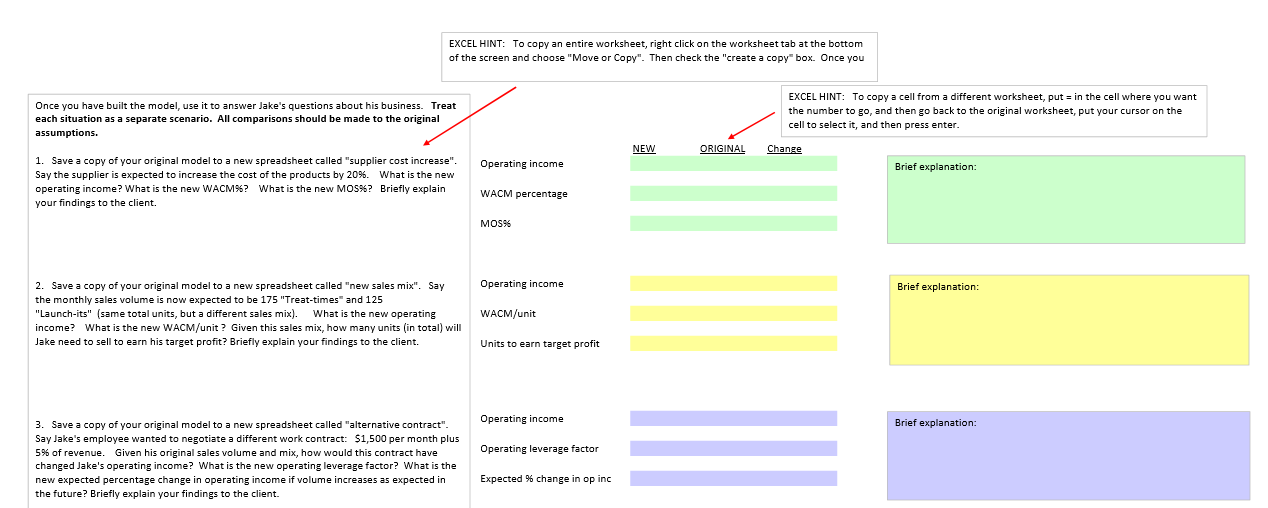
CVP Modeling project Directions The purpose of this project is to give you experience creating a multiproduct profitability analysis that can be used to determine the effects of changing business conditions on the client's financial position. Your goal will be to use Excel in such a way that any changes to the assumptions will correctly ripple through the entire profitability analysis. If executed properly, the client should be able to use this spreadsheet over and over, using different "what if assumptions. You have been hired by Jake to build a CVP model that will help him understand the impact of business conditions on his operating income. (See "Starting File" worksheet.) In your model, all of the original assumptions will be listed in one area of the spreadsheet (blue box). All other calculations in the model will reference the assumptions (blue box) such that if any assumption changes, the effect will ripple through the entire model. To accomplish this goal, you will use FORMULAS, rather than numbers, in every other cell in the worksheet. In other words, the only place you will type numbers is the blue assumptions box FIRST TASK: Rename your worksheet to you and your partner's name and ID#: Name ID#_Name ID# Business Description After taking business classes, Jake, an avid dog-lover, decided to start selling unique pet supplies at trade shows. He has two products: FORMATTING conventions to use throughout project: - Round all UNITS to the nearest whole unit. Use the "decrease decimals" button on your tool bar rather than the Rounding function. - Show all MONETARY amounts as dollars and cents. Round to the nearest cent. (Sx.xx). Use the "decrease decimals" button rather than the rounding function. - Show all percentages as %, not as decimals. (x%, not xx) - Right justify all cells (numbers should be to the right side of the cell, not in the middle or left) Product 1: "Launch-it- a tennis ball thrower that will sell for $10. Product 2: "Treat-time"- an automatic treat dispenser that releases a treat when the dog places his paw on the pedal. The treat dispenser will sell for $30. 1) Complete the assumptions (blue box) based on the data about Jake's business. Identify and list all variable costs separately and all fixed costs separately before finding the total for each type of cost. Costs: Jake has hired an employee to work the trade show booths. The work contract is $1,000 per month plus a commission equal to 10% of revenue. Jake will also spend $500 per month on trade-show entry fees. Jake is purchasing the products from a supplier in Mexico. Launch-its cost $1 each; Treat-times cost $7 each. Shipping and handling on the Launch-its will cost $2 each; Shipping and handling on the Treat-times, which are heavier, will cost $8 each. The shipping and handling costs will be paid by Jake, not the customer. 2) Complete the Product Analysis (yellow boxes) assuming Jake ONLY sells either Product #1 (Launch-its) OR Product #2 (Treat -times) Check figures: B/E Product #1 = 250 units; B/E Product #2= 125 units Assume Jake expects to sell 200 Launch-its and 100 Treat-times during his first month of operations (June). 3) Complete the pro forma CM Income Statement for the month of June (green box). HINT: On product line income statements such as this, the fixed costs are only listed in the total column. Make sure you also show the totals for all other line items. Finally, calculate the overall WACM9 for the company. Jake's financial goal is to earn an operating income of $8,000 per month. He believes volume may grow at a rate of 5% a month. Check figure: Operating income = $900 WACM% = 48% 4) Calculate the weighted average contribution margin (WACM) per unit (in orange box). Check figure: WACM/unit = $8.00 5) Use the WACM/unit to calculate the TOTAL number of units needed to breakeven (TOTAL column in the first gray box). THEN, calculate the number of EACH type of product needed to breakeven. Finally, calculate the sales revenue associated with this volume for EACH product, and then the sales revenue to breakeven in total. Check figures: B/E Product #1 = 125; B/E Product #2-63 6) Use the WACM/unit to calculate the total number of units needed to achieve Jake's target profit (TOTAL column in the second gray box). THEN, calculate the number of EACH type of product needed to achieve the target profit. Finally, calculate sales revenue associated with this volume for EACH product, and then the sales revenue in total. Check figures: B/E Product #1 =792; B/E Product #2396 7) Calculate the MOS using June sales as the expected sales (purple box). Calculate the MOS in terms of sales revenue and as a percentage. Also calculate the current operating leverage factor (round to the nearest 2 decimal places) and use it to determine the expected percentage change in operating income stemming from an expected change in sales volume. Check figures: MOS%= 38%; Operating leverage factor= 2.67 8) Change name of worksheet to "Original Assumptions". 9) Make sure you have cleaned up your worksheet using the formatting conventions listed above. 10) Go to the "Advising client" worksheet and follow the directions found there. Launch-it Launch-it 110 6.00 60% Product #1 Unit CM CM% Breakeven point: -in units in sales revenue Jake's Pet Supplies Pro Forma Contribution Margin Income Statement For the month ending June 30 ASSUMPTIONS Product #1: Sales price per unit Variable costs per unit: Supplies Variable Selling cust (10% 101 Shipping and Handling Total Variable Custs Contribution Margin Monthly Volume $ S 250.00 2.500.00 Product #1 Total 1 2000l Product #2 3000 1800 1200 2 4 sales Less: varible cost Contribution Margin Less: Fixed Cost Net Income 800 1200 Target profit volume: -in units in sales revenue 1 $ $ 5000 2600 2400 15001 900 1,583.33 9,600.00 200 IWACM% 28.50 19.20% 48% Treat-time 30 Treat-time 12.00 40.00 I Product #2: Sales Price Per Unit Variable costs per unit Supplies Variable Selling cost (10%*30) Shipping and Handling Total Variable Custs Contribution Margin Monthly volume Product #2 Unit CM CM% Breakeven point: -in units -in sales revenue Total $ $ 125.00 3,750.00 Calculation of Weighted average CM per unit Product #1 Product #2 2000|| 3000 800 1800 1200 1200 Sales Less: Variable Costs Contribution Margin 18 12 100 50001 2600 24001 Target prolit volume: in units in sales revenue WACM/unit S IS 1,583.33 9.500.00 Fixed costs per month Employee Cost Trade Show entry Fees Total fixed costs per month 1000 500 1500 Product #2 Multiproduct Breakeven point: in units Sales revenue at breakeven Product #1 125 1250 Total 188 3125 Target profit per month 8000 1875 Expected change in volume (%) 5% Multiproduct Target profit point: in units Sales revenue at target profit Product #1 792 7917 Product #2 396 11825 Total 1188 1 0792 Margin of Safety (in %) 1875 Margin of Safety % 38% Operating Leverage Factor 26 Expected % change in operating income (%) EXCEL HINT: To copy an entire worksheet, right click on the worksheet tab at the bottom of the screen and choose "Move or Copy". Then check the "create a copy" box. Once you Once you have built the model, use it to answer Jake's questions about his business. Treat each situation as a separate scenario. All comparisons should be made to the original assumptions. EXCEL HINT: To copy a cell from a different worksheet, put = in the cell where you want the number to go, and then go back to the original worksheet, put your cursor on the cell to select it, and then press enter. NEW ORIGINAL Change Operating income Brief explanation: 1. Save a copy of your original model to a new spreadsheet called "supplier cost increase". Say the supplier is expected to increase the cost of the products by 20%. What is the new operating income? What is the new WACM%? What is the new MOS%? Briefly explain your findings to the client. WACM percentage MOS% Operating income Brief explanation: 2. Save a copy of your original model to a new spreadsheet called "new sales mix". Say the monthly sales volume is now expected to be 175 "Treat-times" and 125 "Launch-its" (same total units, but a different sales mix). What is the new operating income? What is the new WACM/unit? Given this sales mix, how many units (in total) will Jake need to sell to earn his target profit? Briefly explain your findings to the client. WACM/unit Units to earn target profit Operating income Brief explanation: Operating leverage factor 3. Save a copy of your original model to a new spreadsheet called "alternative contract". Say Jake's employee wanted to negotiate a different work contract: $1,500 per month plus 5% of revenue. Given his original sales volume and mix, how would this contract have changed Jake's operating income? What is the new operating leverage factor? What is the new expected percentage change in operating income if volume increases as expected in the future? Briefly explain your findings to the client. Expected % change in op inc CVP Modeling project Directions The purpose of this project is to give you experience creating a multiproduct profitability analysis that can be used to determine the effects of changing business conditions on the client's financial position. Your goal will be to use Excel in such a way that any changes to the assumptions will correctly ripple through the entire profitability analysis. If executed properly, the client should be able to use this spreadsheet over and over, using different "what if assumptions. You have been hired by Jake to build a CVP model that will help him understand the impact of business conditions on his operating income. (See "Starting File" worksheet.) In your model, all of the original assumptions will be listed in one area of the spreadsheet (blue box). All other calculations in the model will reference the assumptions (blue box) such that if any assumption changes, the effect will ripple through the entire model. To accomplish this goal, you will use FORMULAS, rather than numbers, in every other cell in the worksheet. In other words, the only place you will type numbers is the blue assumptions box FIRST TASK: Rename your worksheet to you and your partner's name and ID#: Name ID#_Name ID# Business Description After taking business classes, Jake, an avid dog-lover, decided to start selling unique pet supplies at trade shows. He has two products: FORMATTING conventions to use throughout project: - Round all UNITS to the nearest whole unit. Use the "decrease decimals" button on your tool bar rather than the Rounding function. - Show all MONETARY amounts as dollars and cents. Round to the nearest cent. (Sx.xx). Use the "decrease decimals" button rather than the rounding function. - Show all percentages as %, not as decimals. (x%, not xx) - Right justify all cells (numbers should be to the right side of the cell, not in the middle or left) Product 1: "Launch-it- a tennis ball thrower that will sell for $10. Product 2: "Treat-time"- an automatic treat dispenser that releases a treat when the dog places his paw on the pedal. The treat dispenser will sell for $30. 1) Complete the assumptions (blue box) based on the data about Jake's business. Identify and list all variable costs separately and all fixed costs separately before finding the total for each type of cost. Costs: Jake has hired an employee to work the trade show booths. The work contract is $1,000 per month plus a commission equal to 10% of revenue. Jake will also spend $500 per month on trade-show entry fees. Jake is purchasing the products from a supplier in Mexico. Launch-its cost $1 each; Treat-times cost $7 each. Shipping and handling on the Launch-its will cost $2 each; Shipping and handling on the Treat-times, which are heavier, will cost $8 each. The shipping and handling costs will be paid by Jake, not the customer. 2) Complete the Product Analysis (yellow boxes) assuming Jake ONLY sells either Product #1 (Launch-its) OR Product #2 (Treat -times) Check figures: B/E Product #1 = 250 units; B/E Product #2= 125 units Assume Jake expects to sell 200 Launch-its and 100 Treat-times during his first month of operations (June). 3) Complete the pro forma CM Income Statement for the month of June (green box). HINT: On product line income statements such as this, the fixed costs are only listed in the total column. Make sure you also show the totals for all other line items. Finally, calculate the overall WACM9 for the company. Jake's financial goal is to earn an operating income of $8,000 per month. He believes volume may grow at a rate of 5% a month. Check figure: Operating income = $900 WACM% = 48% 4) Calculate the weighted average contribution margin (WACM) per unit (in orange box). Check figure: WACM/unit = $8.00 5) Use the WACM/unit to calculate the TOTAL number of units needed to breakeven (TOTAL column in the first gray box). THEN, calculate the number of EACH type of product needed to breakeven. Finally, calculate the sales revenue associated with this volume for EACH product, and then the sales revenue to breakeven in total. Check figures: B/E Product #1 = 125; B/E Product #2-63 6) Use the WACM/unit to calculate the total number of units needed to achieve Jake's target profit (TOTAL column in the second gray box). THEN, calculate the number of EACH type of product needed to achieve the target profit. Finally, calculate sales revenue associated with this volume for EACH product, and then the sales revenue in total. Check figures: B/E Product #1 =792; B/E Product #2396 7) Calculate the MOS using June sales as the expected sales (purple box). Calculate the MOS in terms of sales revenue and as a percentage. Also calculate the current operating leverage factor (round to the nearest 2 decimal places) and use it to determine the expected percentage change in operating income stemming from an expected change in sales volume. Check figures: MOS%= 38%; Operating leverage factor= 2.67 8) Change name of worksheet to "Original Assumptions". 9) Make sure you have cleaned up your worksheet using the formatting conventions listed above. 10) Go to the "Advising client" worksheet and follow the directions found there. Launch-it Launch-it 110 6.00 60% Product #1 Unit CM CM% Breakeven point: -in units in sales revenue Jake's Pet Supplies Pro Forma Contribution Margin Income Statement For the month ending June 30 ASSUMPTIONS Product #1: Sales price per unit Variable costs per unit: Supplies Variable Selling cust (10% 101 Shipping and Handling Total Variable Custs Contribution Margin Monthly Volume $ S 250.00 2.500.00 Product #1 Total 1 2000l Product #2 3000 1800 1200 2 4 sales Less: varible cost Contribution Margin Less: Fixed Cost Net Income 800 1200 Target profit volume: -in units in sales revenue 1 $ $ 5000 2600 2400 15001 900 1,583.33 9,600.00 200 IWACM% 28.50 19.20% 48% Treat-time 30 Treat-time 12.00 40.00 I Product #2: Sales Price Per Unit Variable costs per unit Supplies Variable Selling cost (10%*30) Shipping and Handling Total Variable Custs Contribution Margin Monthly volume Product #2 Unit CM CM% Breakeven point: -in units -in sales revenue Total $ $ 125.00 3,750.00 Calculation of Weighted average CM per unit Product #1 Product #2 2000|| 3000 800 1800 1200 1200 Sales Less: Variable Costs Contribution Margin 18 12 100 50001 2600 24001 Target prolit volume: in units in sales revenue WACM/unit S IS 1,583.33 9.500.00 Fixed costs per month Employee Cost Trade Show entry Fees Total fixed costs per month 1000 500 1500 Product #2 Multiproduct Breakeven point: in units Sales revenue at breakeven Product #1 125 1250 Total 188 3125 Target profit per month 8000 1875 Expected change in volume (%) 5% Multiproduct Target profit point: in units Sales revenue at target profit Product #1 792 7917 Product #2 396 11825 Total 1188 1 0792 Margin of Safety (in %) 1875 Margin of Safety % 38% Operating Leverage Factor 26 Expected % change in operating income (%) EXCEL HINT: To copy an entire worksheet, right click on the worksheet tab at the bottom of the screen and choose "Move or Copy". Then check the "create a copy" box. Once you Once you have built the model, use it to answer Jake's questions about his business. Treat each situation as a separate scenario. All comparisons should be made to the original assumptions. EXCEL HINT: To copy a cell from a different worksheet, put = in the cell where you want the number to go, and then go back to the original worksheet, put your cursor on the cell to select it, and then press enter. NEW ORIGINAL Change Operating income Brief explanation: 1. Save a copy of your original model to a new spreadsheet called "supplier cost increase". Say the supplier is expected to increase the cost of the products by 20%. What is the new operating income? What is the new WACM%? What is the new MOS%? Briefly explain your findings to the client. WACM percentage MOS% Operating income Brief explanation: 2. Save a copy of your original model to a new spreadsheet called "new sales mix". Say the monthly sales volume is now expected to be 175 "Treat-times" and 125 "Launch-its" (same total units, but a different sales mix). What is the new operating income? What is the new WACM/unit? Given this sales mix, how many units (in total) will Jake need to sell to earn his target profit? Briefly explain your findings to the client. WACM/unit Units to earn target profit Operating income Brief explanation: Operating leverage factor 3. Save a copy of your original model to a new spreadsheet called "alternative contract". Say Jake's employee wanted to negotiate a different work contract: $1,500 per month plus 5% of revenue. Given his original sales volume and mix, how would this contract have changed Jake's operating income? What is the new operating leverage factor? What is the new expected percentage change in operating income if volume increases as expected in the future? Briefly explain your findings to the client. Expected % change in op inc
Step by Step Solution
There are 3 Steps involved in it

Get step-by-step solutions from verified subject matter experts
 Study Help