







Question: I need help regarding my Visual Basic lab Can you please find my mistake why my button Search for the value >= displaying all the
I need help regarding my Visual Basic lab Can you please find my mistake why my button Search for the value >= displaying all the value from the list box. So in the example it should only need to display (56.33,43.44) but it showing all the value from the listbox. that button need to show only value >= the value inputed on the list box.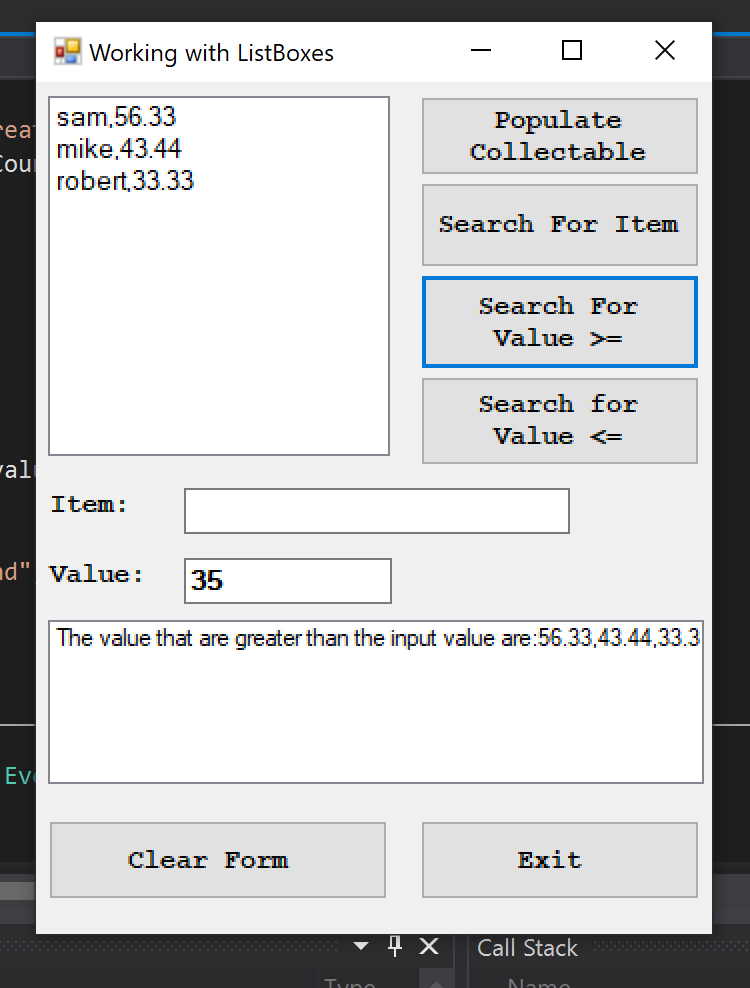 So the program module is Search by Minimum Value button click event This event must validate that information does exist in the input listbox (IstCollectables) and the user has entered a numeric value into the Value textbox (txtValue). If the input is value, IstCollectables should be search and all item with a value greater than or equal to the given value should be listed in the output list box (lstDisplay). Note: the output should be formatted for readability. If not records are found to meet the given criteria, a message should be displayed in IstDisplay to inform user
Public Class Frmlabreview
Private Sub a_Click(sender As Object, e As EventArgs) Handles a.Click
Dim item As String
Dim value As Decimal
Do
item = CStr(InputBox("Enter item description or -1 to stop "))
If item "-1" Then
value = InputBox("Enter the value of a item:")
lstCollectable.Items.Add(item & "," & value)
End If
Loop Until item = "-1"
End Sub
Function DataExist() As Boolean
If lstCollectable.Items.Count
MessageBox.Show("The event required the information on the list box")
lstCollectable.Focus()
Return False
End If
Return True
End Function
Function ItemOk() As Boolean
If txtitem.Text = "" Then
MessageBox.Show("The event required you to enter the item in the text box")
txtitem.Focus()
Return False
End If
Return True
End Function
Function ValueOk() As Boolean
If txtvalue.Text = "" And (IsNumeric(txtvalue.Text)) Then
MessageBox.Show("The event required you to enter valid value")
Return False
End If
Return True
End Function
Sub GetIteam(ByRef item As String)
item = txtitem.Text
End Sub
Sub GetValue(ByVal value As Decimal)
value = txtvalue.Text
End Sub
Sub DissectLine(ByVal line As String, ByRef item As String, ByRef value As Decimal)
Dim comma As String
comma = line.IndexOf(",")
item = line.Substring(0, comma)
value = line.Substring(comma + 1).Trim()
End Sub
Private Sub btnsearchgreater_Click(sender As Object, e As EventArgs) Handles btnsearchgreater.Click
If ValueOk() = False Then
Return
End If
Dim item As String
Dim value As Decimal
Dim line As String
Dim found As Boolean = False
Dim SearchValue As String
' Dim graterValue
GetValue(value)
SearchValue = value
Dim message As String = "The value that are greater than the input value are:"
For i As Integer = 0 To lstCollectable.Items.Count - 1
line = CStr(lstCollectable.Items(i))
DissectLine(line, item, value)
If value >= SearchValue Then
found = True
End If
If found = True Then
lstdisplay.Items.Clear()
message = message + Convert.ToString(value) + ","
Else
MessageBox.Show("No greater Value Found")
End If
Next
lstdisplay.Items.Add(message)
End Sub
Step by Step Solution
There are 3 Steps involved in it

Get step-by-step solutions from verified subject matter experts
 Study Help