







Question: I need help setting up this table class using my domino175.py code which I have below. Your help is greatly appreciated. from queues import CircularQueuefrom
I need help setting up this table class using my domino175.py code which I have below. Your help is greatly appreciated.
from queues import CircularQueuefrom stack import Stackimport randomclass Domino: def __init__(self, dotsA, dotsB): assert isinstance(dotsA, int) and isinstance(dotsB, int), 'Error: Type error, must input int' assert (0 6) and (0 6), 'Error: Dots must be between 0 and 6' self.top = dotsA self.bottom = dotsB self.faceDown = False def setTop(self, dots): new_set = {self.top, self.bottom} if dots in new_set: if self.bottom > self.top: self.bottom = self.top self.top = dots else: raise AssertionError('Value not in domino') def turnOver(self): self.faceDown = True def getTop(self): return self.top def getBottom(self): return self.bottom def isFaceDown(self): return self.faceDown def __str__(self): string = '[{}|{}]' if not self.faceDown: string = string.format(self.bottom, self.top) else: string = string.format('?', '?') return stringclass DominoDeck: def __init__(self): self.__deck = CircularQueue(28) def populate(self, useFile): if useFile: found = False while not found: fileName = input('Name of file that should be used to populate the grid of dominoes:') try: lines = open(fileName, 'r') except FileNotFoundError: print('Cannot read from {}'.format(fileName)) else: found = True for line in lines: line = line.strip().split('/') try: self.__deck.enqueue(Domino(int(line[0]), int(line[1]))) except ValueError: print('Cannot populate deck: invalid data in {}'.format(fileName)) lines.close() if not self.__deck.isFull(): self.__deck.clear() raise Exception('Cannot populate deck: invalid data in {}'.format(fileName)) lines.close() elif not useFile: deck = set() while len(deck) != self.__deck.capacity(): deck.add((random.randint(0, 6), random.randint(0, 6))) for item in deck: self.__deck.enqueue(Domino(item[0], item[1])) else: raise AssertionError('Cannot populate deck: invalid argument provided') def deal(self): if self.__deck.isEmpty(): raise Exception('Cannot deal domino from empty deck') else: item = self.__deck.dequeue() item.turnOver() return item def isEmpty(self): return len(self.__deck.size()) == 0 def size(self): return self.__deck.size() def __str__(self): string = str(self.__deck) string = 'front-> ' + string[1:-1] return stringclass DominoStack(Stack): def peek(self): if not self.items: raise Exception('Error: cannot peek into an empty stack') else: return self.items[len(self.items) - 1].getTop() def push(self, domino): if not isinstance(domino, Domino): raise AssertionError('Can only push Dominoes onto the DominoStack') else: if self.isEmpty(): self.items.append(domino) elif self.peek() == domino.getBottom() or self.peek() == domino.getTop(): domino.setTop(domino.bottom) domino.bottom = self.peek() self.items.append(domino) else: raise Exception('Cannot play {} on stack'.format(str(domino))) def __str__(self): stackAsString = '' for item in self.items: stackAsString += str(item) + '-' stackAsString = stackAsString[:-1] return stackAsString
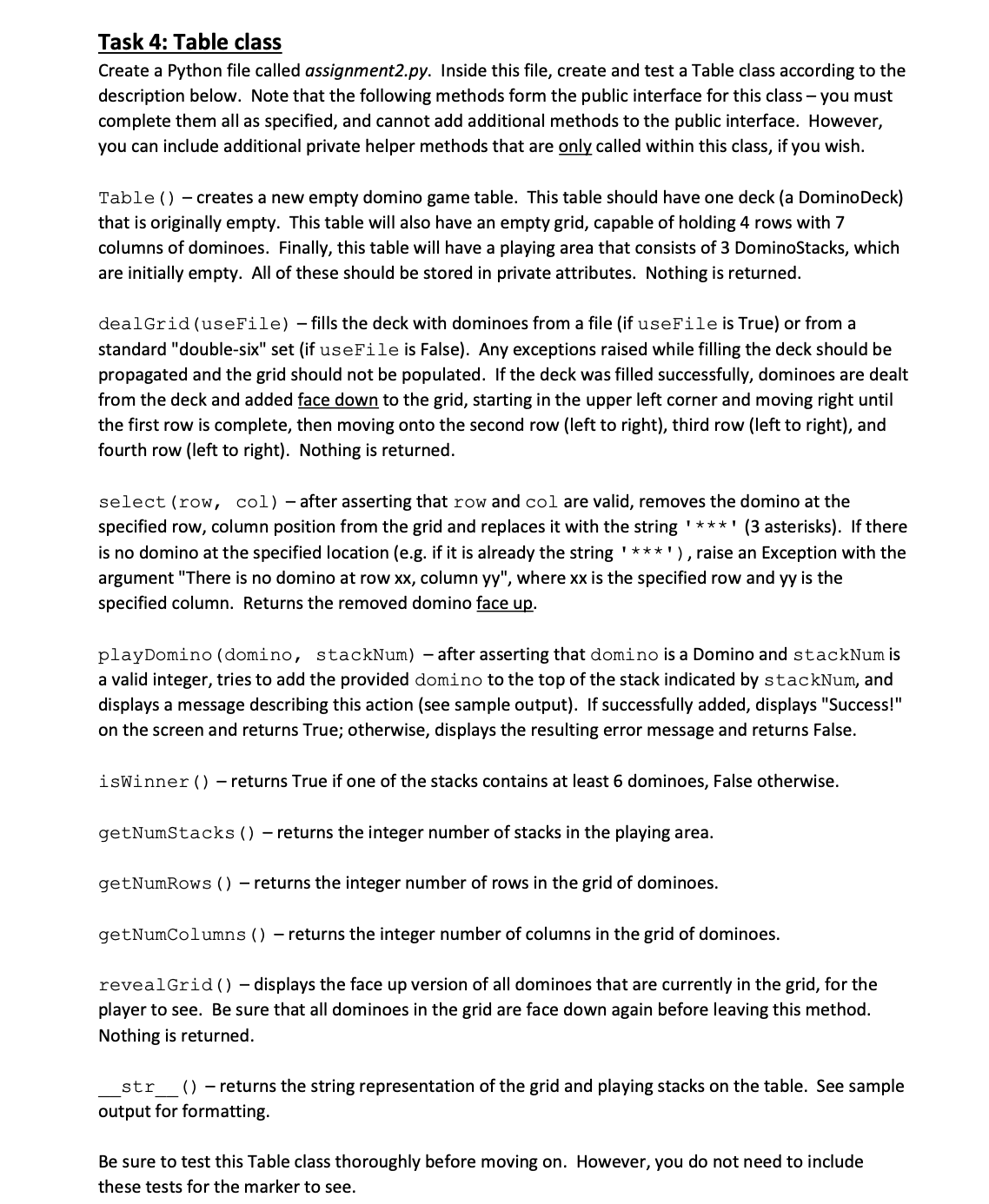
Task 4: Table class Create a Python file called assignment2.py. Inside this file, create and test a Table class according to the description below. Note that the following methods form the public interface for this class you must complete them all as specied, and cannot add additional methods to the public interface. However, you can include additional private helper methods that are ycalled within this class, ifyou wish. Table (1 creates a new empty domino game table. This table should have one deck (a DominoDeck} that is originally empty. This table will also have an empty grid, capable of holding 4 rows with 7 columns of dominoes. Finally, this table will have a playing area that consists of 3 DominoStacks, which are initially empty. All of these should be stored in private attributes. Nothing is returned. dealGrid {useFile} fills the deck with dominoes from a file (if useFile is True) or from a standard "double-six" set (if useFile is False]. Any exceptions raised while filling the deck should be propagated and the grid should not be populated. If the deck was filled successfully, dominoes are dealt from the deck and added face down to the grid, starting in the upper left corner and moving right until the first row is complete, then moving onto the second row (left to right), third row (left to right}, and fourth row (left to right). Nothing is returned. select (row, col) after asserting that row and col are valid, removes the domino at the specied row, column position from the grid and replaces it with the string ' ***' (3 asterisks]. If there is no domino at the specified location (e.g. if it is already the string ' ***' ), raise an Exception with the argument "There is no domino at row xx, column yy", where xx is the specied row and yy is the specied column. Returns the removed domino face up. playDomino (domino, stackNum) after asserting that domino is a Domino and staokNum is a valid integer, tries to add the provided domino to the top of the stack indicated by staokNum, and displays a message describing this action (see sample output). If successfully added, displays "Successl" on the screen and returns True; otherwise, displays the resulting error message and returns False. isWinner () returns True if one of the stacks contains at least 6 dominoes, False othenivise. getNumStaoks l) returns the integer number of stacks in the playing area. getNumRows (J returns the integer number of rows in the grid of dominoes. getNumColumns {J returns the integer number of columns in the grid of dominoes. revealGrid (J displays the face up version of all dominoes that are currently in the grid, for the player to see. Be sure that all dominoes in the grid are face down again before leaving this method. Nothing is returned. str {1 returns the string representation of the grid and playing stacks on the table. See sample output for formatting. Be sure to test this Table class thoroughly before moving on. However, you do not need to include these tests for the marker to see
Step by Step Solution
There are 3 Steps involved in it

Get step-by-step solutions from verified subject matter experts
 Study Help