







Question: I need help understanding why my program in python isn't displaying results. If somebody could fix the code or explain to me what I have
I need help understanding why my program in python isn't displaying results. If somebody could fix the code or explain to me what I have to do.Thanks
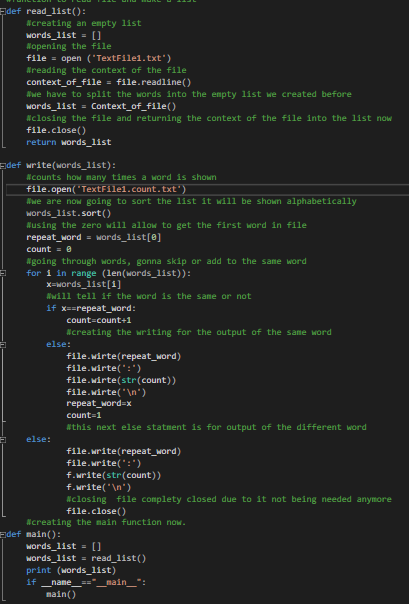
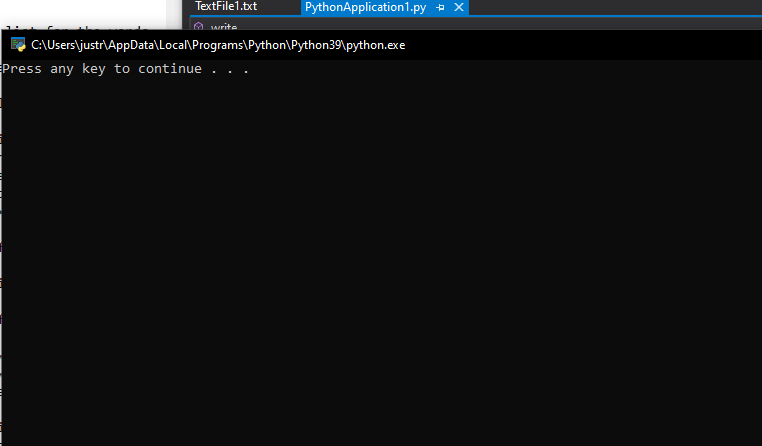
Fidef read_list(): Acreating an empty list words_list = 0) Hopening the file file = open ("TextFilei.txt") Areading the context of the file context_of_file = file.readline() we have to split the words into the empty list we created before words_list = Context_of_file() Aclosing the file and returning the context of the file into the list now file.close() return words_list Edef write(words_list): Acounts how many times a word is shown file.open('TextFilei.count.txt') Awe are now going to sort the list it will be shown alphabetically words_list.sort() Musing the zero will allow to get the first word in file repeat_word = words_list[@] count = 0 Ngoing through words, gonna skip or add to the same word for i in range (len(words_list)): x=words_list[1] Awill tell if the word is the same or not if x==repeat_word: count=count+1 #creating the writing for the output of the same word else: file.wirte (repeat_word) file.wirte(':') file.wirte(str(count)) file. wirte(" ') repeat_wordex count=1 this next else statment is for output of the different word else: file.write(repeat_word) file.write(':') f.write(str(count)) f.write(" ") #closing file complety closed due to it not being needed anymore file.close() Acreating the main function now. Eldef main(): words_list = [] words_list = read_list() print (words_list) if name main": main() TextFile1.txt PythonApplication 1.py + X A write C:\Users\justr\AppData\Local\Programs\Python Python39\python.exe Press any key to continue . . Fidef read_list(): Acreating an empty list words_list = 0) Hopening the file file = open ("TextFilei.txt") Areading the context of the file context_of_file = file.readline() we have to split the words into the empty list we created before words_list = Context_of_file() Aclosing the file and returning the context of the file into the list now file.close() return words_list Edef write(words_list): Acounts how many times a word is shown file.open('TextFilei.count.txt') Awe are now going to sort the list it will be shown alphabetically words_list.sort() Musing the zero will allow to get the first word in file repeat_word = words_list[@] count = 0 Ngoing through words, gonna skip or add to the same word for i in range (len(words_list)): x=words_list[1] Awill tell if the word is the same or not if x==repeat_word: count=count+1 #creating the writing for the output of the same word else: file.wirte (repeat_word) file.wirte(':') file.wirte(str(count)) file. wirte(" ') repeat_wordex count=1 this next else statment is for output of the different word else: file.write(repeat_word) file.write(':') f.write(str(count)) f.write(" ") #closing file complety closed due to it not being needed anymore file.close() Acreating the main function now. Eldef main(): words_list = [] words_list = read_list() print (words_list) if name main": main() TextFile1.txt PythonApplication 1.py + X A write C:\Users\justr\AppData\Local\Programs\Python Python39\python.exe Press any key to continue
Step by Step Solution
There are 3 Steps involved in it

Get step-by-step solutions from verified subject matter experts
 Study Help