







Question: I need help with a Task IN JAVA ( If you need to review these problems go to the link at: https://www.youtube.com/playlist?list=PL94c6yqxunA3fz2AJ7TzMehUcb08JuJjz) Create a subclass
I need help with a Task IN JAVA
(If you need to review these problems go to the link at: https://www.youtube.com/playlist?list=PL94c6yqxunA3fz2AJ7TzMehUcb08JuJjz)
Create a subclass of the Function.java abstract class named Function1.java which implements the cost function shown below, as well as the other functions required by Function.java. The first problem is to find the radius and height of a cylindrical can that would hold 2 liters of fluid and minimize the cost of construction, according to different costs for the base and top versus the side. The following shows the derivation of cost as a function of radius (height is a function of radius also).
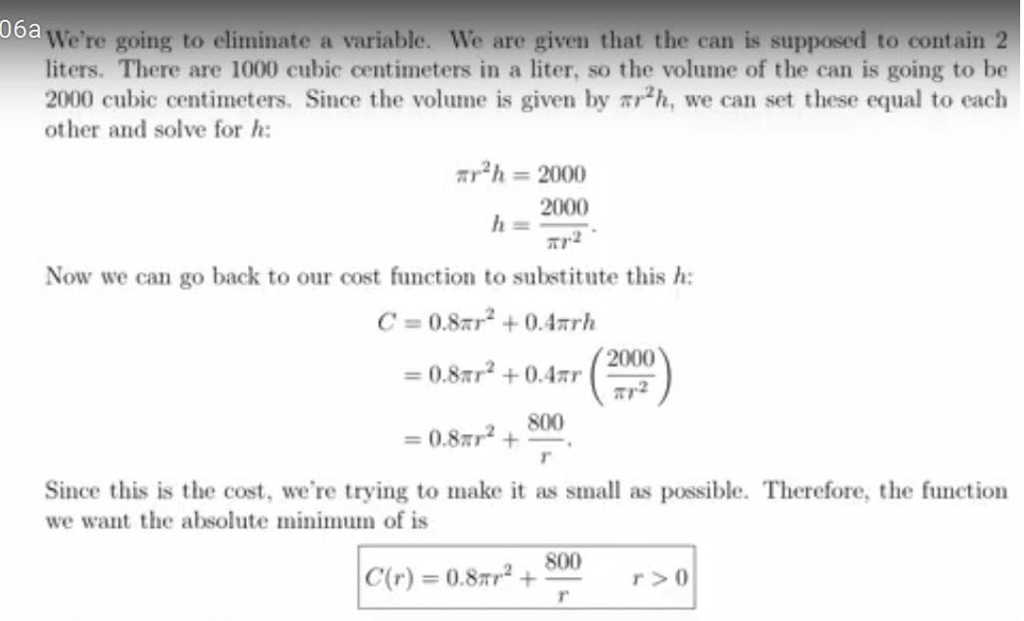
So C(r) is the expression of cost as a function of the radius. Create a subclass of the Function.java abstract class named Function1.java which implements the functions fnValue, toString, answerString, getXVal, getYVal, and getZVal, according to the following descriptions:
fnValue(double x): returns a double which is the cost in terms of x, the specified radius. (Follow the examples in Lab 8 for this method).
toString(): returns a string describing the problem, e.g., "Minimize the cost of a can that will hold 2 liters of liquid"; answerString(double cost, double radius, double height, double z): returns a string that describes the result of the optimization. For problem 1, z is not used, so can be any value.
getXVal(double x): returns x, the radius
getYVal(double x): returns the height in terms of the radius, according to the formula derived above in eliminating the variable h.
getZVal(double x): returns the double -1.0, but is not relevant to problem 1. This method is included only to conform to the abstract class Function.java, which requires it to be implemented. In order to run the application with only Function1.java implemented, you comment out the following lines:
two lines in OptimizerManager() constructor that attempt to instantiate Function2 and Function3
two lines in OptimizerManager.toString() that deal with functions 2 and 3
two lines in OptimizerManager.answerString() that deal with functions 2 and 3
When running the application, be careful not to select anything other than choice #1 .
Here is the code provided by the instructor:
public abstract class Function {
/**
* Prints a result for the specific function based on three inputs
* @param optVal
* @param x
* @param y
* @param z
* @return a string which is the answer to the function
*/
public abstract String answerString(double optVal, double x, double y, double z);
/**
* Calculates the value f(x) of the function at x
* @param x The x-value at which the function will be evaluated
* @return a double, the value of the function at x
*/
public abstract double fnValue(double x);
/**
* Translates f(x) to the display coordinate system. Note that swing
* and awt place (0,0) in the upper left, and (xmax, ymax) in the lower right of the
* display. A buffer of 5 pixels is kept at top and bottom.
* @param x the value at which f(x) will be evaluated
* @param gridHeight the height in pixels of the display
* @param minY the minimum f(x) to be displayed, over the extent of the x's
* @param maxY the maximum f(x) to be displayed, over the extent of the x's
* @return the value of f(x) translated to the display coordinate system
*/
public double fnValueToPlot(double x, double gridHeight, double minY, double maxY) {
double y = fnValue(x);
double yDraw = (gridHeight+5)-((y-minY)*(gridHeight/(maxY-minY)));
return yDraw;
}
/**
* Determines the display value where y=0
* @param height Height of the Canvas
* @param minY th=0e minimum height of the function within the chosen extents
* @param maxY the maximum height of the function within the chosen extents
* @return the value of y to display corresponding to y
*/
public double originToPlot(double height, double minY, double maxY) {
double yDraw = (height+5)-((0-minY)*(height/(maxY-minY)));
return yDraw;
}
public abstract double getXVal (double x);
public abstract double getYVal (double x);
public abstract double getZVal (double x);
}
/**
* The manager deals with the specified problems for optimization, i.e., selecting the problem that the user wants,
* setting the x-axis and y-axis extents that the user wants plotted, getting the function value at a
* specified x, and getting the y value to be drawn on the GUI.
* @author ralexander
*
*/
public class OptimizerManager implements OptimizerManagerInterface {
private double xLeft, xRight;
private double yTop = Integer.MIN_VALUE;
private double yBottom = Integer.MAX_VALUE;
private int functionChoice=-999;
private double gridWidth;
Function function1, function2, function3, function4, function5, function6;
/**
* Constructor instantiates the functions specified.
*/
OptimizerManager() {
function1 = new Function1();
function2 = new Function2();
function3 = new Function3();
}
/**
* getFnValue calculates the value of the function requested by the user, at a specific x value.
* @param fnNum the choice of which function to evaluate
* @param x the value at which to evaluate the function
* @return the value of f(x)
*/
public double getFnValue (int fnNum, double x) {
switch(fnNum) {
case 1: return function1.fnValue(x);
case 2: return function2.fnValue(x);
case 3: return function3.fnValue(x);
default: return 0;
}
}
/**
* Sets the function choice
* @param choice an integer indexing the function desired
*/
public void setFunctionChoice(int choice) {
functionChoice = choice;
}
/**
* Gets the function index previously selected by the user
* @return an index 1-3 corresponding to a function
*/
public int getFunctionChoice() {
return functionChoice;
}
/**
* Gets the actual function instance
* @param choice the index of the function desired
* @return an instance of a sub-class of the Function class
*/
public Function getFunction(int choice) {
switch(choice) {
case 1: return function1;
case 2: return function2;
case 3: return function3;
default: return null;
}
}
/**
* Sets the left and right extents to be considered, and computes and sets the minimum and maximum
* values of f(x) for those left-right extents.
* @param xLeft user's desired left extent
* @param xRight user's desired right extent
* @param gridWidth2 width of the panel in pixels
*/
public void setExtents(double xLeft, double xRight, double gridWidth2) {
this.xLeft = xLeft;
this.xRight = xRight;
this.gridWidth = gridWidth2;
double x0=xLeft, x1=0, y1;
Function fn = getFunction(functionChoice);
yTop = Integer.MIN_VALUE;
yBottom = Integer.MAX_VALUE;
y1 = fn.fnValue(x0);
if (y1>yTop && y1 if (y1 for (int i=1; i x1 = x0+((xRight-xLeft)/gridWidth2); y1 = fn.fnValue(x1); // getFnValue(functionChoice, x1); if (y1>yTop && y1 if (y1 x0=x1; } System.out.println("xLeft = "+xLeft+"; xRight = "+xRight+" maxY = "+yTop+"; minY = "+yBottom+" gridWidth = "+gridWidth2); } /** * Gets the left extent of the function to be considered * @return the x value of the left extent as a double */ public double getLeftExtent () { return xLeft; } public double getGridwidth() { return gridWidth; } /** * Gets the right extent of the function to be considered * @return the x value of the right extent as a double */ public double getRightExtent () { return xRight; } /** * Gets the top extent of the function to be considered * @return the maximum f(x) value that occurs from left to right */ public double getTopExtent () { return yTop; } /** * Gets the bottom extent of the function to be considered * @return the minimum f(x) value that occurs from left to right */ public double getBottomExtent () { return yBottom; } /** * Overrides toString, creating a string describing the functions' formulas */ public String toString() { String rtnString = ""; rtnString+="1. "+function1.toString()+" "; rtnString+="2. "+function2.toString()+" "; rtnString+="3. "+function3.toString()+" "; return rtnString; } public String answerString(int choice, double optVal, double x, double y, double z) { switch(choice) { //public String answerString(double cost, double height, double radius) case 1: return "1. "+function1.answerString(optVal, x, y, z)+" "; case 2: return "2. "+function2.answerString(optVal, x, y, z)+" "; case 3: return "3. "+function3.answerString(optVal, x, y, z)+" "; default: return "wrong choice"; } } //TO DO: figure out how to detect multiple optima public Optimum optimize (int choice) { Optimum opt=null; double x0=xLeft, x1=0, maxY = Integer.MIN_VALUE, minY = Integer.MAX_VALUE, y1; double xMin=0, xMax=0; double gridWidth = getGridwidth(); Function fn = getFunction(choice); for (int i=1; i x1 = x0+((xRight-xLeft)/gridWidth); y1 = fn.fnValue(x1); if (y1>maxY){ maxY=y1; xMax=x1; } if (y1 x0=x1; } switch(choice) { case 1: opt = new Optimum(minY, fn.getXVal(xMin), fn.getYVal(xMin), fn.getZVal(-1.0)); return opt; case 2: opt = new Optimum(minY, fn.getXVal(xMin), fn.getYVal(-1.0), fn.getZVal(-1.0)); return opt; case 3: opt = new Optimum(minY, xMin, fn.getYVal(-1.0), fn.getZVal(-1.0)); return opt; default: return null; } } } public interface OptimizerManagerInterface { /** * The optimize method iterates from the left extent to the right extent, computing the function * at each point, and saving the minimum or maximum values according to the optimization problem * being estimated, and saving the x values that produce them. * @param choice the problem number to be optimized * @return an instance of the Optimum class, containing the optimal value and the x value that produced * it, along with y and z values. */ public Optimum optimize (int choice); /** * getFnValue calculates the value of the function requested by the user, at a specific x value. * @param fnNum the choice of which function to evaluate * @param x the value at which to evaluate the function * @return the value of f(x) */ public double getFnValue (int fnNum, double x); /** * Gets the actual function instance * @param choice the index of the function desired * @return an instance of a sub-class of the Function class */ public Function getFunction(int choice); /** * Sets the left and right extents to be considered, and computes and sets the minimum and maximum * values of f(x) for those left-right extents. Note that these values are NOT transformed to fit in the * display grid, they are just the values of x and f(x) * @param xLeft user's desired left extent * @param xRight user's desired right extent * @param gridWidth width of the panel in pixels */ public void setExtents(double xLeft, double xRight, double gridWidth); /** * Gets the left extent of the function to be considered * @return the x value of the left extent as a double */ public double getLeftExtent (); /** * Gets the right extent of the function to be considered * @return the x value of the right extent as a double */ public double getRightExtent (); /** * Gets the top extent of the function to be considered * @return the maximum f(x) value that occurs from left to right */ public double getTopExtent (); /** * Gets the bottom extent of the function to be considered * @return the minimum f(x) value that occurs from left to right */ public double getBottomExtent (); } import javafx.application.Application; import javafx.scene.Scene; import javafx.scene.layout.BorderPane; import javafx.stage.Stage; public class OptimizerDriverFX extends Application { public final double CANVAS_WIDTH = 400; public final double CANVAS_HEIGHT = 300; public final double WINDOW_HEIGHT = 400; public static void main(String[] args){ launch(args); } /** * start is required by the class Application and is called by launch * It initializes MainPaneFX, which returns the main panel */ public void start(Stage stage) throws Exception { MainPaneFX mainPane = new MainPaneFX(CANVAS_WIDTH, CANVAS_HEIGHT); BorderPane root = mainPane.getMainPane(); Scene scene = new Scene(root, CANVAS_WIDTH, WINDOW_HEIGHT); stage.setScene(scene); stage.setTitle("Function Grapher"); stage.show(); } } import javax.swing.JOptionPane; import javafx.geometry.Insets; import javafx.geometry.Pos; import javafx.scene.Group; import javafx.scene.Parent; import javafx.scene.canvas.Canvas; import javafx.scene.canvas.GraphicsContext; import javafx.scene.control.Button; import javafx.scene.control.Tooltip; import javafx.scene.layout.BorderPane; import javafx.scene.layout.HBox; import javafx.scene.layout.StackPane; /** * This panel is the basic pane, inside which other panes are placed. * @author ralexander */ public class MainPaneFX { private BorderPane mainPane; private HBox buttonPanel; private GraphPanelFX graphPanel; private Canvas graphCanvas; private Button optimizeButton, exitButton; //The manager is the way the GUI communicates with the worker code private OptimizerManager optimizerManager; /** * The MainPanel constructor sets up the GUI with two buttons and a display area. */ MainPaneFX(double CANVAS_WIDTH, double CANVAS_HEIGHT) { mainPane = new BorderPane(); //create the dataManager instance optimizerManager = new OptimizerManager(); //create the exitButton exitButton = new Button("Exit"); exitButton.setTooltip(new Tooltip("Select to close the application")); exitButton.setOnAction(event -> System.exit(0) ); //create the button to start graphing optimizeButton = new Button("Optimize a problem"); optimizeButton.setTooltip(new Tooltip("Select a problem and optimize it")); /* * When the button pushed Optimize button, user is prompted to select one of the problems to optimize, * and is asked for the left and right limits (extents) to plot the function. */ optimizeButton.setOnAction(event -> { graphCanvas.setVisible(false); int choice = 0; double left=0, right=0; Optimum opt=null; choice = askForFunction("Select one of the following problems to optimize (by number): "+optimizerManager.toString()); if(choice != 0) { optimizerManager.setFunctionChoice(choice); try { left = askForExtent("Enter the left extent of the function domain"); right = askForExtent("Enter the right extent of the function domain"); optimizerManager.setExtents(left, right, graphCanvas.getWidth()); graphPanel.drawGraph(); opt = optimizerManager.optimize(choice); JOptionPane.showMessageDialog(null, optimizerManager.answerString(choice, opt.getOptimum(),opt.getOptX(),opt.getOptY(),opt.getOptZ())); } catch (NullPointerException e) { JOptionPane.showMessageDialog(null, "No entry: exiting"); } graphCanvas.setVisible(true); } }); //create the buttonPanel buttonPanel = new HBox(); buttonPanel.setVisible(true); buttonPanel.setAlignment(Pos.CENTER); HBox.setMargin(exitButton, new Insets(10,10,10,10)); HBox.setMargin(optimizeButton, new Insets(10,10,10,10)); buttonPanel.getChildren().addAll(exitButton, optimizeButton); //add the panel to the bottom section of the main panel mainPane.setBottom(buttonPanel); //panel to hold the graph graphPanel = new GraphPanelFX(optimizerManager, CANVAS_WIDTH, CANVAS_HEIGHT); graphCanvas = graphPanel.getGraphCanvas(graphPanel); graphCanvas.setVisible(true); mainPane.setCenter(graphCanvas); } public OptimizerManager getGraphManager() { return optimizerManager; } private int askForFunction(String str) { boolean error=false; int returnVal=0; do { try { returnVal = Integer.parseInt(JOptionPane.showInputDialog (null, str)); if (returnVal5) { error = true; JOptionPane.showMessageDialog(null, "Choice of problem must be an integer between 1 and 3"); } else error = false; } catch (NumberFormatException e) { JOptionPane.showMessageDialog(null, "Input Error: "+e); error = true; } } while(error); return returnVal; } private double askForExtent(String str) throws NullPointerException { boolean error=false; double returnVal=0; do { try { returnVal = Double.parseDouble(JOptionPane.showInputDialog(null, str)); error = false; } catch (NumberFormatException e) { JOptionPane.showMessageDialog(null, "Input Error - "+e); error = true; } } while(error); return returnVal; } public BorderPane getMainPane() { // TODO Auto-generated method stub return mainPane; } } import javafx.scene.canvas.Canvas; import javafx.scene.canvas.GraphicsContext; import javafx.scene.paint.Paint; /** * GraphPanelFX creates the Canvas and draws the graph * @author ralexander * */ public class GraphPanelFX { double gridWidth; double gridHeight; double xLeft, xRight, yTop, yBottom; OptimizerManager graphMgr; Canvas graphCanvas; GraphicsContext gc; GraphPanelFX(OptimizerManager graphManager, double CANVAS_WIDTH, double CANVAS_HEIGHT) { graphMgr = graphManager; graphCanvas = new Canvas(CANVAS_WIDTH, CANVAS_HEIGHT); gc = graphCanvas.getGraphicsContext2D(); } public Canvas getGraphCanvas(GraphPanelFX graphPanel2) { return graphCanvas; } /** * drawGraph is called when the "Graph a Function" button is selected */ public void drawGraph() { gridWidth = gc.getCanvas().getWidth(); gridHeight = gc.getCanvas().getHeight(); gc.clearRect(0,0,gridWidth,gridHeight); System.out.println("in paintComponent(); width="+gridWidth+"; height="+gridHeight); drawGraph(gridWidth, gridHeight-10, gc); } /** * Draws line segments from left extent to right extent, pixel by pixel, transforming points * to the coordinate system of the panel. * @param gridWidth2 the width of the panel in pixels * @param gridHeight the height of the panel in pixels * @param g2 the Graphics2D instance generated by Java library classes and sent as a argument of paintComponent */ public void drawGraph(double gridWidth2, double gridHeight, GraphicsContext gc) { double x0=xLeft, y0, x1=0; double x1Draw, x0Draw, y1Draw, y0Draw; int functionChoice = graphMgr.getFunctionChoice(); Function fn = graphMgr.getFunction(functionChoice); //check to make sure a function choice has been made before drawing if(functionChoice>0) { xLeft = graphMgr.getLeftExtent(); xRight = graphMgr.getRightExtent(); graphMgr.setExtents(xLeft, xRight, gridWidth2); yTop = graphMgr.getTopExtent(); yBottom = graphMgr.getBottomExtent(); //draw a gray horizontal line at y=0 gc.setStroke(Paint.valueOf("Gray")); y1Draw = fn.originToPlot(gridHeight, yBottom, yTop); gc.strokeLine(0,y1Draw,gridWidth2,y1Draw); //set the graphing color and width gc.setStroke(Paint.valueOf("BLUE")); gc.setLineWidth(2); x0=xLeft; y0 = graphMgr.getFnValue(functionChoice, x0); //loop pixel by pixel, drawing the function between each value of x for (int i=1; i x1 = x0+((xRight-xLeft)/gridWidth2); x0Draw = i; x1Draw = i+1; y1Draw = fn.fnValueToPlot(x1, gridHeight, yBottom, yTop); y0Draw = fn.fnValueToPlot(x0, gridHeight, yBottom, yTop); System.out.println("x0="+x0+" y0="+graphMgr.getFnValue(functionChoice, x0)+"; x0Draw="+x0Draw+" y0Draw="+y0Draw); gc.strokeLine(x1Draw,y1Draw,x0Draw,y0Draw); x0=x1; } } } }
Step by Step Solution
There are 3 Steps involved in it

Get step-by-step solutions from verified subject matter experts
 Study Help