







Question: I need help with C++: Polymorphism Below is a rather complete list of possible shapes organized in categories. Shape TwoDimensionalShape Quadrilateral Parallelogram Rectangle Square Diamond
I need help with C++:
Polymorphism
Below is a rather complete list of possible shapes organized in categories.
Shape
TwoDimensionalShape
Quadrilateral
Parallelogram
Rectangle
Square
Diamond
Ellipse
Circle
Triangle
RightTriangle
EquilateralTriangle
IsocelesTriangle
Parabola
Line
Hyperbola
ThreeDimensional
Ellipsoid
Sphere
Prism
Cylinder
Cone
Cube
Tetrahedron
Hyperboloid
OneSheetHyperboloid
TwoSheetHyperboloid
Plane
You will apply the knowledge of inheritance and polymorphism and develop a program that work on different shapes. The idea of inheritance is to promote code reuse. Items that are of similar kind can be grouped together to form a family. Any feature that is common to all the family members are defined in the base class, and features that are unique to individual members are defined in derived classes.
The shape list above is a little overwhelming. Modify the hierarchy to leave the shapes you choose to work with and define the classes based on the modified hierarchy. The top class Shape should be an abstract base class containing the interface (that is, common features, or common behaviors) of the entire family of classes. The commonalities for any shapes are: upper left corner position (or center position for circles) in terms of x and y coordinates, and a print function that outputs these information. The print function of Shape, of cause, is pure virtual.
The middle layer TwoDimensionalShape and ThreeDimensionalShape are both derived from Shape and are also abstract. Commonality for two dimensional shapes would be color, fill style and an operation of determine area. And commonality for three dimensional shapes would be determining volume.
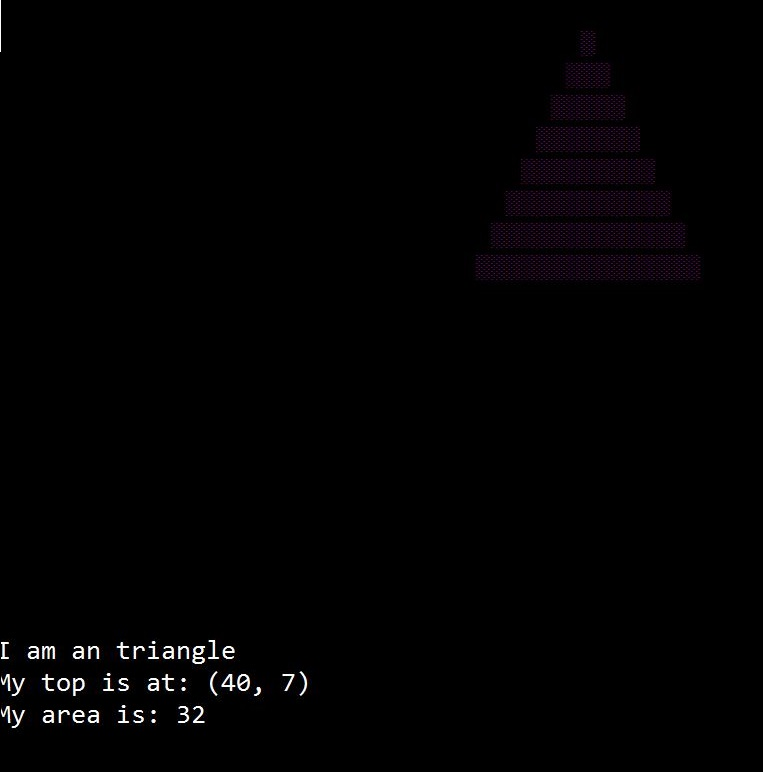
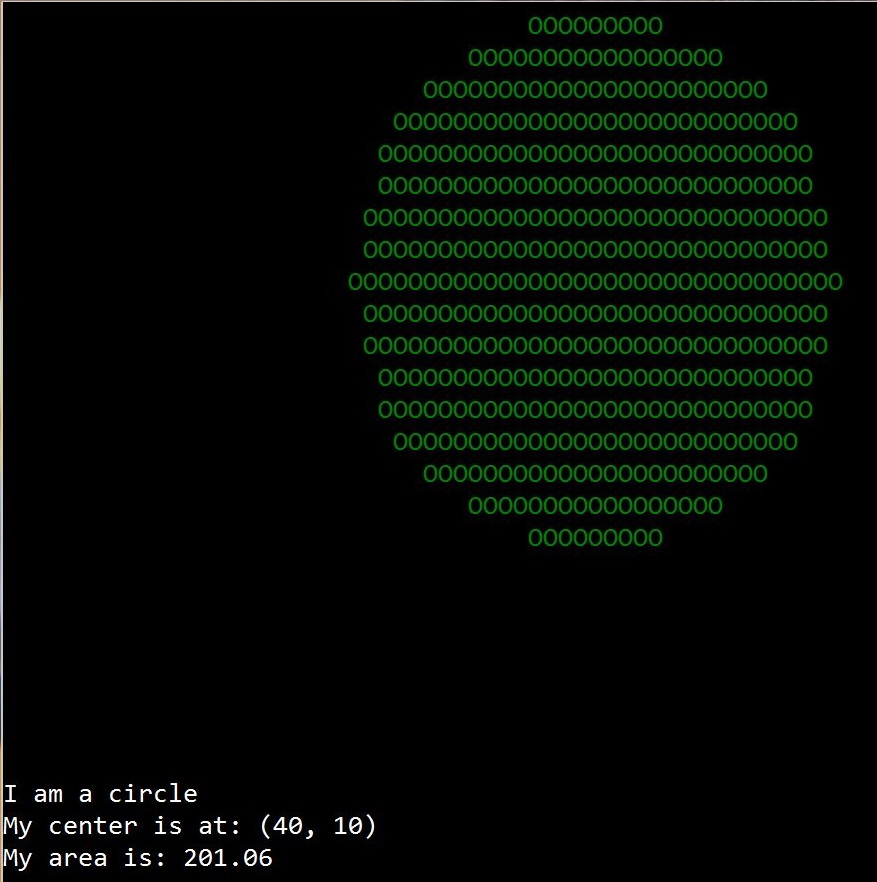
Define three classes of two dimensional shapes. You may choose from circle, rectangle, hollow-box, or triangle. Each should be derived from class TwoDimensionalShape. The print function for these two dimensional shapes should print what shape it is, its dimension, area, and also draw the shape on screen with its color and fill style using the console graphics files provided.
Define two classes of three-dimensional shapes of your choice. You may choose from sphere, cubic, box, etc. The print function for three-dimensional shape only need print what shape it is along with its dimension and volume, dont need draw the shape.
In client code, test the shape family as follows:
Make an array of 50 pointers to Shape
Add shapes to the array according to a input data file by using the function below:
int addShape (Shape**, int);
where parameter Shape** is an array of pointers to Shape; the int is the maximum capacity of the array, and the return int is how many shapes were added
Below is a sample data file layout:
c 40 10 5 1 1 // c for circle, followed by coordinate x, y of center of circle, //radius, foreground color and fill style
t 40 7 11 3 3 // t for triangle, the numbers are upper left corner coordinate x, y, //followed by height, foreground color and fill style
r 40 7 10 15 6 1 // r for rectangle, followed by x, y, width, length, color and fill
h 6 4 8 10 12 3 // h for hollow box, followed by x, y, width, length, color and fill
S 20 20 10 // S for sphere, followed by x, y and radius
C 40 12 10 12 14 // C for cubic, followed by x, y, width, length and height
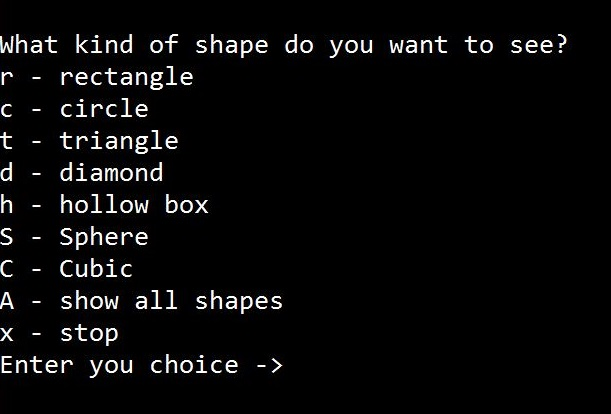
Display a menu to allow user to choose whether to display all the shapes, or any specific shape available. What shown below is a sample menu:
What kind of shape do you want to see?
r - rectangle
c - circle
t - triangle
h - hollow box
S - Sphere
C - Cubic
A - show all shapes
x - stop
Enter you choice ->
You may have a different menu item based on your choice of shapes. Use a function menuChoice to display the menu and return a valid user pick.
Once a menu choice is selected, display all the shapes that meet the menu choice, one after another, in a time interval of 2 seconds, by calling the print function. You will observe polymorphism in action here. Clear screen between the displays of each shape. The clear screen and wait functions are both provided in the console graphics files.
The display menu should appear repeatedly until user chooses Exit.
The client code need some logical planning. Without planning, you may end up with similar code repeated for different menu options. You need organize the code to minimize this redundancy.
Ive made a sample solution and included its executable together with data file in this assignment folder. Check it out to see how the program behaves at run time. Your solution should behave in similar ways. To run the executable, first save it to somewhere, then save the data file also to that location, and then you may double click the executable icon to run it.
the result should look like the following print screens:
Step by Step Solution
There are 3 Steps involved in it

Get step-by-step solutions from verified subject matter experts
 Study Help