







Question: I need help with java (Only java fx is allowed) This program expands on the DataSetBookGUI in the last unit (I provided code from last
I need help with java (Only java fx is allowed)
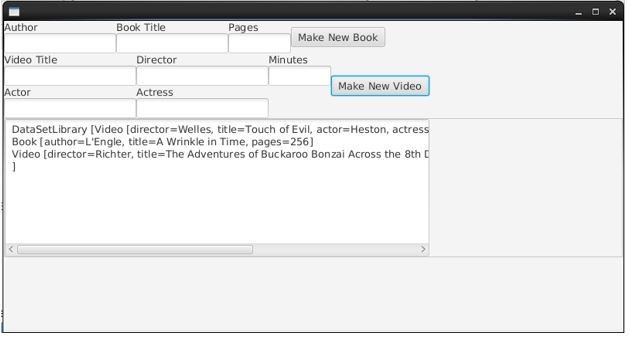
This program expands on the DataSetBookGUI in the last unit (I provided code from last unit below) . We are expanding the items our DataSet can accommodate to include videos as well as books. This program allows the user to enter not only Books, but Videos as well. A Video has a title, director, leading actor, leading actress, and a length in minutes. It also displays the contents of the DataSet. A simple scenario is shown in the attached Word document.
Start with your Book class from last week and the Video class in the attached zip file. There are several ways that DataSet, Book and Video can be enhanced so that a DataSet can accommodate both Book and Video objects . You are free to choose any technique we've covered so far this semester. You may also tweak the toString methods on Book or Video (or your DataSet) as necessary.
The DataSet must limit the types of objects it accepts. A DataSet must not accept just anything; it should not accept String or Integer or Random objects, for example.
The program must have two buttons: one to add a Book to the DataSet, the other to add a Video. The event handler to add a Book must be implemented using a lambda expression. The event handler to add a Video must be implemented using an anonymous class.
code from last unit plus java class provided for this lab (Video.java)
//////////////////// DataSetBook.java ///////////////////////
import java.util.ArrayList; /** * * A simple store for Book objects. * */ public extends ArrayList { /** * * Default constructor * */ public DataSetBook() { } public boolean add(Book objToAdd) { return super.add(objToAdd); } /** * The number of Books currently in the store * * @return number of Book objects * */ public int size() { return super.size(); } /** * Determine the Book with the fewest pages * * @return null if the store is empty. The book with the fewest pages * otherwise. If more than one book has the fewest number of pages, the * first one is returned. * */ public Book getMin() { if (super.isEmpty()) { return null; } Book mEle = super.get(0); for (int i = 1; i super.size(); i++) { if (mEle.getPages() > (super.get(i).getPages())) { mEle = super.get(i); } } return mEle; } /* Determine the Book with the most pages*/ public Book getMax() { if (super.isEmpty()) { return null; } Book mEle = super.get(0); for (int i = 1; i super.size(); i++) { if (mEle.getPages() super.get(i).getPages())) { mEle = super.get(i); } } return mEle; } @Override public String toString() { String data=""; for(int i=0;i" "; } return data; } }///////////////////////////////////////////
//////Book.java////
public class Book { private String author; private String title; private int pages; public Book(String auth, String titl, int pag) { author = auth; title = titl; pages = pag; } public int getPages() { return pages; } @Override public String toString() { return "'"+title+"' by "+author+" ("+pages+" pages)"; //return "Book [author=" + author + ", title=" + title + ", pages=" + pages + "] "; } @Override public boolean equals(Object obj) { if (this == obj) { return true; } if (obj == null) { return false; } if (getClass() != obj.getClass()) { return false; } Book other = (Book) obj; if (author == null) { if (other.author != null) { return false; } } else if (!author.equals(other.author)) { return false; } if (pages != other.pages) { return false; } if (title == null) { if (other.title != null) { return false; } } else if (!title.equals(other.title)) { return false; } return true; } }////////////////////////////
BooksGUI.java
import javafx.application.Application; import static javafx.application.Application.launch; import javafx.event.ActionEvent; import javafx.scene.Scene; import javafx.scene.control.Button; import javafx.scene.control.Label; import javafx.scene.control.TextArea; import javafx.scene.control.TextField; import javafx.scene.layout.HBox; import javafx.scene.layout.Pane; import javafx.scene.layout.VBox; import javafx.stage.Stage; public class BooksGUI extends Application { private TextField author, title, pages; private Button makeBtn; private TextArea output; private DataSetBook books; @Override public void start(Stage primaryStage) { author = new TextField(); author.setPromptText("Author"); title = new TextField(); title.setPromptText("Title"); pages = new TextField(); pages.setPromptText("Pages"); makeBtn = new Button("Make New Book"); ButtonClickHandler handler=new ButtonClickHandler(); makeBtn.setOnAction(handler); HBox hBox = new HBox(author, title, pages, makeBtn); hBox.setSpacing(20); output = new TextArea(); output.setEditable(false); Label label=new Label("Books Added:"); VBox vBox = new VBox(hBox,label, output); vBox.setSpacing(15); books=new DataSetBook(); update(); Pane pane = new Pane(vBox); Scene scene = new Scene(pane); primaryStage.setScene(scene); primaryStage.show(); } public static void main(String[] args) { launch(args); } private void update(){ output.setText(books.toString()); } private class ButtonClickHandler implements javafx.event.EventHandler { @Override public void handle(ActionEvent event) { String auth=author.getText(); String titl=title.getText(); try{ int page=Integer.parseInt(pages.getText()); Book book=new Book(auth, titl, page); books.add(book); update(); }catch(Exception e ){ } } }
///////////////////////////////
Video.java
public class Video { private String director; private String title; private String actor; private String actress; private int minutes; public Video(String title, String director, String actor, String actress, int min) { this.director = director; this.title = title; this.actor = actor; this.actress = actress; this.minutes = min; } public String getDirector() { return director; } public String getTitle() { return title; } public int getMinutes() { return minutes; } public String getActor() { return actor; } public String getActress() { return actress; } @Override public String toString() { return "Video [director=" + director + ", title=" + title + ", actor=" + actor + ", actress=" + actress + ", minutes=" + minutes + "]"; } @Override public boolean equals(Object obj) { if (this == obj) return true; if (obj == null) return false; if (getClass() != obj.getClass()) return false; Video other = (Video) obj; if (actor == null) { if (other.actor != null) return false; } else if (!actor.equals(other.actor)) return false; if (actress == null) { if (other.actress != null) return false; } else if (!actress.equals(other.actress)) return false; if (director == null) { if (other.director != null) return false; } else if (!director.equals(other.director)) return false; if (minutes != other.minutes) return false; if (title == null) { if (other.title != null) return false; } else if (!title.equals(other.title)) return false; return true; } } Author Book Title Pages Make New Book Video Title Director Minutes Make New Video Actor Actress DataSetLibrary [Video [director-Welles, title-Touch of Evil, actor Heston, actress Book [author L'Engle, title A Wrinkle in Time, pages-256) Video [director=Richter, title=The Adventures of Buckaroo Bonzai Across the 8th C
Step by Step Solution
There are 3 Steps involved in it

Get step-by-step solutions from verified subject matter experts
 Study Help