







Question: i need help with numer 10 part a,b,c Copy U $. % ) . BIU Conditional Forma!! BO Formatting Table IV. Merge Center. Alignment te
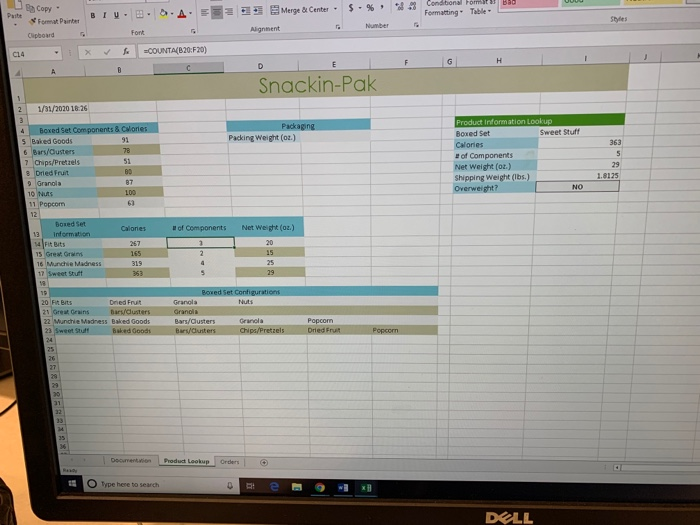
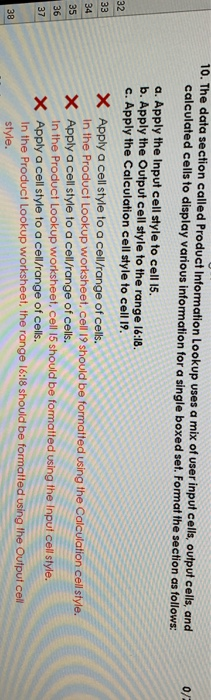
Copy" U $. % ) . BIU Conditional Forma!! BO Formatting Table IV. Merge Center. Alignment te cupboard CHA ster as X .A. E s COUNTA(B20F20) Font Snackin-Pak 1/31/2020 18:26 Packaging Packing Weight (oz.) Boxed Set Components & Cortes 5 Baked Goods 6 Bars/Ousters 7 Chips/Pretzels 8 Dried Fruit 9 Granola 100 11 Popcom Product information Lookup Boxed Set Sweet Stuff Calories of Components Net Weight (oz.) Shipping Weight (lbs.) Overweight? Calories of components Net Weight (z.) Bored Set 13 information Bits 15 Gretorn 16 Munchie Madness 165 319 Boxed Set Configurations 20 Fit Bits Dried Fruit 21 Great Grains bars/Clusters 22 Munchie Madness Baked Goods 23 Sweet Stutt Baked Goods Bars/Qusters Bars/Clusters Chica/Preteels Documention Product Lookup Orders O Type here to search DELL wweu Product Information Lookup uses a mix of user input cells, output cells, and calculated cells to display various information for a single boxed set. Format the section as follows: a. Apply the input cell style to cell 15. b. Apply the Output cell style to the range 16:18. c. Apply the Calculation cell style to cell 19. X Apply a cell style to a cell/range of cells. In the Product Lookup worksheet, cell 19 should be formatted using the Calculation cell style. X Apply a cell style to a cell/range of cells. In the Product Lookup worksheel, cell 15 should be formatted using the Inpul cell style. Apply a cell style to a cell/range of cells. In the Product Lookup worksheet, the range 16:18 should be formatted using the Output cell style. Copy" U $. % ) . BIU Conditional Forma!! BO Formatting Table IV. Merge Center. Alignment te cupboard CHA ster as X .A. E s COUNTA(B20F20) Font Snackin-Pak 1/31/2020 18:26 Packaging Packing Weight (oz.) Boxed Set Components & Cortes 5 Baked Goods 6 Bars/Ousters 7 Chips/Pretzels 8 Dried Fruit 9 Granola 100 11 Popcom Product information Lookup Boxed Set Sweet Stuff Calories of Components Net Weight (oz.) Shipping Weight (lbs.) Overweight? Calories of components Net Weight (z.) Bored Set 13 information Bits 15 Gretorn 16 Munchie Madness 165 319 Boxed Set Configurations 20 Fit Bits Dried Fruit 21 Great Grains bars/Clusters 22 Munchie Madness Baked Goods 23 Sweet Stutt Baked Goods Bars/Qusters Bars/Clusters Chica/Preteels Documention Product Lookup Orders O Type here to search DELL wweu Product Information Lookup uses a mix of user input cells, output cells, and calculated cells to display various information for a single boxed set. Format the section as follows: a. Apply the input cell style to cell 15. b. Apply the Output cell style to the range 16:18. c. Apply the Calculation cell style to cell 19. X Apply a cell style to a cell/range of cells. In the Product Lookup worksheet, cell 19 should be formatted using the Calculation cell style. X Apply a cell style to a cell/range of cells. In the Product Lookup worksheel, cell 15 should be formatted using the Inpul cell style. Apply a cell style to a cell/range of cells. In the Product Lookup worksheet, the range 16:18 should be formatted using the Output cell style
Step by Step Solution
There are 3 Steps involved in it

Get step-by-step solutions from verified subject matter experts
 Study Help