







Question: I need help with task #8, but I thought I'd post the other tasks and the concepts in case it helps solve the problem. I've
I need help with task #8, but I thought I'd post the other tasks and the concepts in case it helps solve the problem. I've been trying nested IF functions but to no avail...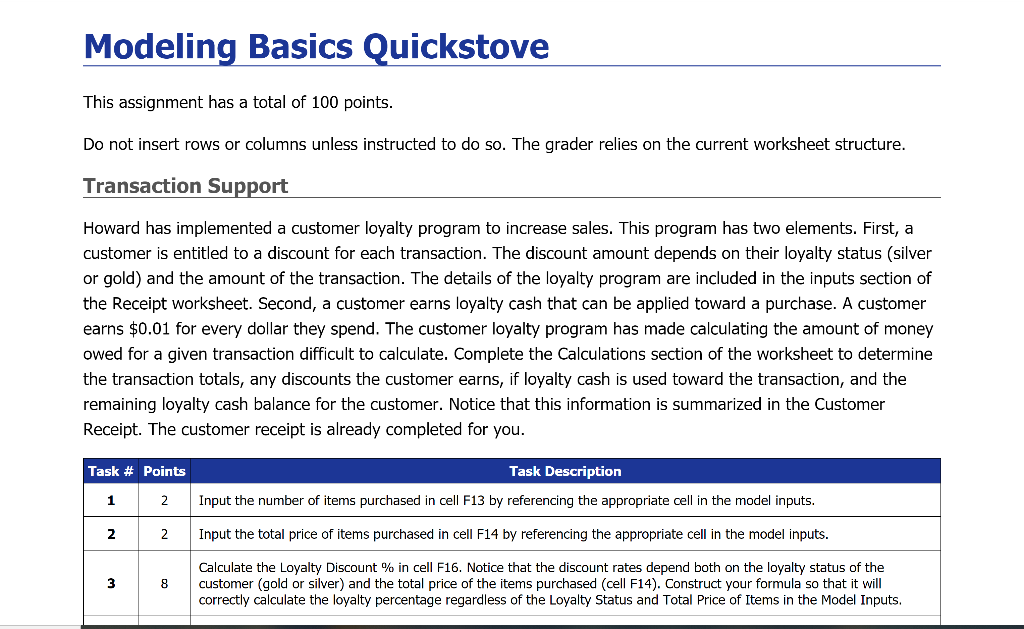
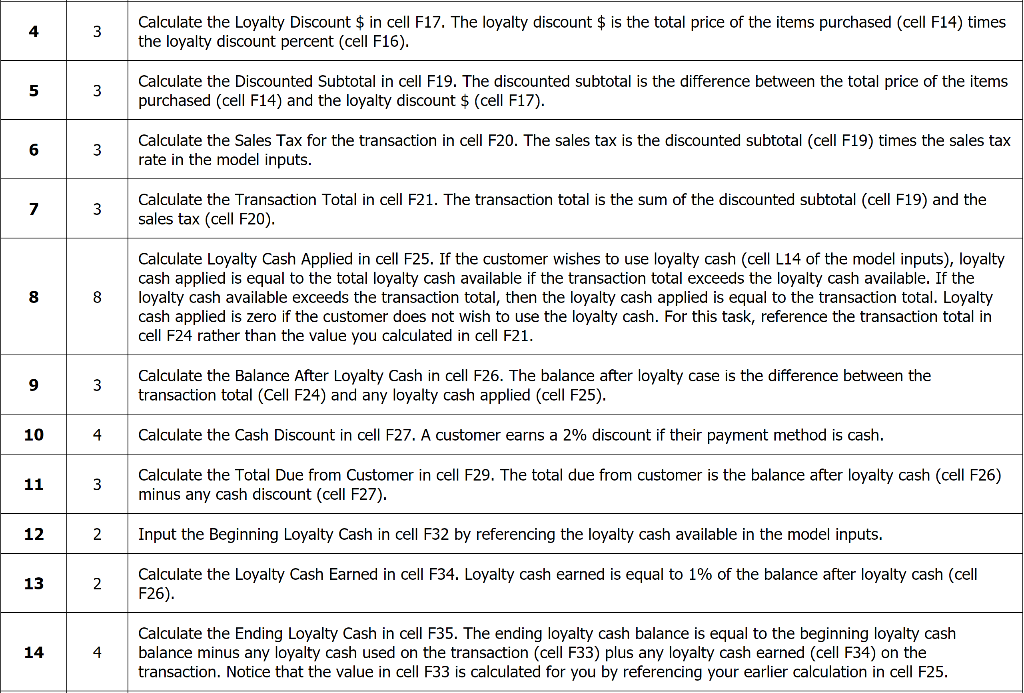
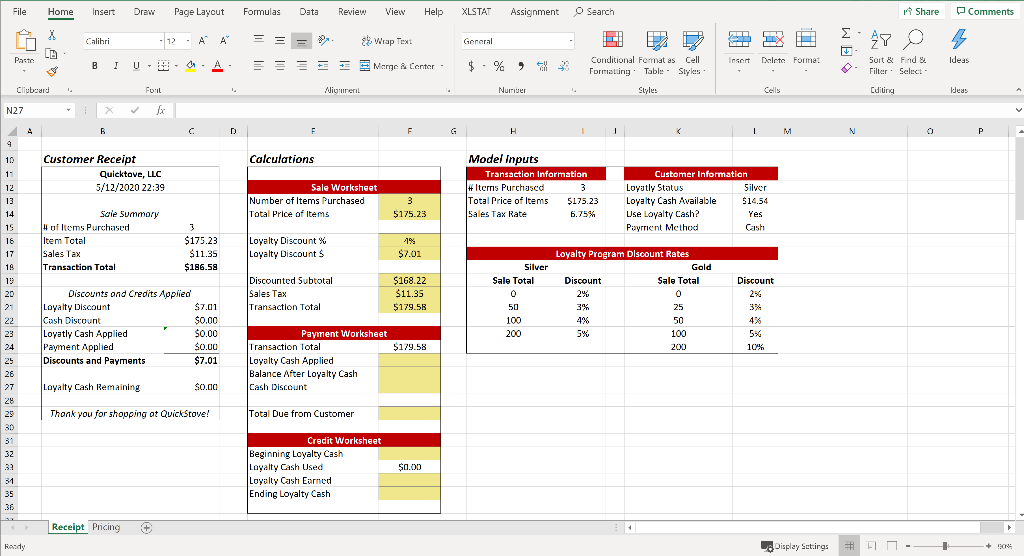
Modeling Basics Quickstove This assignment has a total of 100 points. Do not insert rows or columns unless instructed to do so. The grader relies on the current worksheet structure. Transaction Support Howard has implemented a customer loyalty program to increase sales. This program has two elements. First, a customer is entitled to a discount for each transaction. The discount amount depends on their loyalty status (silver or gold) and the amount of the transaction. The details of the loyalty program are included in the inputs section of the Receipt worksheet. Second, a customer earns loyalty cash that can be applied toward a purchase. A customer earns $0.01 for every dollar they spend. The customer loyalty program has made calculating the amount of money owed for a given transaction difficult to calculate. Complete the Calculations section of the worksheet to determine the transaction totals, any discounts the customer earns, if loyalty cash is used toward the transaction, and the remaining loyalty cash balance for the customer. Notice that this information is summarized in the Customer Receipt. The customer receipt is already completed for you. Task # Points Task Description Input the number of items purchased in cell F13 by referencing the appropriate cell in the model inputs. 1 2 2 Input the total price of items purchased in cell F14 by referencing the appropriate cell in the model inputs. Calculate the Loyalty Discount % in cell F16. Notice that the discount rates depend both on the loyalty status of the customer (gold or silver) and the total price of the items purchased (cell F14). Construct your formula so that it will correctly calculate the loyalty percentage regardless of the Loyalty Status and Total Price of Items in the Model Inputs. Calculate the Loyalty Discount $ in cell F17. The loyalty discount $ is the total price of the items purchased (cell F14) times the loyalty discount percent (cell F16). Calculate the Discounted Subtotal in cell F19. The discounted subtotal is the difference between the total price of the items purchased (cell F14) and the loyalty discount $ (cell F17). 3 3 Calculate the Sales Tax for the transaction in cell F20. The sales tax is the discounted subtotal (cell F19) times the sales tax rate in the model inputs. Calculate the Transaction Total in cell F21. The transaction total is the sum of the discounted subtotal (cell F19) and the sales tax (cell F20). 8 8 Calculate Loyalty Cash Applied in cell F25. If the customer wishes to use loyalty cash (cell L14 of the model inputs), loyalty cash applied is equal to the total loyalty cash available if the transaction total exceeds the loyalty cash available. If the loyalty cash available exceeds the transaction total, then the loyalty cash applied is equal to the transaction total. Loyalty cash applied is zero if the customer does not wish to use the loyalty cash. For this task, reference the transaction total in cell F24 rather than the value you calculated in cell F21. 93 Calculate the Balance After Loyalty Cash in cell F26. The balance after loyalty case is the difference between the transaction total (Cell F24) and any loyalty cash applied (cell F25). 10 Calculate the Cash Discount in cell F27. A customer earns a 2% discount if their payment method is cash. 11 Calculate the Total Due from Customer in cell F29. The total due from customer is the balance after loyalty cash (cell F26) minus any cash discount (cell F27). 12 2 Input the Beginning Loyalty Cash in cell F32 by referencing the loyalty cash available in the model inputs. 13 Calculate the Loyalty Cash Earned in cell F34. Loyalty cash earned is equal to 1% of the balance after loyalty cash (cell F26). Calculate the Ending Loyalty Cash in cell F35. The ending loyalty cash balance is equal to the beginning loyalty cash balance minus any loyalty cash used on the transaction (cell F33) plus any loyalty cash earned (cell F34) on the transaction. Notice that the value in cell F33 is calculated for you by referencing your earlier calculation in cell F25. File Home Insert Draw Page Layout Formulas Data Review View Help XLSTAT Assignment Search Share Comments = = General 27 0 12. A A 0. A = SEE WE Wrap Text Marge Center - Calibri BIU- Foil i X Paste Ideas $ Insert Daleta Format 7% Conditional Format as Formatting Table - * Cell Styles Sort & Filter Find Select- 707 % Nuriver Niynirent Styles Cells Cditing Ideas Clipboard N27 Calculations Customer Receipt Quicktove, LLC 5/12/2020 22:39 Sale Worksheet Number of Items Purchased Total Price of Items Model Inputs Transaction Information # Items Purchased 3 Total Price of Items $175.23 Sales Tax Rate 6.7556 Customer Information Loyatly Status Silver Loyalty Cash Available $14.54 Use Loyalty Cash? Yes Payment Method Cash $175.23 Sale Summary # of Items Purchased Item Total Sales Tax Transaction Total $175.23 Loyalty Discount % Loyalty Discounts 19 $7.01 $11.35 $186.58 Silver Sale Total Loyalty Program Discount Rates Gold Discount Sale Total Discount Discounted Subtotal Sales Tax Transaction Total $168.22 $11.35 5179.58 22 $7.01 $0.00 $0.00 100 Discounts and Credits Applied Loyalty Discount Cash Discount Loyatly Cash Applied Payment Applied Discounts and Payments 4% 200 100 200 $0.00 $179.58 10% $7.01 177 Payment Worksheet Transaction Total Loyalty Cash Applied Balance After Loyalty Cash Cash Discount Loyalty Cash Remaining $0.00 Thonk you for shopping at QuickStove! Total Due from Customer Credit Worksheet Beginning Loyalty Cash Loyalty Cash Used Loyalty Cash Earned Ending Loyalty Cash $0.00 Receipt Pricing Handy Display Sct.ings # F M -- + 20
Step by Step Solution
There are 3 Steps involved in it

Get step-by-step solutions from verified subject matter experts
 Study Help