Question: I need help with the 4 remaining requirements mostly the first 3 my major hardship is getting the novel name by using user input between
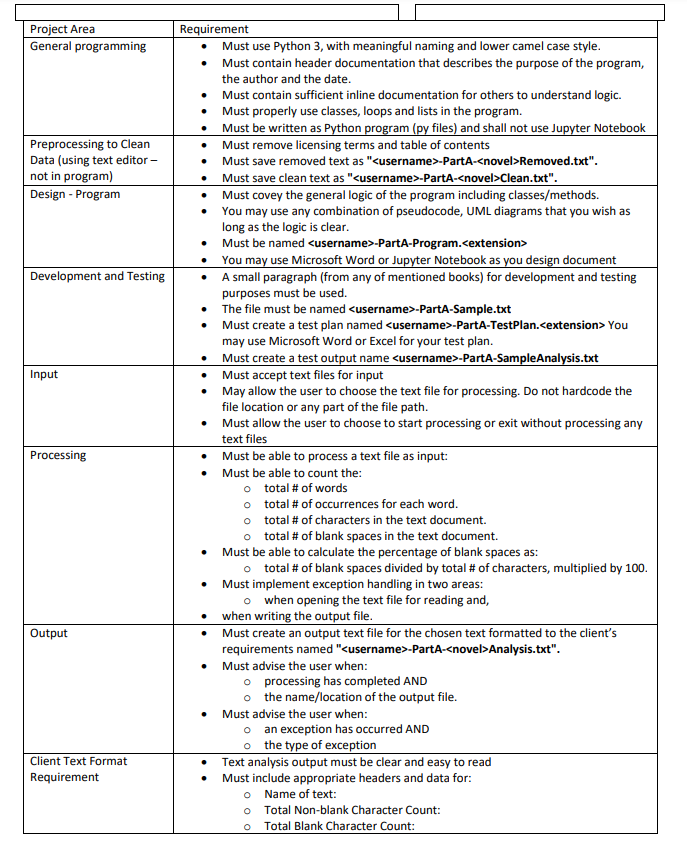
I need help with the 4 remaining requirements mostly the first 3 my major hardship is
getting the novel name by using user input between the 3 options user has for a path file (using 3 text files so 3 opitions for paths user can input)
any help will do thank you
#1 needs another class to meet requirements. minimum 2 classes
#2 files need to be cleaned and have all punctuations and symbols removed leaving only letters and spaces
#3 file name cant be hard coded and must use name of correct file selected to get the novel/text name by reading the file name user will input a file path of their choice in my code below ive hard coded the file name tales of 2 cities. the output should use the input to output a file name so if the path user selects is another novel the output should get that name and count so on.
#4 must let user select between entering a file path or exiting (this one i can complete on my own)
must let user select between entering a file path or exiting AND Must advise the user when processing has completed AND the name/location of the output file. Must advise the user when an exception has occurred AND the type of exception
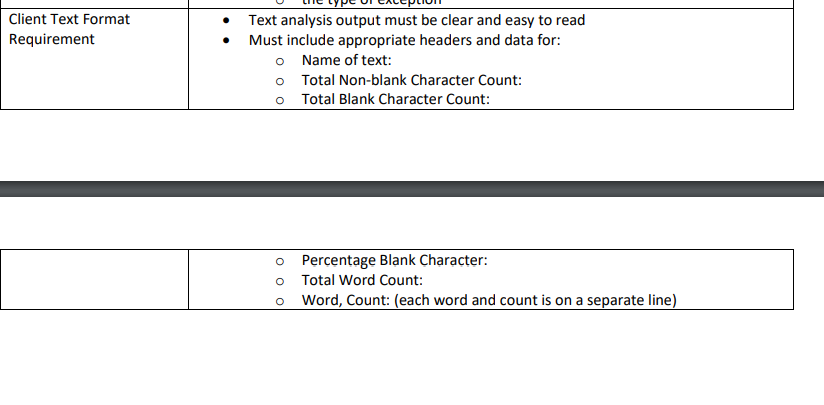
check client text requirements
my code what i have right now is bellow:
filepath = input("Enter the file location of the text file that you want to preprocess : ") try: # total no of words with open(filepath, "r") as myfile: data = myfile.read() words = data.split() words_count = len(words) print (f"Number of words is: {words_count}") # total no of occurrences for each word. with open(filepath, "r") as myfile: # Create an empty dictionary dic= dict() # Loop through each line of the file for line in myfile: # Remove the leading spaces and newline character line = line.strip() # Convert the characters in line to # lowercase to avoid case mismatch line = line.lower() # Split the line into words words = line.split(" ") # Iterate over each word in line for word in words: # Check if the word is already in dictionary if word in dic: # Increment count of word by 1 dic[word] = dic[word] + 1 else: # Add the word to dictionary with count 1 dic[word] = 1 # Print the contents of dictionary for key in list(dic.keys()): print(key, ":", dic[key]) # total no of characters in the text document. with open(filepath, "r") as myfile: num_char = 0 for line in myfile: words = line.split() num_char += len(line) print (f'Number of characters are: {num_char}') # total no of blank spaces in the text document with open(filepath, "r") as myfile: count = 0 while True: #this will read each character #then store in a char char = myfile.read(1) if char.isspace(): count += 1 if not char: break print (f'Number of spaces is {count}') # total no of blank spaces divided by total # of characters, multiplied by 100. with open(filepath, "r") as myfile: count = 0 while True: #this will read each character #then store in a char char = myfile.read(1) if char.isspace(): count += 1 if not char: break with open(filepath, "r") as myfile: num_char = 0 for line in myfile: words = line.split() num_char += len(line) # % of number of spaces per_space =(count * 100 / num_char ) two_decimal = "{:.2f}%".format(per_space) print (f'The % of spaces equals {two_decimal}') with open("-PartA-Analysis.txt", 'w') as f: f.write(f"Name of the text : A tell of two cities ") f.write(f"Total non-blank character count : {num_char - count} ") f.write(f"Total blank character count : {count} ") f.write(f"Percentage blank character : {two_decimal} ") f.write(f"Total word count : {words_count} ") for key , value in dic.items(): f.write(f"{key} , {value} ") except FileNotFoundError: print(f"'{filepath}' is an invalid path please enter valid path") Project Area General programming . Preprocessing to Clean Data (using text editor - not in program) Design - Program Development and Testing Input Requirement Must use Python 3, with meaningful naming and lower camel case style. Must contain header documentation that describes the purpose of the program, the author and the date. Must contain sufficient inline documentation for others to understand logic. Must properly use classes, loops and lists in the program. Must be written as Python program (py files) and shall not use Jupyter Notebook Must remove licensing terms and table of contents Must save removed text as "-PartA--novel>Removed.txt". Must save clean text as "-PartA-Clean.txt". Must covey the general logic of the program including classes/methods. You may use any combination of pseudocode, UML diagrams that you wish as long as the logic is clear. Must be named -PartA-Program. You may use Microsoft Word or Jupyter Notebook as you design document A small paragraph (from any of mentioned books) for development and testing purposes must be used. The file must be named -PartA-Sample.txt Must create a test plan named -PartA-TestPlan. extension> You may use Microsoft Word or Excel for your test plan. Must create a test output name -PartA-SampleAnalysis.txt Must accept text files for input . May allow the user to choose the text file for processing. Do not hardcode the file location or any part of the file path. Must allow the user to choose to start processing or exit without processing any text files Must be able to process a text file as input: Must be able to count the: o total # of words o total # of occurrences for each word. o total # of characters in the text document. o total # of blank spaces in the text document. Must be able to calculate the percentage of blank spaces as: o total # of blank spaces divided by total # of characters, multiplied by 100. Must implement exception handling in two areas: o when opening the text file for reading and, when writing the output file. Must create an output text file for the chosen text formatted to the client's requirements named "-PartA--novel>Analysis.txt". Must advise the user when: o processing has completed AND o the name/location of the output file. Must advise the user when: o an exception has occurred AND o the type of exception Text analysis output must be clear and easy to read Must include appropriate headers and data for: Name of text: Total Non-blank Character Count: Total Blank Character Count: Processing Output Client Text Format Requirement o o Client Text Format Requirement Text analysis output must be clear and easy to read Must include appropriate headers and data for: O Name of text: Total Non-blank Character Count: O Total Blank Character Count: o O Percentage Blank Character: Total Word Count: o Word, Count: (each word and count is on a separate line) Project Area General programming . Preprocessing to Clean Data (using text editor - not in program) Design - Program Development and Testing Input Requirement Must use Python 3, with meaningful naming and lower camel case style. Must contain header documentation that describes the purpose of the program, the author and the date. Must contain sufficient inline documentation for others to understand logic. Must properly use classes, loops and lists in the program. Must be written as Python program (py files) and shall not use Jupyter Notebook Must remove licensing terms and table of contents Must save removed text as "-PartA--novel>Removed.txt". Must save clean text as "-PartA-Clean.txt". Must covey the general logic of the program including classes/methods. You may use any combination of pseudocode, UML diagrams that you wish as long as the logic is clear. Must be named -PartA-Program. You may use Microsoft Word or Jupyter Notebook as you design document A small paragraph (from any of mentioned books) for development and testing purposes must be used. The file must be named -PartA-Sample.txt Must create a test plan named -PartA-TestPlan. extension> You may use Microsoft Word or Excel for your test plan. Must create a test output name -PartA-SampleAnalysis.txt Must accept text files for input . May allow the user to choose the text file for processing. Do not hardcode the file location or any part of the file path. Must allow the user to choose to start processing or exit without processing any text files Must be able to process a text file as input: Must be able to count the: o total # of words o total # of occurrences for each word. o total # of characters in the text document. o total # of blank spaces in the text document. Must be able to calculate the percentage of blank spaces as: o total # of blank spaces divided by total # of characters, multiplied by 100. Must implement exception handling in two areas: o when opening the text file for reading and, when writing the output file. Must create an output text file for the chosen text formatted to the client's requirements named "-PartA--novel>Analysis.txt". Must advise the user when: o processing has completed AND o the name/location of the output file. Must advise the user when: o an exception has occurred AND o the type of exception Text analysis output must be clear and easy to read Must include appropriate headers and data for: Name of text: Total Non-blank Character Count: Total Blank Character Count: Processing Output Client Text Format Requirement o o Client Text Format Requirement Text analysis output must be clear and easy to read Must include appropriate headers and data for: O Name of text: Total Non-blank Character Count: O Total Blank Character Count: o O Percentage Blank Character: Total Word Count: o Word, Count: (each word and count is on a separate line)









 Study Help