







Question: I need help with the validation portion of this assignment. (I already posted this minus the pictures, I finally figured out how to upload them).
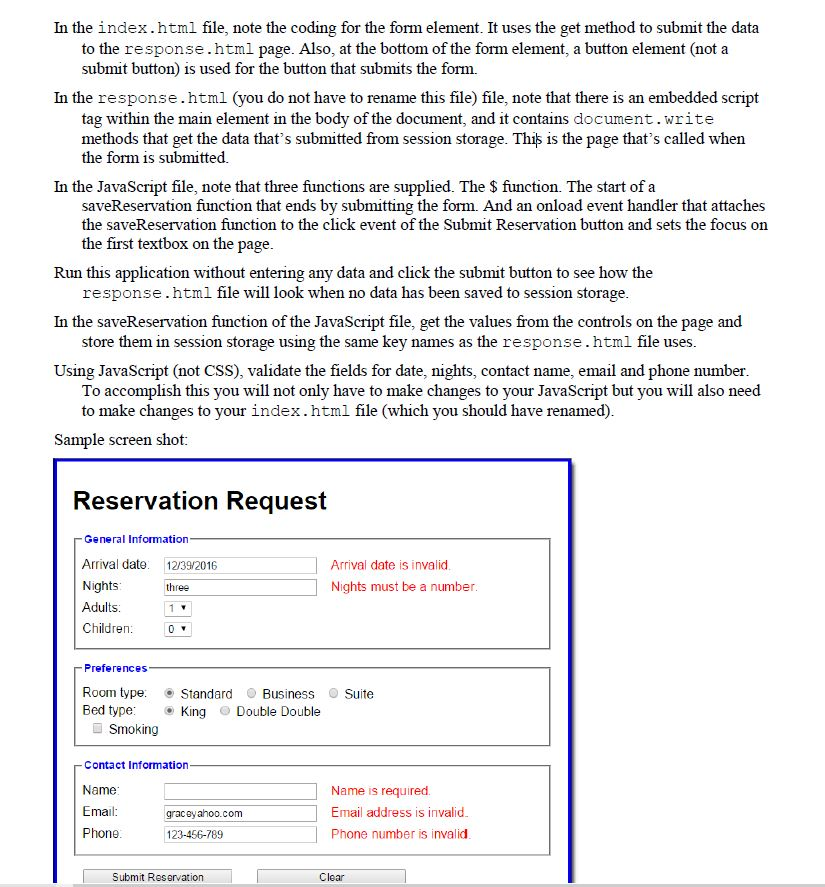
I need help with the validation portion of this assignment. (I already posted this minus the pictures, I finally figured out how to upload them). I have the session storage correct, I only need help validating the data (the name field validation is also correct). I have been stuck on this for three days, and cannot find any good guides on how to do this. (we did not get a lecture, pretty much figuring it out on our own) I will post my code at the bottom of the pictures.
Index.html:
Reservation Request
reservation.js:
"use strict"; var $ = function(id) { return document.getElementById(id); }; //validate and store information var saveReservation = function() { //Validate and store name if(document.getElementById("name").value != "") { sessionStorage.setItem('name', $("name").value ); //save the name in sessionStorage } else { nameMessage.innerHTML = "Please Enter a name"; return false; } //Validate and store phone number sessionStorage.setItem('phone', $("phone").value ); //save the phone number value in sessionStorage //Validate and store email sessionStorage.setItem('email', $("email").value ); //save the email value in sessionStorage
//Validate and store arrivalDate sessionStorage.setItem('arrivalDate', $("arrival_date").value ); //save the arrival_date in sessionStorage //Validate and store nights sessionStorage.setItem('nights', $("nights").value ); //save the nights value in sessionStorage //these do not need validated sessionStorage.setItem('adults', $("adults").value ); //save the adults value in sessionStorage sessionStorage.setItem('children', $("children").value ); //save the children value in sessionStorage //Check the radio buttons and checkboxes if($("standard").checked)//check if the standard checkbox is selected { sessionStorage.setItem('roomType', $("standard").value ); // save the roomType value in sessionStorage } else if($("business").checked)//check if the business checkbox is selected { sessionStorage.setItem('roomType', $("business").value ); // save the roomType value in sessionStorage } else if($("suite").checked)//check if the suite checkbox is selected { sessionStorage.setItem('roomType', $("suite").value ); // save the roomType value in sessionStorage } if($("king").checked)//check if the king checkbox is selected { sessionStorage.setItem('bedType', $("king").value ); // save the bedType value in sessionStorage } else if($("double").checked)//check if the double checkbox is selected { sessionStorage.setItem('bedType', $("double").value ); // save the bedType value in sessionStorage }
if($("smoking").checked)//check if the smoking checkbox is selected { sessionStorage.setItem('smoking', 'yes' ); // save the smoking value to yes in sessionStorage } else { sessionStorage.setItem('smoking', 'no' ); // save the smoking value to no in sessionStorage } // submit form $("reservation_form").submit(); };
window.onload = function() { $("submit_request").onclick = saveReservation; $("arrival_date").focus(); };
response.html:
reservation.css:body { font-family: Arial, Helvetica, sans-serif; background-color: white; margin: 0 auto; width: 600px; border: 3px solid blue; padding: 10px 20px; } fieldset { margin-top: 1em; margin-bottom: 1em; padding: .5em; } legend { color: blue; font-weight: bold; font-size: 85%; margin-bottom: .5em; } label { float: left; width: 90px; } input, select { margin-left: 1em; margin-right: 1em; margin-bottom: .5em; } input { width: 14em; } input[type="radio"], input[type="checkbox"] { width: 1em; padding-left: 0; margin-right: 0.5em; } span { color:red; }
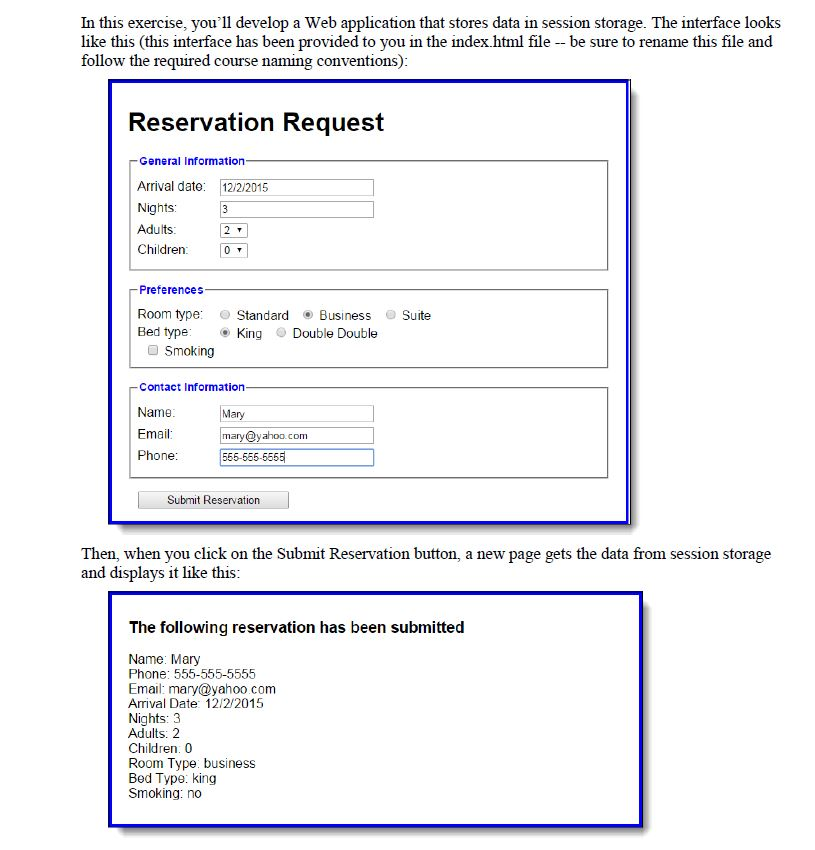
In this exercise, you'll develop a Web application that stores data in session storage. The interface looks like this (this interface has been provided to you in the index html file -- be sure to rename this file and follow the required course naming conventions) Reservation Request General Information Arrival date: 12/2/2015 Nights Adults Children Preferences Room type: O Standard Business @ Suite Bed type: e) King . Double Double Smoking Contact Information Name Email Mary yahoo.com Phone 555-555-5555 Submit Reservation Then, when you click on the Submit Reservation button, a new page gets the data from session storage and displays it like this The following reservation has been submitted Name: Mary Phone: 555-555-5555 Email: mary@yahoo.com Arrival Date: 12/2/2015 Nights: 3 Adults: 2 Children. 0 Room Type: business Bed Type: king Smoking: no
Step by Step Solution
There are 3 Steps involved in it

Get step-by-step solutions from verified subject matter experts
 Study Help