







Question: (I need help with these functions written in PHP please and make sure to follow each requirement, thank you!) Modify the User Authentication PHP file
(I need help with these functions written in PHP please and make sure to follow each requirement, thank you!)
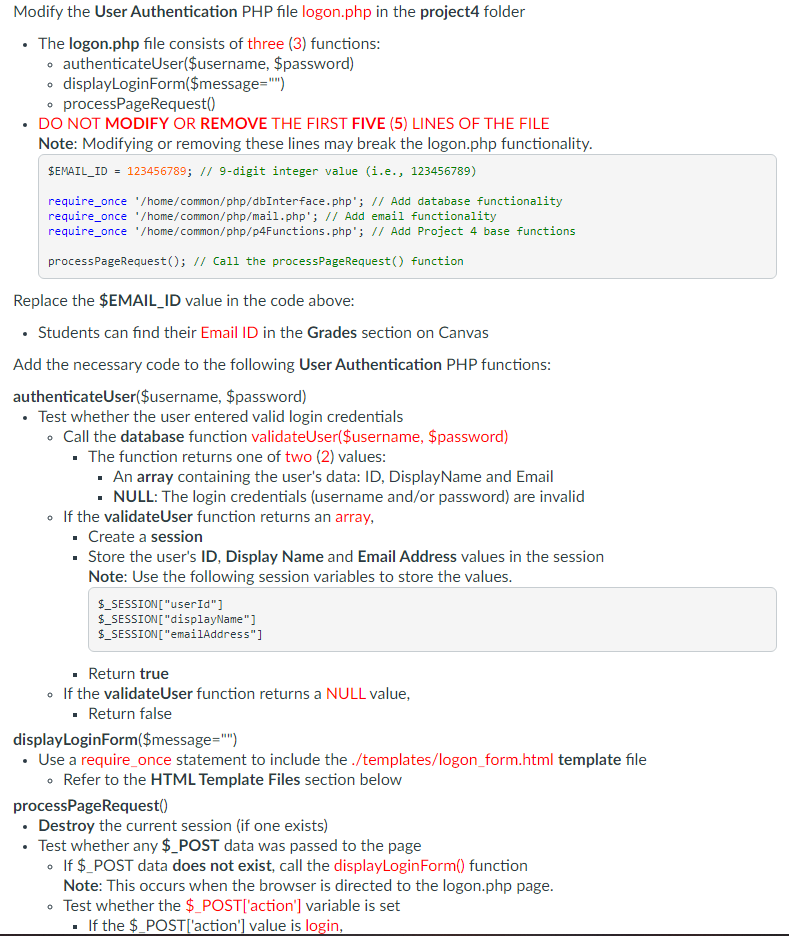
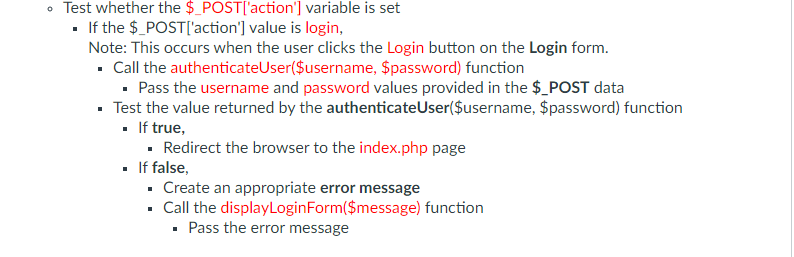
Modify the User Authentication PHP file logon.php in the project4 folder The logon.php file consists of three (3) functions: o authenticateUser($username, $password) o displayLoginForm($message="") o processPageRequest() DO NOT MODIFY OR REMOVE THE FIRST FIVE (5) LINES OF THE FILE Note: Modifying or removing these lines may break the logon.php functionality. SEMAIL_ID = 123456789; // 9-digit integer value (i.e., 123456789) require_once '/home/common/php/dbInterface.php'; // Add database functionality require_once '/home/common/php/mail.php'; // Add email functionality require_once '/home/common/php/p4Functions.php'; // Add Project 4 base functions processPageRequest(); // Call the processPageRequest() function Replace the $EMAIL_ID value in the code above: Students can find their Email ID in the Grades section on Canvas Add the necessary code to the following User Authentication PHP functions: authenticateUser($username, $password) Test whether the user entered valid login credentials . Call the database function validateUser($username, $password) The function returns one of two (2) values: An array containing the user's data: ID, DisplayName and Email NULL: The login credentials (username and/or password) are invalid . If the validateUser function returns an array, Create a session Store the user's ID, Display Name and Email Address values in the session Note: Use the following session variables to store the values. $_SESSION["userId"] $_SESSION["displayName"] $_SESSION["emailAddress"] Return true If the validateUser function returns a NULL value, . Return false displayLoginForm($message="") Use a require_once statement to include the ./templates/logon_form.html template file . Refer to the HTML Template Files section below processPageRequest() Destroy the current session (if one exists) Test whether any $_POST data was passed to the page If $_POST data does not exist, call the displayLogin Form() function Note: This occurs when the browser is directed to the logon.php page. . Test whether the $_POST['action') variable is set If the $_POST['action') value is login, Test whether the $_POST['action'] variable is set . If the $_POST['action') value is login, Note: This occurs when the user clicks the Login button on the Login form. . Call the authenticateUser($username, $password) function Pass the username and password values provided in the $_POST data Test the value returned by the authenticateUser($username, $password) function . If true, Redirect the browser to the index.php page . If false, Create an appropriate error message . Call the displayLogin Form($message) function Pass the error message Modify the User Authentication PHP file logon.php in the project4 folder The logon.php file consists of three (3) functions: o authenticateUser($username, $password) o displayLoginForm($message="") o processPageRequest() DO NOT MODIFY OR REMOVE THE FIRST FIVE (5) LINES OF THE FILE Note: Modifying or removing these lines may break the logon.php functionality. SEMAIL_ID = 123456789; // 9-digit integer value (i.e., 123456789) require_once '/home/common/php/dbInterface.php'; // Add database functionality require_once '/home/common/php/mail.php'; // Add email functionality require_once '/home/common/php/p4Functions.php'; // Add Project 4 base functions processPageRequest(); // Call the processPageRequest() function Replace the $EMAIL_ID value in the code above: Students can find their Email ID in the Grades section on Canvas Add the necessary code to the following User Authentication PHP functions: authenticateUser($username, $password) Test whether the user entered valid login credentials . Call the database function validateUser($username, $password) The function returns one of two (2) values: An array containing the user's data: ID, DisplayName and Email NULL: The login credentials (username and/or password) are invalid . If the validateUser function returns an array, Create a session Store the user's ID, Display Name and Email Address values in the session Note: Use the following session variables to store the values. $_SESSION["userId"] $_SESSION["displayName"] $_SESSION["emailAddress"] Return true If the validateUser function returns a NULL value, . Return false displayLoginForm($message="") Use a require_once statement to include the ./templates/logon_form.html template file . Refer to the HTML Template Files section below processPageRequest() Destroy the current session (if one exists) Test whether any $_POST data was passed to the page If $_POST data does not exist, call the displayLogin Form() function Note: This occurs when the browser is directed to the logon.php page. . Test whether the $_POST['action') variable is set If the $_POST['action') value is login, Test whether the $_POST['action'] variable is set . If the $_POST['action') value is login, Note: This occurs when the user clicks the Login button on the Login form. . Call the authenticateUser($username, $password) function Pass the username and password values provided in the $_POST data Test the value returned by the authenticateUser($username, $password) function . If true, Redirect the browser to the index.php page . If false, Create an appropriate error message . Call the displayLogin Form($message) function Pass the error message
Step by Step Solution
There are 3 Steps involved in it

Get step-by-step solutions from verified subject matter experts
 Study Help