







Question: i need help with this assignment and build a table in excel or apex please send a photo of the whole chart included for this
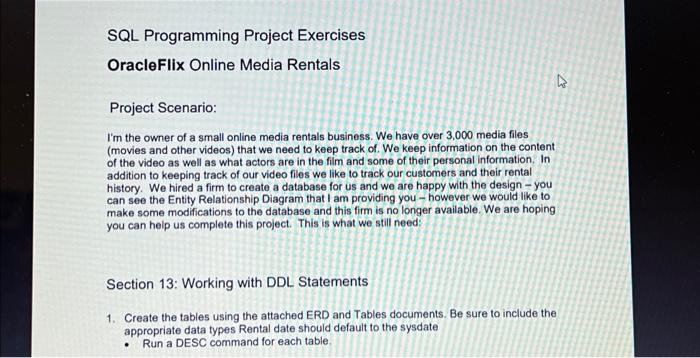
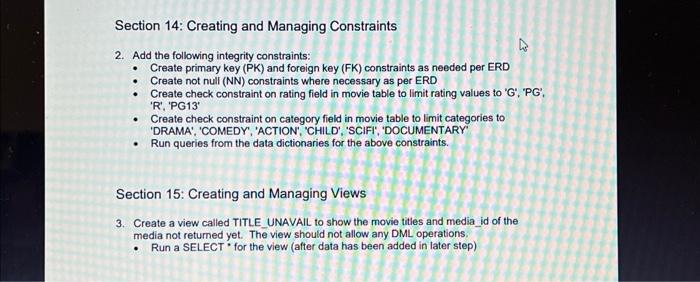
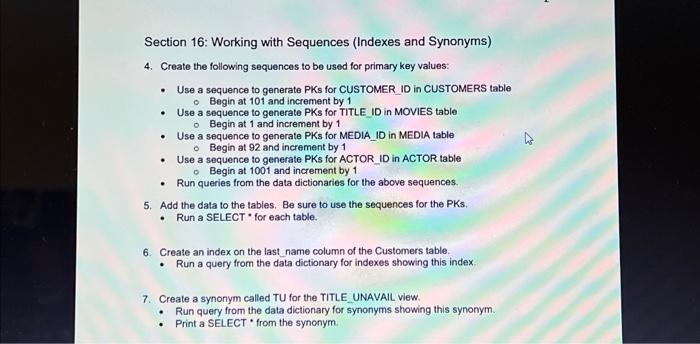
Project Scenario: I'm the owner of a small online media rentals business. We have over 3,000 media files (movies and other videos) that we need to keep track of. We keep information on the content of the video as well as what actors are in the film and some of their personal information. In addition to keeping track of our video files we like to track our customers and their rental history. We hired a firm to create a database for us and we are happy with the design - you can see the Entity Relationship Diagram that I am providing you - however we would like to make some modifications to the database and this firm is no longer available. We are hoping you can help us complete this project. This is what we still need: Section 13: Working with DDL Statements 1. Create the tables using the attached ERD and Tables documents. Be sure to include the appropriate data types Rental date should default to the sysdate - Run a DESC command for each table. 2. Add the following integrity constraints: - Create primary key (PK) and foreign key (FK) constraints as needed per ERD - Create not null (NN) constraints where necessary as per ERD - Create check constraint on rating field in movie table to limit rating values to 'G', 'PG', ' R ', 'PG13' - Create check constraint on category field in movie table to limit categories to 'DRAMA', 'COMEDY', 'ACTION', 'CHILD', 'SCIFI', 'DOCUMENTARY' - Run queries from the data dictionaries for the above constraints. Section 15: Creating and Managing Views 3. Create a view called TITLE_UNAVAIL to show the movie titles and media id of the media not returned yet. The view should not allow any DML operations. - Run a SELECT" for the view (after data has been added in later step) Section 16: Working with Sequences (Indexes and Synonyms) 4. Create the following sequences to be used for primary key values: - Use a sequence to generate PKs for CUSTOMER ID in CUSTOMERS table - Begin at 101 and increment by 1 - Use a sequence to generate PKs for TITLE ID in MOVIES table - Begin at 1 and increment by 1 - Use a sequence to generate PKs for MEDIA_ID in MEDIA table - Begin at 92 and increment by 1 - Use a sequence to generate PKs for ACTOR ID in ACTOR table - Begin at 1001 and increment by 1 - Run queries from the data dictionaries for the above sequences. 5. Add the data to the tables. Be sure to use the sequences for the PKs. - Run a SELECT * for each table. 6. Create an index on the last name column of the Customers table. - Run a query from the data dictionary for indexes showing this index 7. Create a synonym called TU for the TITLE UNAVAIL view. - Run query from the data dictionary for synonyms showing this synonym. - Print a SELECT * from the synonym
Step by Step Solution
There are 3 Steps involved in it

Get step-by-step solutions from verified subject matter experts
 Study Help