







Question: I need help with this assignment: just simple method, no fancy code's like this : ( if ( $ ( #cart ) . find
I need help with this assignment:
just simple method, no fancy code's like this :
if $#cart"findcartitemdataname$productNamelength alertItem already in the cart. Remove it first to add again."; return;
and explanations to all methods and functions,
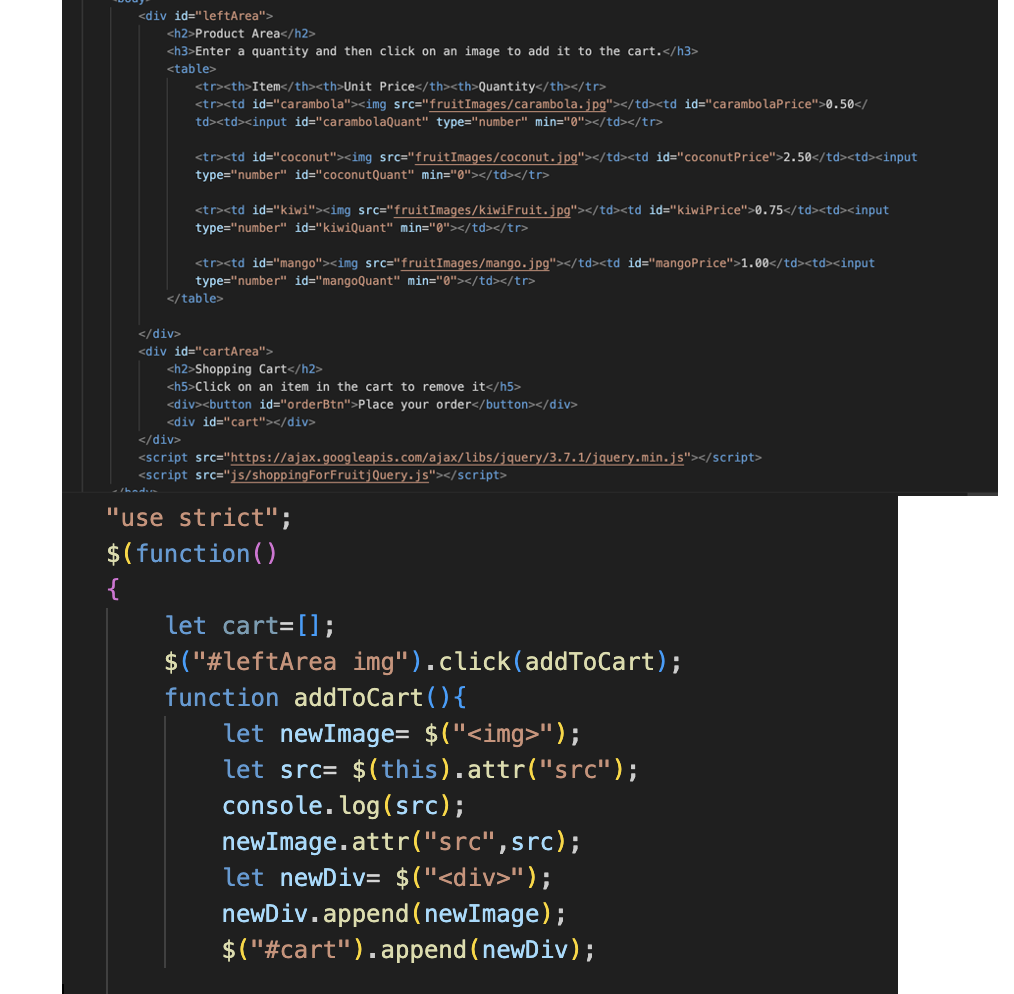
please look at the screenshots: html and js begining how should be resolved,
thank you!
CGS : JavaScript Programming Assignment : Shopping for Fruit
Part File to download: Download the zip file, FruitMarket.zip, and extract it into your cgs folder. Once you extract the contents of the zip file, you should see a folder named FruitMarket. RENAME the FruitMarket folder as FruitMarketYourInitials.
Part Program description:
File: shoppingForFruitjQuery.html The document links to a JavaScriptjQuery file called shoppingForFruitjQuery.js described below. Study this HTML file and open it in your browser to see how it looks originally. DO NOT CHANGE THE CONTENTS OF THIS HTML FILE! File: shoppingForFruitjQuery.js located in the js folder Add jQuery statements to this file so that every time the user clicks on an image, a div element is created containing a copy of the image, the quantity selected by the user, the unit price, and the cost of the item. Make sure that the user did enter a quantity. If not, display an error message and don't do anything else. This new div should be put inside the div that has an ID of cart. When the user clicks the "Place your order" button, the total cost, tax and final cost of all items in the cart should be displayed with corresponding captions. When the user clicks on an image in the cart, it should be removed from the cart and the total cost should be adjusted accordingly.
Other requirements:
Do NOT remove the image from the product area when a user clicks on it Make a new image using the information from the image that was clicked and add that new image to the cart. You should not allow the same product to be placed in the cart if it is already in the cart. If an attempt is made to add the same item, display a message stating that the user should remove the item from the cart first. When the user clicks on an image in the cart, remove that image ONLY from the cart. Remember to adjust the total cost accordingly. Clear the quantity input area after an image is selected from the product area. Print all money with two decimal places. Tax is collected on the total cost NOT on the cost for each item.
"use strict"; $function
let cart;
$#leftArea img"clickaddToCart; function addToCart
let newImage$;
let src$thisattrsrc; console.logsrc;
newImage.attrsrcsrc; let newDiv$
Step by Step Solution
There are 3 Steps involved in it
1 Expert Approved Answer
Step: 1 Unlock

Question Has Been Solved by an Expert!
Get step-by-step solutions from verified subject matter experts
Step: 2 Unlock
Step: 3 Unlock
 Study Help