







Question: I need help with this code, I have provided output pictures of what it should look like. JavaFX GUI. Create an application that lets the
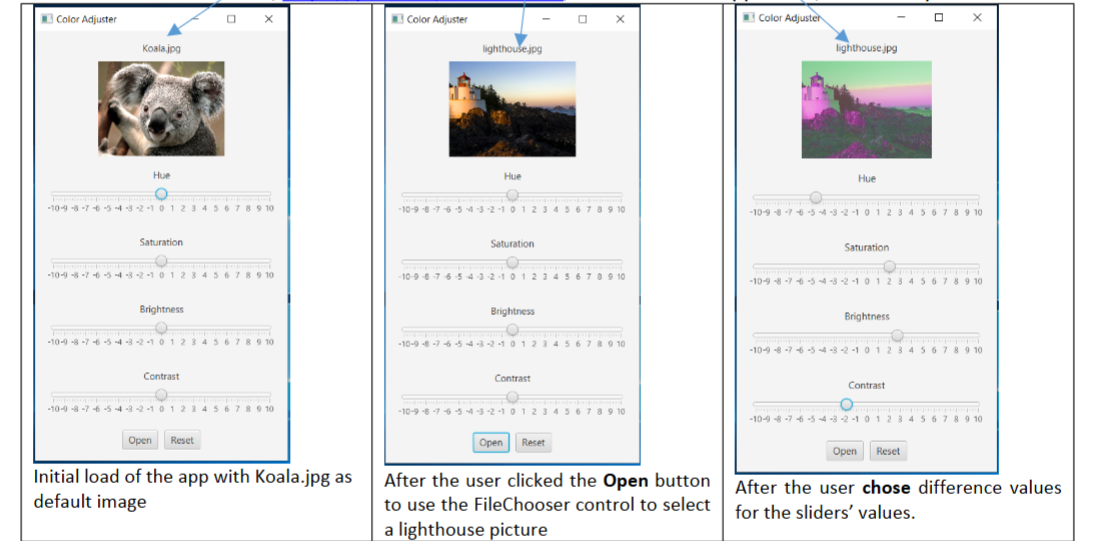
I need help with this code, I have provided output pictures of what it should look like. JavaFX GUI.
Create an application that lets the user select an image file via a FileChooser dialog. The application should
display the image and provide four Slider controls see the screenshots below
Below are the requirements of the application:
The Slider controls should let the user adjust the images hue, saturation, brightness, and contrast.
a Set the tick marks range between and having value as the default when the app initially loaded.
b Display the major tickmarks eg as well.
Set the imageviews width to pixels and make sure that the original ratio of the imageviews width and height
keeps the same so the image wont look distorted after it is loaded.
a Set the Koala.jpg as the default image when the app initially loaded.
Make sure the Open button will allow a user to choose a different image file.
a Make sure that the app display the image file name.
Make sure that all the controls imageview and the four sliders, labels are visible. For example, I set the scene
size to x
Set app title to Color Adjuster
The Reset button and its reset features refer to the demo video are not required. But if you provides the
correct features, I will add bonus points to your app.
Step by Step Solution
There are 3 Steps involved in it
1 Expert Approved Answer
Step: 1 Unlock

Question Has Been Solved by an Expert!
Get step-by-step solutions from verified subject matter experts
Step: 2 Unlock
Step: 3 Unlock
 Study Help