







Question: I need help with this code. I have the images downloaded already 52 cards from a card deck. I need help on getting the code
I need help with this code. I have the images downloaded already 52 cards from a card deck. I need help on getting the code right so when I compile it with JGRASP it works and it finds and loads the files that I have to display them four cards randomly when the user clicks refresh. I just need help with coding the proper file in the code. So the code finds the right path. Thank you for your help!
I have the images currently with this path: G:\My Drive\Java Programming 2\unit2\cards
This is the code that I have:
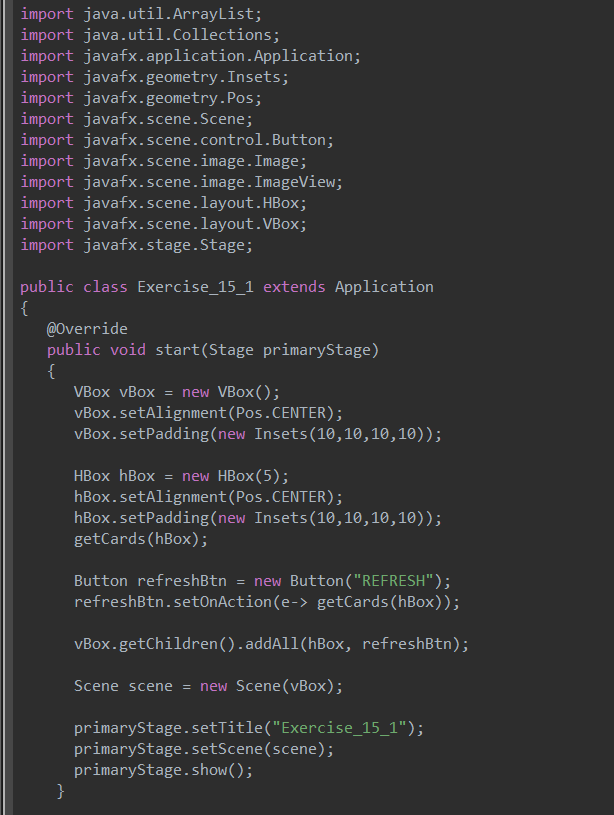
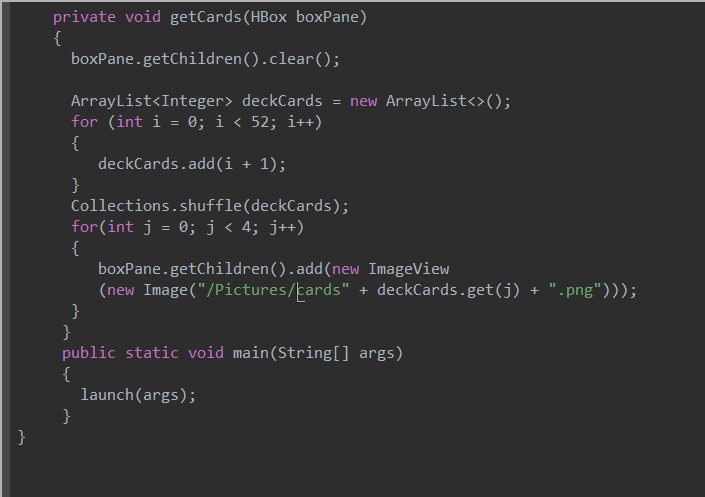
import java.util.ArrayList; import java.util.Collections; import javafx.application. Application; import javafx.geometry. Insets; import javafx.geometry.Pos; import javafx.scene. Scene; import javafx.scene.control.Button; import javafx.scene. image. Image; import javafx.scene. image. ImageView; import javafx.scene.layout.HBox; import javafx.scene.layout.VBox; import javafx. stage. Stage; public class Exercise_15_1 extends Application { @Override public void start(Stage primaryStage) { VBox vBox = new VBox(); vBox.setAlignment(Pos.CENTER); vBox.setPadding(new Insets (10,10,10,10)); HBox hBox = new HBox(5); hBox.setAlignment(Pos.CENTER); hBox.setPadding(new Insets (10,10,10,10)); getCards (hBox); Button refreshBtn = new Button("REFRESH"); refreshBtn.setOnAction(e-> getCards (hBox)); vBox.getChildren() .addAll(hBox, refreshBtn); Scene scene = new Scene(vBox); primaryStage.setTitle("Exercise_15_1"); primaryStage.setScene(scene); primaryStage.show(); } private void getCards (HBox boxPane) { boxPane.getChildren().clear(); ArrayList
Step by Step Solution
There are 3 Steps involved in it

Get step-by-step solutions from verified subject matter experts
 Study Help