







Question: I need help with this Gui, and so far I've only been able to code a Checkerboard: Part 1: The lunatics are taking over the
I need help with this Gui, and so far I've only been able to code a Checkerboard:
Part 1:
The lunatics are taking over the asylum, and you are the last guard left. Your goal is to escape through the only exit door. This week, you will create a JavaFX GUI that represents the Scaryville State Home for the Criminally Insane.
Do the styling (coding of the details of the appearance of the GUI, such as colors and font sizes) using CSS, not the JavaFX setters, wherever possible. Make the start and finish squares appear different from other squares.
Grading for this lab will heavily weight the appearance of the GUI as well as its functionality. To get a good grade on this assignment, your GUI must both work correctly and look good.
Here are some of the classes you will need. This is not a complete list, and each class will need more than the basics I specify below:
A Coordinate class with an int row, an int column, and a char representing the value of the coordinate (this week, you will use four values for the Coordinates: blank (' ') for an empty space, W for a wall, S for the starting point, and E for the exit.) Provide getters and setters.
An AsylumMap class with a two-dimensional array of Coordinates but no GUI code.
A JavaFX GUI class called MapPane. Since the constructor for Scene takes a Pane as a parameter, this class should extend one of the Pane classes, most likely BorderPane. It should also contain a GridPane with a two-dimensional grid of Labels. One label in the GridPane corresponds to one Coordinate in the AsylumMap. Note this important distinction: the MapPane is for the the user interface while the AsylumMap is for data.
The outer edges of the grid should consist of walls, except for one exit square. Use the square at row 1, column 1 as the starting point. When the game starts, squares that are not on the edges and are not the start square should be randomly set to wall and space squares (use about 25% walls.) Note that this does not guarantee that it is possible to escape the lunatics at all.
You will also need a game reset button. This button creates a new random map. In my solution, the reset button is in an HBox contained in the MapPane. Write an event handler for the F10 key which does the same thing. The event handler handle a KeyEvent and find the key strokes using the the method getKeyCode(), which returns a KeyCode enum. Attack the event handler to the outer pane. Here are some key lines of code for the event handler.
final EventHandler keyEventHandler = new EventHandler() { public void handle(final KeyEvent keyEvent) { if (keyEvent.getCode() == KeyCode.F10) { You may use this GUI as a model if you like, but feel free to create a different one: 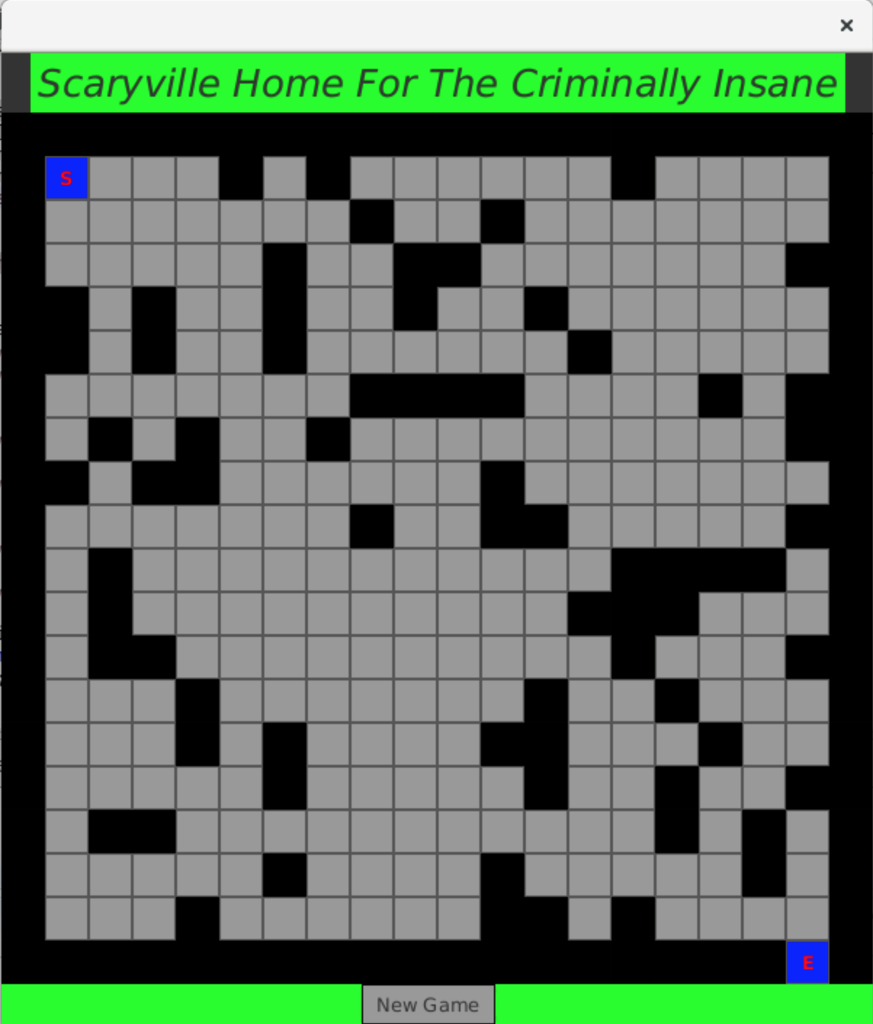
Part 2:
The player in the game represents the sole surviving guard. Use a Coordinate variable to keep track of his location. His movements are controlled by the scroll keys; see the hints in Lab 8 about how to handle key strokes. Both the GUI and the map class need to track his location, so the event handler needs to update both the array of Coordinates in the AsylumMap and the labels in MapPane. I did not use a Guard class, but you may use one if you like.
The lunatics decide for themselves how to move, so you will need a Lunatic class. Among other things, it will contain a method to determine the lunatics's next step. If a lunatic can see the guard by looking along a row or column, he moves towards him. Note, though, that the lunatics cannot see through walls. If the lunatic cannot see the guard, he moves toward the guard's last known location if possible, otherwise he moves randomly. Avoid moving to a square where another lunatic is already located. Like the guard, the lunatics can't move through walls. Update both the GUI and the map class for each lunatic move.
As the lunatics and the guard move, change the css classes for the labels they move to as well as the labels they move from. Don't try to add new labels to the grid as they move.
Due to strong antipsychotic medication administered in the asylum, the Lunatics are exceptionally physically fit. They should move faster than the guard. The best way to implement this is for the lunatics to take more than one move for each guard move. You can code this by writing a method in AsylumMap that calls each lunatics's move method, and calling the AsylumMap method some number of times from inside the guard move event handler (the one that responds to the scroll keys.) The guard should get a few free moves before the Lunatics begin moving.
If the guard reaches the exit unharmed, show a congratulatory message in the window, next to the reset button. If a lunatic catches up to the guard, show a message reading "RIP." Neither the guard nor the lunatics should move after the guard is dead. The player must be able to start a new game at any time with the reset button or F10.
Experiment with the game to make it difficult, but still possible, for the guard to escape unharmed. Design Main so that you can set parameters there for the number of turns in the head start, the number of lunatics, and the number of lunatic moves per guard move. If you want more practice with GUI building, provide a way to set these parameters with user input.
Scaryville Home For The Criminally Insane New Game
Step by Step Solution
There are 3 Steps involved in it

Get step-by-step solutions from verified subject matter experts
 Study Help