







Question: I need help with this java question. Please provide code and output for FancyStringArray.java so I can test it on CodeLab. FancyStringArray.java FancyStringArrayTest.java // DO
I need help with this java question. Please provide code and output for FancyStringArray.java so I can test it on CodeLab.
 FancyStringArray.java
FancyStringArrayTest.java
// DO NOT MODIFY THIS FILE.
public class FancyStringArrayTest { public static void main(String[] args) { testNoArgConstructor(); testParameterizedConstructor(); testSize(); testAdd(); testGet(); testSet(); testContains(); testToString(); testEquals(); }
private static void testNoArgConstructor() { System.out.println("Testing no-arg constructor"); new FancyStringArray(); System.out.println(); }
private static void testParameterizedConstructor() { System.out.println("Testing parameterized constructor");
try { new FancyStringArray(0); new FancyStringArray(1); new FancyStringArray(10); new FancyStringArray(100); } catch (Exception e) { System.out.println("an exception should not have occurred here, but did"); }
try { new FancyStringArray(-1); System.out.println("an exception should have occurred here, but didn't"); } catch (Exception ignored) { }
System.out.println(); }
private static void testSize() { System.out.println("Testing size");
FancyStringArray a = new FancyStringArray(); System.out.println(a.size()); // expected: 0 a.add("a string"); System.out.println(a.size()); // expected: 1 a.add("another string"); System.out.println(a.size()); // expected: 2
FancyStringArray b = new FancyStringArray(5); System.out.println(b.size()); // expected: 0 b.add("a string"); System.out.println(b.size()); // expected: 1 b.add("another string"); System.out.println(b.size()); // expected: 2
System.out.println(); }
private static void testAdd() { System.out.println("Testing add");
FancyStringArray a = new FancyStringArray();
try { for (int i = 0; i
try { a.add("a string"); System.out.println("an exception should have occurred here, but didn't"); } catch (Exception ignored) { }
FancyStringArray b = new FancyStringArray(3); try { for (int i = 0; i
try { b.add("a string"); System.out.println("an exception should have occurred here, but didn't"); } catch (Exception ignored) { }
System.out.println(); }
private static void testGet() { System.out.println("Testing get");
FancyStringArray a = new FancyStringArray(5); a.add("first"); a.add("second"); a.add("third");
System.out.println(a.get(0)); // expected: first System.out.println(a.get(1)); // expected: second System.out.println(a.get(2)); // expected: third
try { a.get(-1); System.out.println("an exception should have occurred here, but didn't"); } catch (Exception ignored) { }
try { a.get(3); System.out.println("an exception should have occurred here, but didn't"); } catch (Exception ignored) { }
System.out.println(); }
private static void testSet() { System.out.println("Testing set");
FancyStringArray a = new FancyStringArray(5); a.add("first"); a.add("second"); a.add("third");
String oldString = a.set(1, "another"); System.out.println(oldString); // expected: second System.out.println(a.get(1)); // expected: another
try { a.set(-1, "another"); System.out.println("an exception should have occurred here, but didn't"); } catch (Exception ignored) { }
try { a.set(3, "another"); System.out.println("an exception should have occurred here, but didn't"); } catch (Exception ignored) { }
System.out.println(); }
private static void testContains() { System.out.println("Testing contains");
FancyStringArray a = new FancyStringArray(5); a.add("first"); a.add("second"); a.add("third");
System.out.println(a.contains(new String("first"))); // expected: true System.out.println(a.contains(new String("second"))); // expected: true System.out.println(a.contains("third")); // expected: true System.out.println(a.contains("another")); // expected: false
a.set(1, "another"); System.out.println(a.contains("another")); // expected: true
System.out.println(); }
private static void testToString() { System.out.println("Testing toString");
FancyStringArray a = new FancyStringArray(5); System.out.println(a); // expected: []
a.add("first"); System.out.println(a); // expected: [first]
a.add("second"); a.add("third"); System.out.println(a); // expected: [first, second, third]
System.out.println(); }
private static void testEquals() { System.out.println("testing equals");
FancyStringArray a = new FancyStringArray(5); a.add("first"); a.add("second"); a.add("third");
FancyStringArray b = new FancyStringArray(10); b.add("first"); b.add("second"); b.add("third");
FancyStringArray c = new FancyStringArray(5); c.add("first"); c.add("second"); c.add("another");
FancyStringArray d = new FancyStringArray(5); d.add("first"); d.add("second");
System.out.println(a.equals(b)); // expected: true System.out.println(a.equals(c)); // expected: false System.out.println(a.equals(d)); // expected: false
System.out.println(a.equals("a string")); // expected: false System.out.println(a.equals(null)); // expected: false
System.out.println(); } }
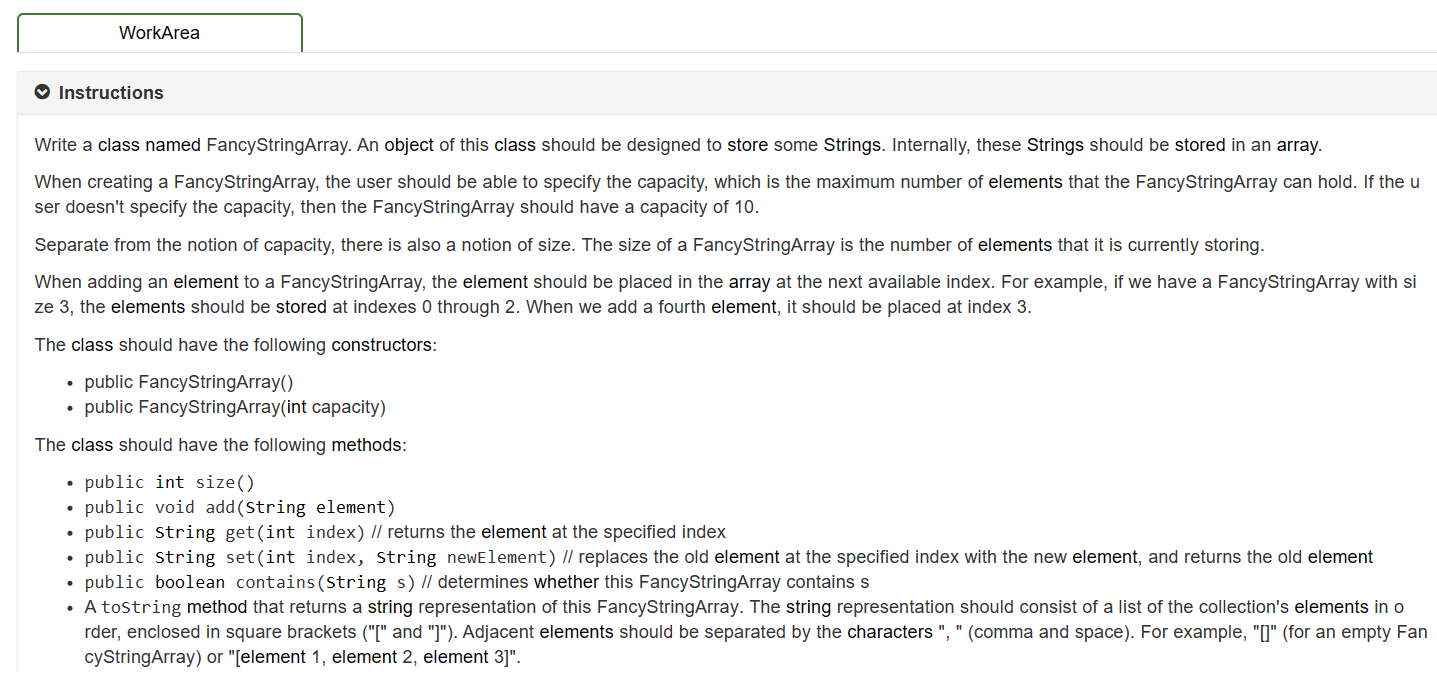
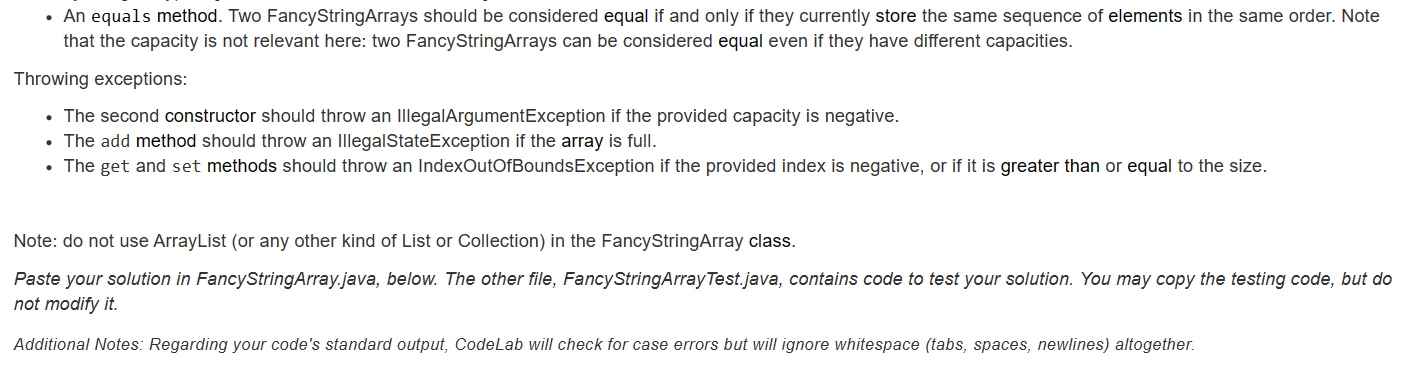
Write a class named FancyStringArray. An object of this class should be designed to store some Strings. Internally, these Strings should be stored in an array. When creating a FancyStringArray, the user should be able to specify the capacity, which is the maximum number of elements that the FancyStringArray can hold. If the u ser doesn't specify the capacity, then the FancyStringArray should have a capacity of 10. Separate from the notion of capacity, there is also a notion of size. The size of a FancyStringArray is the number of elements that it is currently storing. When adding an element to a FancyStringArray, the element should be placed in the array at the next available index. For example, if we have a FancyStringArray with si ze 3 , the elements should be stored at indexes 0 through 2 . When we add a fourth element, it should be placed at index 3. The class should have the following constructors: - public FancyStringArray() - public FancyStringArray(int capacity) The class should have the following methods: - public int size() - public void add(String element) - public string get(int index)// returns the element at the specified index - public string set(int index, string newElement) // replaces the old element at the specified index with the new element, and returns the old - public boolean contains(String s) // determines whether this FancyStringArray contains s - A tostring method that returns a string representation of this FancyStringArray. The string representation should consist of a list of the collection's elements in o rder, enclosed in square brackets ("[" and "]"). Adjacent elements should be separated by the characters ", " (comma and space). For example, "[]" (for an empty Fan cyStringArray) or "[element 1, element 2, element 3]". - An equals method. Two FancyStringArrays should be considered equal if and only if they currently store the same sequence of elements in the same order. Note that the capacity is not relevant here: two FancyStringArrays can be considered equal even if they have different capacities. Throwing exceptions: - The second constructor should throw an IllegalArgumentException if the provided capacity is negative. - The add method should throw an IllegalStateException if the array is full. - The get and set methods should throw an IndexOutOfBoundsException if the provided index is negative, or if it is greater than or equal to the size. Note: do not use ArrayList (or any other kind of List or Collection) in the FancyStringArray class. Paste your solution in FancyStringArray.java, below. The other file, FancyStringArrayTest.java, contains code to test your solution. You may copy the testing code, but do not modify it. Additional Notes: Regarding your code's standard output, CodeLab will check for case errors but will ignore whitespace (tabs, spaces, newlines) altogether
Step by Step Solution
There are 3 Steps involved in it

Get step-by-step solutions from verified subject matter experts
 Study Help