







Question: I Need help with this project showing step by step on Visual Studios 2019 on MacBook 6 Projects for Murach's C# (7th Edition) 7 Projects
I Need help with this project showing step by step on Visual Studios 2019 on MacBook
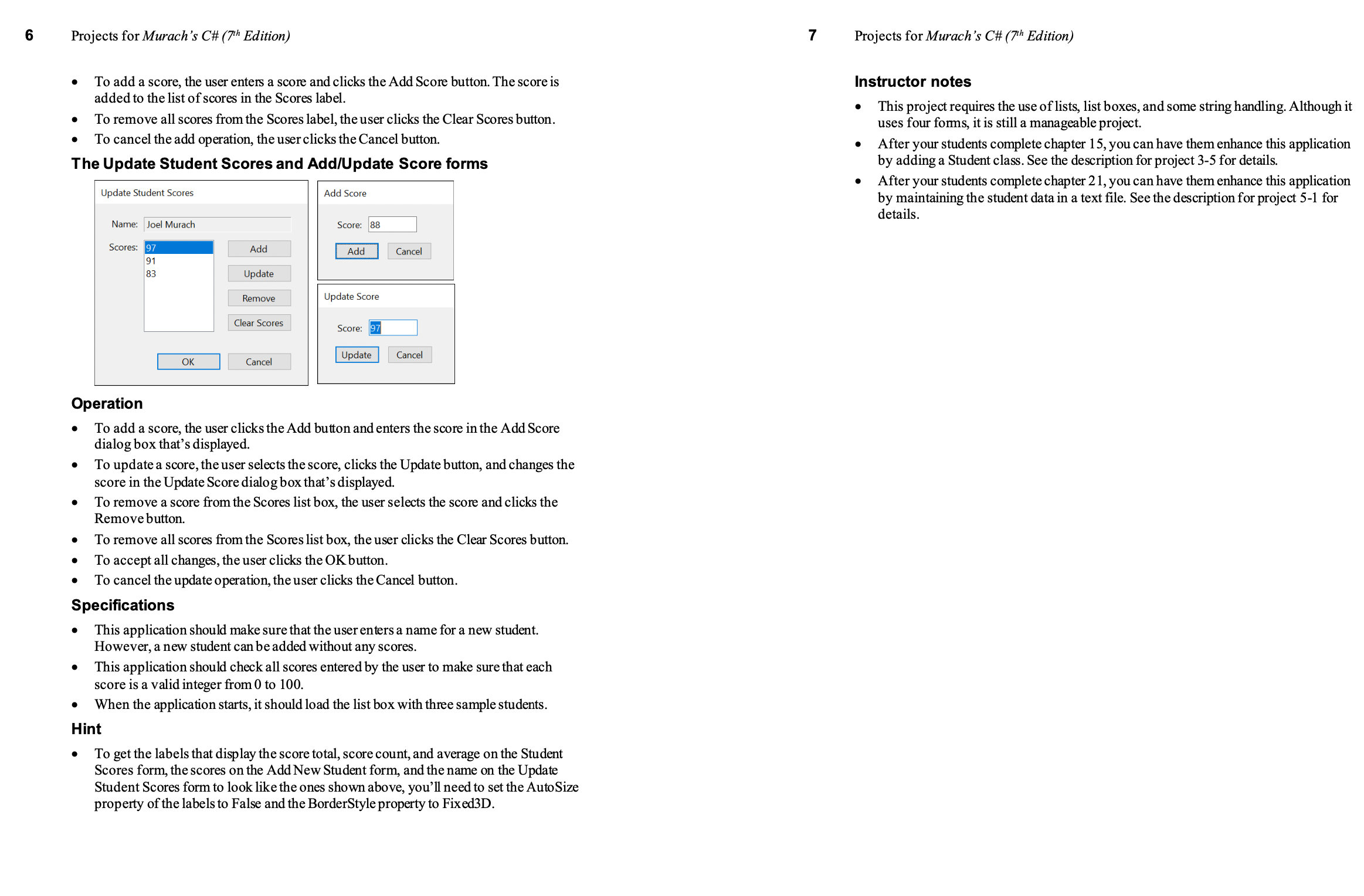
6 Projects for Murach's C# (7th Edition) 7 Projects for Murach's C# (7th Edition) To add a score, the user enters a score and clicks the Add Score button. The score is Instructor notes added to the list of scores in the Scores label This project requires the use of lists, list boxes, and some string handling. Although it To remove all scores from the Scores label, the user clicks the Clear Scores button. uses four forms, it is still a manageable project. To cancel the add operation, the user clicks the Cancel button. After your students complete chapter 15, you can have them enhance this application The Update Student Scores and Add/Update Score forms by adding a Student class. See the description for project 3-5 for details. After your students complete chapter 21, you can have them enhance this application Update Student Scores Add Score by maintaining the student data in a text file. See the description for project 5-1 for details. Name: Joel Murach Score: 8 Scores: 97 Add Add Cancel 191 Update Remove Update Score Clear Scores Score: 97 OK Update Cancel Cancel Operation To add a score, the user clicks the Add button and enters the score in the Add Score dialog box that's displayed. To update a score, the user selects the score, clicks the Update button, and changes the score in the Update Score dialog box that's displayed. To remove a score from the Scores list box, the user selects the score and clicks the Remove button. To remove all scores from the Scores list box, the user clicks the Clear Scores button. To accept all changes, the user clicks the OK button. To cancel the update operation, the user clicks the Cancel button. Specifications This application should make sure that the user enters a name for a new student. However, a new student can be added without any scores. This application should check all scores entered by the user to make sure that each score is a valid integer from 0 to 100. When the application starts, it should load the list box with three sample students. Hint To get the labels that display the score total, score count, and average on the Student Scores form, the scores on the Add New Student form, and the name on the Update Student Scores form to look like the ones shown above, you'll need to set the Auto Size property of the labels to False and the BorderStyle property to Fixed3D
Step by Step Solution
There are 3 Steps involved in it

Get step-by-step solutions from verified subject matter experts
 Study Help