







Question: I need help with what formulas to put in the yellow boxes to have the correct answer displayed. Thank you! Calculating Liquidity, Solvency, and Profitability
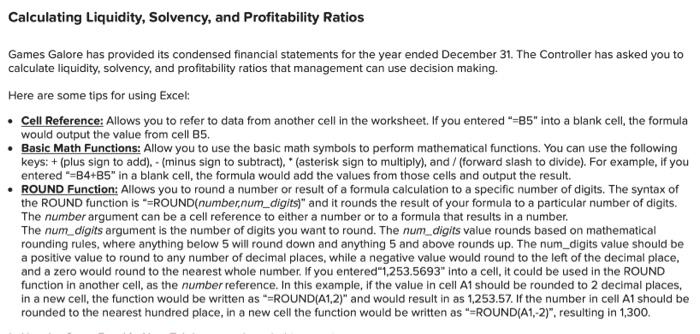
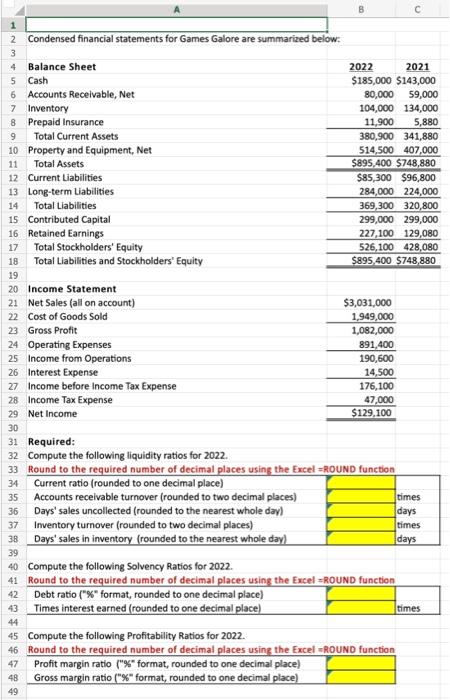
Calculating Liquidity, Solvency, and Profitability Ratios Games Galore has provided its condensed financial statements for the year ended December 31. The Controller has asked you to calculate liquidity, solvency, and profitability ratios that management can use decision making. Here are some tips for using Excel: Cell Reference: Allows you to refer to data from another cell in the worksheet. If you entered "=85" into a blank cell, the formula would output the value from cell B5. Basic Math Functions: Allow you to use the basic math symbols to perform mathematical functions. You can use the following keys: + (plus sign to add). - (minus sign to subtract).* (asterisk sign to multiply), and / (forward slash to divide). For example, if you entered "=B4+B5" in a blank cell, the formula would add the values from those cells and output the result. ROUND Function: Allows you to round a number or result of a formula calculation to a specific number of digits. The syntax of the ROUND function is "=ROUND(number,num_digits" and it rounds the result of your formula to a particular number of digits. The number argument can be a cell reference to either a number or to a formula that results in a number. The num_digits argument is the number of digits you want to round. The num_digits value rounds based on mathematical rounding rules, where anything below 5 will round down and anything 5 and above rounds up. The num_digits value should be a positive value to round to any number of decimal places, while a negative value would round to the left of the decimal place, and a zero would round to the nearest whole number. If you entered"1,253.5693" into a cell, it could be used in the ROUND function in another cell, as the number reference. In this example, if the value in cell A1 should be rounded to 2 decimal places, in a new cell, the function would be written as "=ROUND(A1,2)" and would result in as 1,253.57. If the number in cell A1 should be rounded to the nearest hundred place, in a new cell the function would be written as "=ROUND(A1, 2)", resulting in 1,300. B 1 2 Condensed financial statements for Games Galore are summarized below: 3 4 Balance Sheet 2022 2021 5 Cash $185,000 $143,000 6 Accounts Receivable, Net 80,000 59,000 7 Inventory 104,000 134,000 8 Prepaid Insurance 11,900 5,880 9 Total Current Assets 380,900 341,880 10 Property and Equipment, Net 514,500 407,000 11 Total Assets $895,400 $748,880 12 Current Liabilities $85,300 $96,800 13 Long-term Liabilities 284,000 224,000 14 Total Liabilities 369,300 320,800 15 Contributed Capital 299,000 299,000 16 Retained Earnings 227,100 129,080 17 Total Stockholders' Equity 526,100 428,080 18 Total Liabilities and Stockholders' Equity $895,400 $748,880 19 20 Income Statement 21 Net Sales (all on account) $3,031,000 22 Cost of Goods Sold 1,949,000 23 Gross Profit 1,082,000 24 Operating Expenses 891,400 25 Income from Operations 190,600 26 Interest Expense 14,500 27 Income before Income Tax Expense 176,100 28 Income Tax Expense 47,000 29 Net Income $129,100 30 31 Required: 32 Compute the following liquidity ratios for 2022. 33 Round to the required number of decimal places using the Excel =ROUND function 34 Current ratio (rounded to one decimal place) 35 Accounts receivable turnover (rounded to two decimal places) 36 Days' sales uncollected (rounded to the nearest whole day) days 37 Inventory turnover (rounded to two decimal places) times 38 Days' sales in inventory (rounded to the nearest whole day) days 39 40 Compute the following Solvency Ratios for 2022. 41 Round to the required number of decimal places using the Excel =ROUND function 42 Debt ratio ("%" format, rounded to one decimal place) 43 Times interest earned (rounded to one decimal place) times 44 45 Compute the following Profitability Ratios for 2022. 46 Round to the required number of decimal places using the Excel =ROUND function 47 Profit margin ratio ("%" format, rounded to one decimal place) 48 Gross margin ratio ("%" format, rounded to one decimal place) 49 times
Step by Step Solution
There are 3 Steps involved in it

Get step-by-step solutions from verified subject matter experts
 Study Help