







Question: I need help writing a binary search and sort program in java. I am looking for the simplest solution so that I can better undertsand
I need help writing a binary search and sort program in java. I am looking for the simplest solution so that I can better undertsand the topics.
The topics covered in the program are:
-Text & Binary file read/write
-ArrayList of Objects
-Searching
-Sorting
-Comparator, Serializable interface
-Exception handling (try..catch blocks)
Here is the UML diagram:
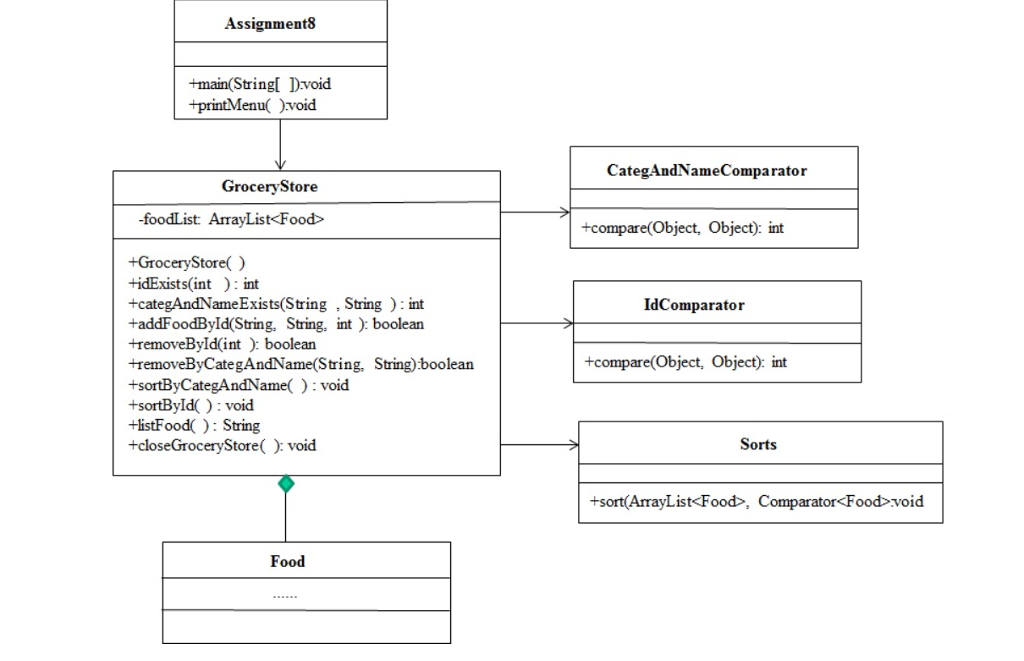
I have to complete 6 classes:
-Assignment8.java - to be completed (More code need to be added)
-Food.java - to be completed (it needs to be modified for this assignment)
-IdComparator.java - to be completed
-CategAndNameComparator.java - to be completed
-Sorts.java - to be completed
Here is a desription of each class:
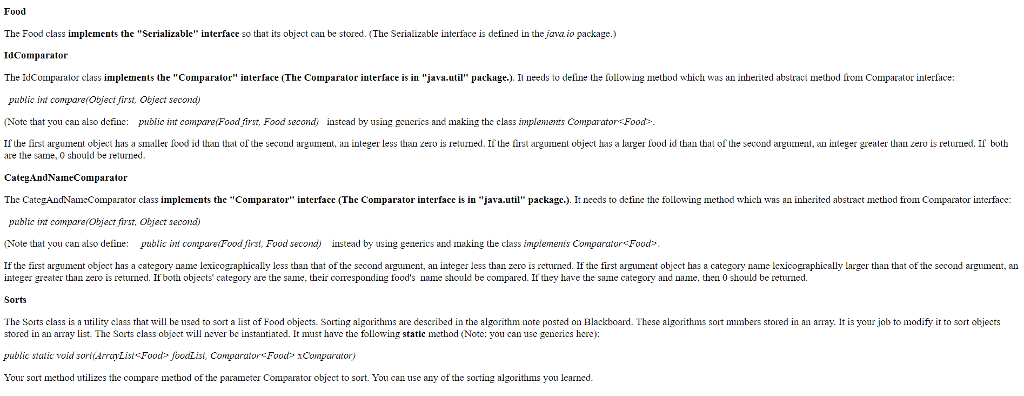
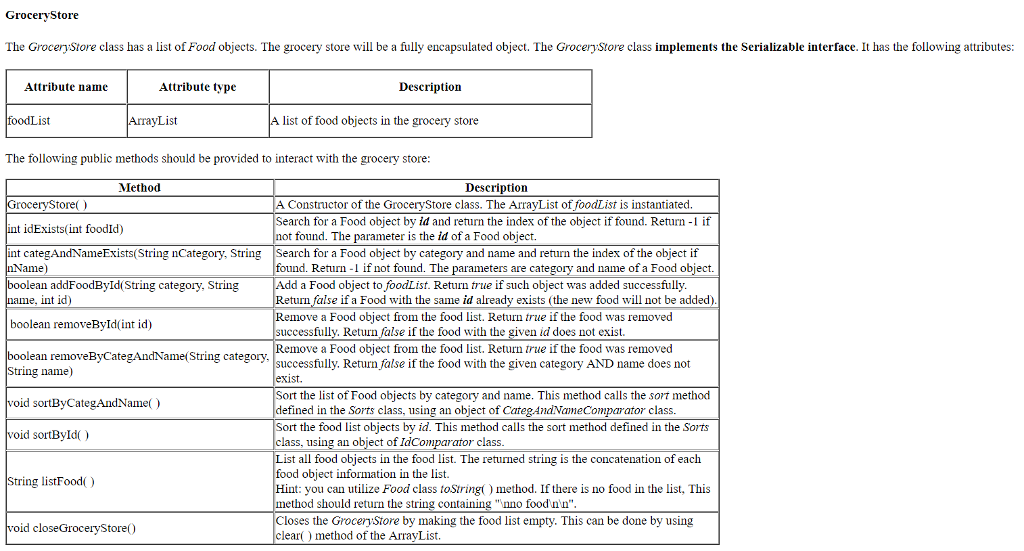
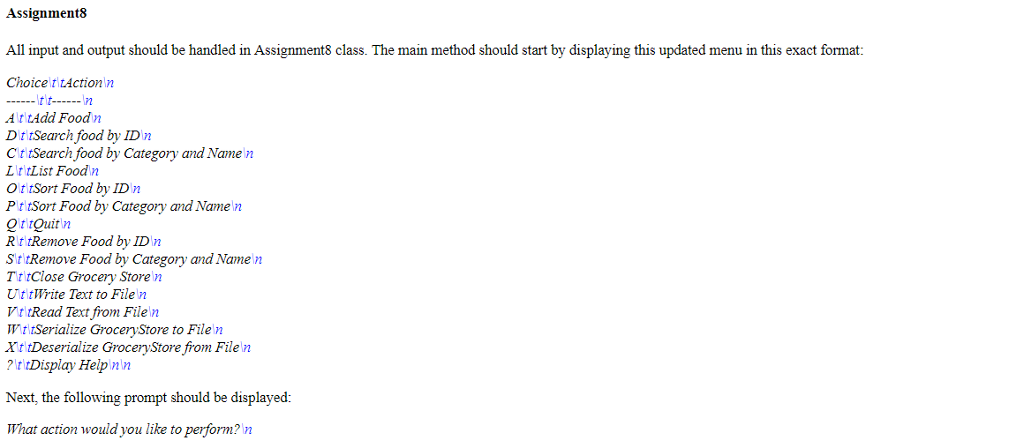
Here is a description of what the program should do:
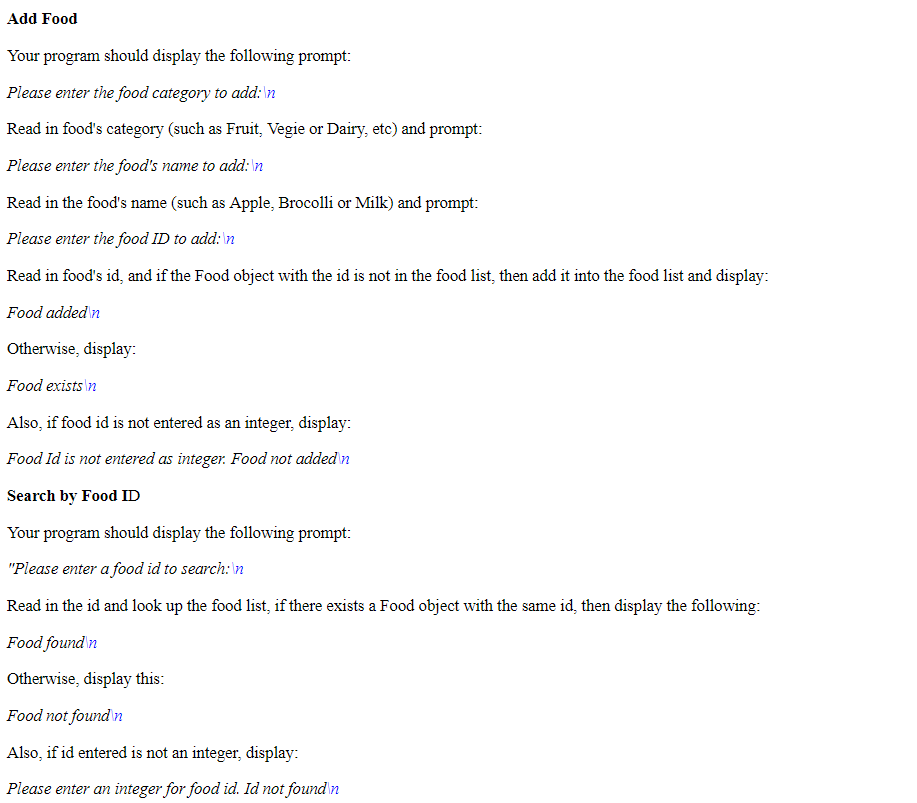
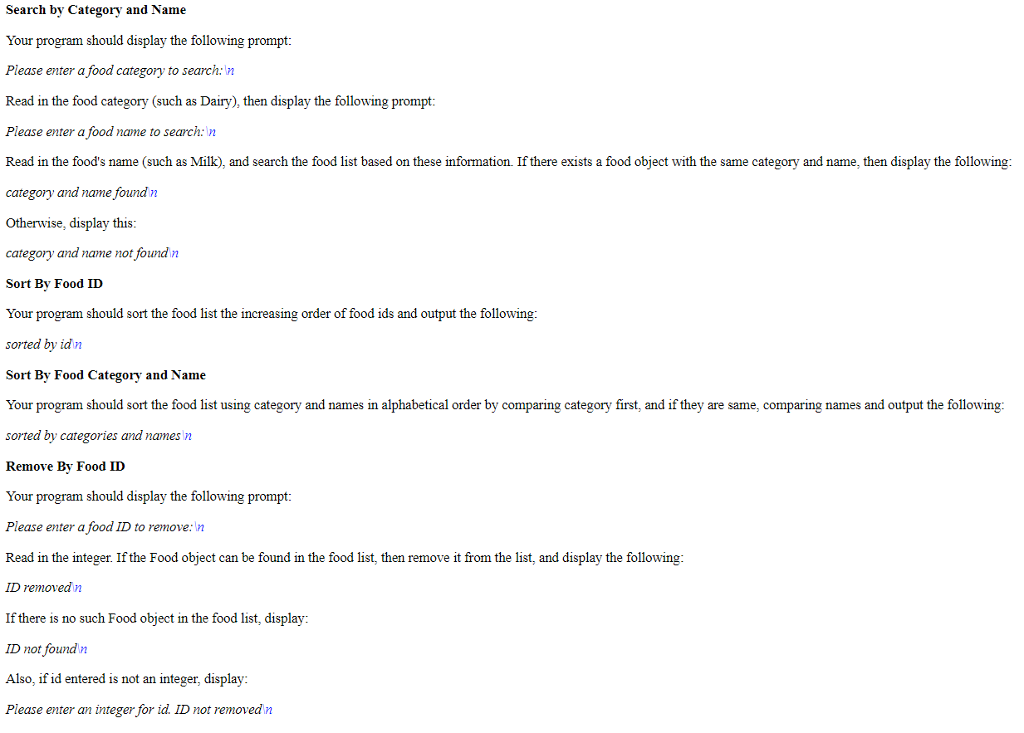
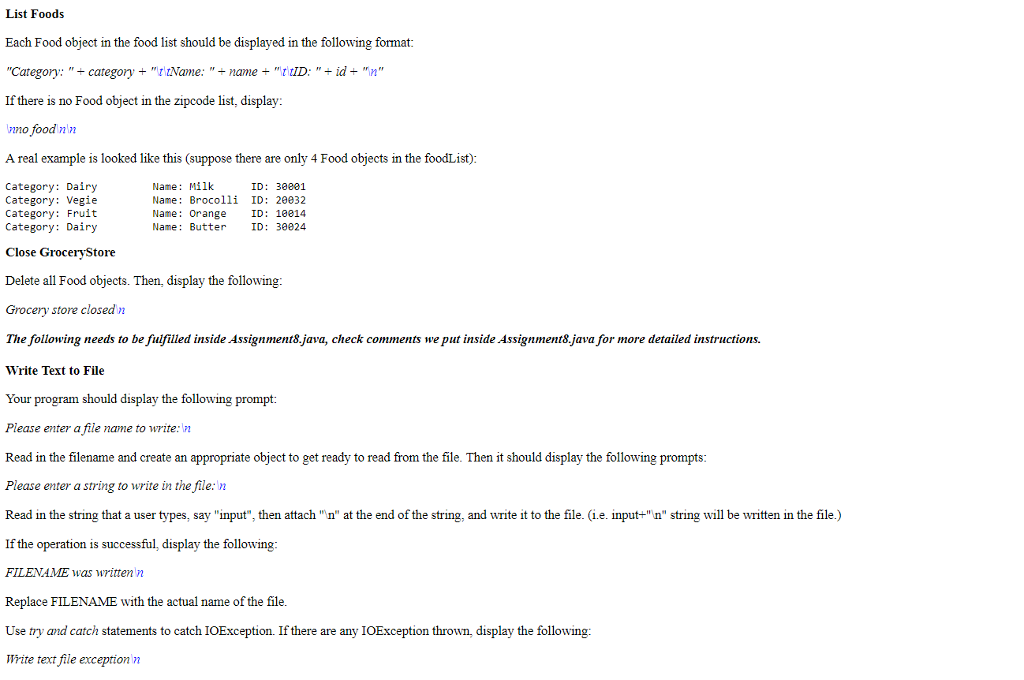
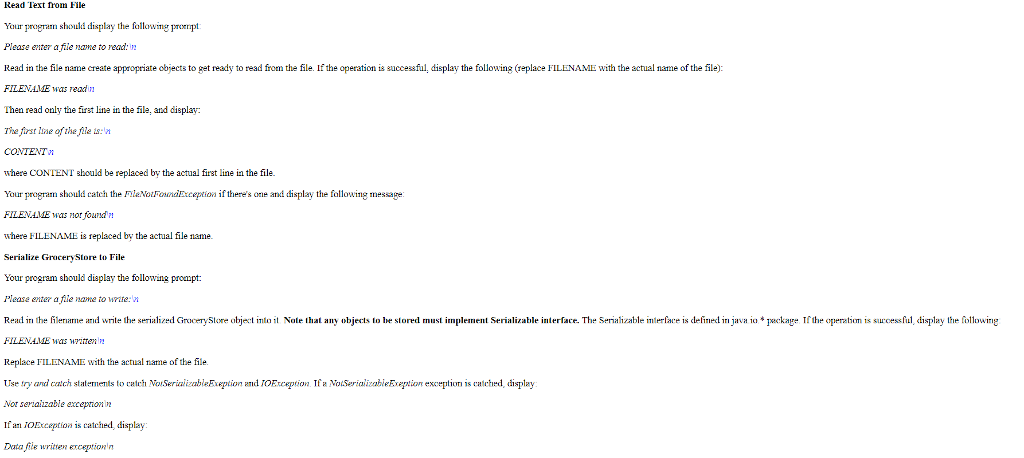
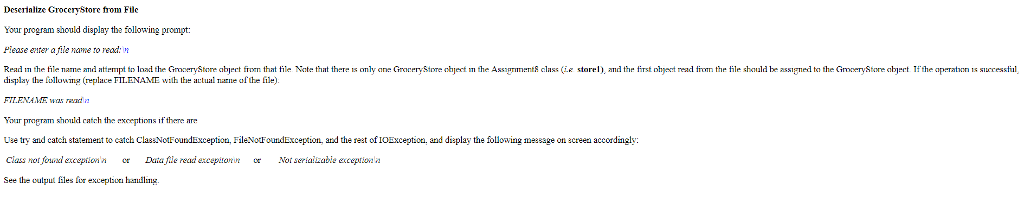
Assigment driver file:
import java.io.*; import java.util.*; public class Assignment8 { public static void main (String[] args) { char input1; String category, name, idStr; int id; boolean operation = false; int operation2 = 0; String line; String filename; // create a GroceryStore object. This is used throughout this class. GroceryStore store1 = new GroceryStore(); try { // print out the menu printMenu(); // create a BufferedReader object to read input from a keyboard InputStreamReader isr = new InputStreamReader (System.in); BufferedReader stdin = new BufferedReader (isr); do { System.out.print("What action would you like to perform? "); line = stdin.readLine().trim(); //read a line input1 = line.charAt(0); input1 = Character.toUpperCase(input1); if (line.length() == 1) //check if a user entered only one character { switch (input1) { case 'A': //Add Food try { System.out.print("Please enter the food category to add: "); category = stdin.readLine().trim(); System.out.print("Please enter the food's name to add: "); name = stdin.readLine().trim(); System.out.print("Please enter the food ID to add: "); idStr = stdin.readLine().trim(); id = Integer.parseInt(idStr); operation = store1.addFoodById(category, name, id); if (operation == true) System.out.print("Food added "); else System.out.print("Food exists "); } /************************************************************************************ *** Complete the follwing catch statement, if exception is caught, show "Food Id is not entered as integer. Food not added " on screen ***********************************************************************************/ catch( ) { } break; case 'D': //Search by Food ID try { System.out.print("Please enter a food id to search: "); idStr = stdin.readLine().trim(); id = Integer.parseInt(idStr); operation2=store1.idExists(id); if (operation2 > -1) System.out.print("Food found "); else System.out.print("Food not found "); } /************************************************************************************ *** Complete the follwing catch statement, if exception is caught, show "Food Id is not entered as integer. Food not added " on screen ***********************************************************************************/ catch( ) { } break; case 'C': //Search by Category and Name System.out.print("Please enter a food category to search: "); category = stdin.readLine().trim(); System.out.print("Please enter a food name to search: "); name = stdin.readLine().trim(); operation2=store1.categAndNameExists(category, name); if (operation2 > -1) System.out.print("category and name found "); else System.out.print("category and name not found "); break; case 'L': //List all foods System.out.print(store1.listFood()); break; case 'O': // Sort by food ID store1.sortById(); System.out.print("sorted by id "); break; case 'P': // Sort by categories and names store1.sortByCategAndName(); System.out.print("sorted by categories and names "); break; case 'Q': //Quit break; case 'R': //Remove by ID try { System.out.print("Please enter a food ID to remove: "); idStr = stdin.readLine().trim(); id = Integer.parseInt(idStr); operation=store1.removeById(id); if (operation == true) System.out.print("ID removed "); else System.out.print("ID not found "); } /************************************************************************************ *** Complete the follwing catch statement ***********************************************************************************/ catch( ) { } break; case 'S': //Remove by category and name System.out.print("Please enter a category to remove: "); category = stdin.readLine().trim(); System.out.print("Please enter a name to remove: "); name = stdin.readLine().trim(); operation=store1.removeByCategAndName(category, name); if (operation == true) System.out.print("category and name removed "); else System.out.print("category and name not found "); break; case 'T': //Close GroceryStore store1.closeGroceryStore(); System.out.print("Grocery store closed "); break; case 'U': //Write Text to a File System.out.print("Please enter a file name to write: "); filename = stdin.readLine().trim(); /************************************************************************************ *** ADD your code to write a text (string) to the specified file, if any exceptions are thrown, catch it with showing message "Text file written exception " on screen. ************************************************************************************/ System.out.print("Please enter a string to write in the file: "); String inputStr = stdin.readLine().trim(); try { } catch(IOException exception) { } break; case 'V': //Read Text from a File System.out.print("Please enter a file name to read: "); filename = stdin.readLine().trim(); /****************************************************************************************** *** ADD your code to read a text (string) from the specified file, if file not found and any exceptions are thrown, catch it with showing message "filename + "was not found " on screen. ******************************************************************************************/ try { } catch ( ) { } break; case 'W': //Serialize GroceryStore to a File System.out.print("Please enter a file name to write: "); filename = stdin.readLine().trim(); /******************************************************************************************** *** ADD your code to write the grocery store object to the specified file, if any exceptions are thrown, catch them by showing "Data file written exception" message on screen. *********************************************************************************************/ try { } catch (NotSerializableException exception) { } catch (IOException exception) { } break; case 'X': //Deserialize GroceryStore object from a File System.out.print("Please enter a file name to read: "); filename = stdin.readLine().trim(); /*********************************************************************************************************** *** ADD your code to read a grocery store object from the specified file, if any exception is thrown, catch it by showing "Not serializable exception " or "Data file read excepiton " or "Class not found exception " on screen. *************************************************************************************************************/ try { } catch (ClassNotFoundException exception) { } catch (NotSerializableException exception) { } catch (IOException exception) { } break; case '?': //Display Menu printMenu(); break; default: System.out.print("Unknown action "); break; } } else { System.out.print("Unknown action "); } } while (input1 != 'Q' || line.length() != 1); } catch (IOException exception) { System.out.print("IO Exception "); } } /** The method printMenu displays the menu to a user **/ public static void printMenu() { System.out.print("Choice\t\tAction " + "------\t\t------ " + "A\t\tAdd Food " + "D\t\tSearch food by ID " + "C\t\tSearch food by Category and Name " + "L\t\tList Food " + "O\t\tSort Food by ID " + "P\t\tSort Food by Category and Name " + "Q\t\tQuit " + "R\t\tRemove Food by ID " + "S\t\tRemove Food by Category and Name " + "T\t\tClose Grocery Store " + "U\t\tWrite Text to File " + "V\t\tRead Text from File " + "W\t\tSerialize GroceryStore to File " + "X\t\tDeserialize GroceryStore from File " + "?\t\tDisplay Help "); } } // end of Assignment8 class Food driver file:
public class Food { private String category; private String name; private int id; //constructor public Food(String nCategory, String nName, int nId) { category = nCategory; name = nName; id = nId; } //accessors & mutators public String getCategory() { return category; } public void setCategory(String nCategory) { category = nCategory; } public String getName() { return name; } public void setName(String nName) { name = nName; } public int getId() { return id; } public void setId(int nId) { id = nId; } public String toString() { return "Category: " + category + "\t\tName: " + name + "\t\tID: " + id + " "; } }The rest of the classes do not have driver files. Thanks in advance!
Assignment8 +main(Stringl Dvoid printMenu )void CategAndNameComparator GroceryStore foodList: ArrayList
Step by Step Solution
There are 3 Steps involved in it

Get step-by-step solutions from verified subject matter experts
 Study Help