







Question: I need help writing a program in python and pandas to Convert Text data into vector, as well as the remaining instructions to pass 4
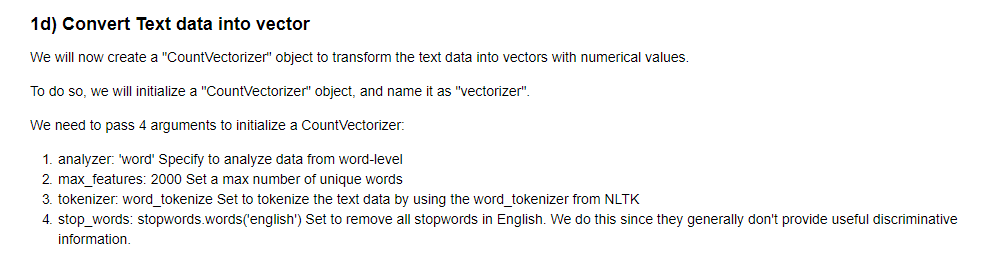
I need help writing a program in python and pandas to Convert Text data into vector, as well as the remaining instructions to pass 4 arguments to initialize a CountVectorizer. 1.) analyzer:'word' specify to analyze data from word-level, 2. max_features: 2000 set a max number of unique words, 3. tokenizer: word_tokenize set to tokenize the text data by using the word_tokenizer from NLTK, and 4.
I have no idea how to start writing the code, please help!
1d) Convert Text data into vector We will now create a "CountVectorizer" object to transform the text data into vectors with numerical values. To do so, we will initialize a "CountVectorizer" object, and name it as "vectorizer" We need to pass 4 arguments to initialize a CountVectorizer: 1. analyzer: 'word Specify to analyze data from word-level 2. max_features: 2000 Set a max number of unique words 3. tokenizer. word _tokenize Set to tokenize the text data by using the word_tokenizer from NLTK 4. stop_words: stopwords.words(english) Set to remove all stopwords in English. We do this since they generally don't provide useful discriminative information 1d) Convert Text data into vector We will now create a "CountVectorizer" object to transform the text data into vectors with numerical values. To do so, we will initialize a "CountVectorizer" object, and name it as "vectorizer" We need to pass 4 arguments to initialize a CountVectorizer: 1. analyzer: 'word Specify to analyze data from word-level 2. max_features: 2000 Set a max number of unique words 3. tokenizer. word _tokenize Set to tokenize the text data by using the word_tokenizer from NLTK 4. stop_words: stopwords.words(english) Set to remove all stopwords in English. We do this since they generally don't provide useful discriminative information
Step by Step Solution
There are 3 Steps involved in it

Get step-by-step solutions from verified subject matter experts
 Study Help