







Question: I need it asap. LAB 2 - RPI CPU INFORMATION Note: Labs must be completed individually. Plagiarism will result in receiving no credit for the
I need it asap.
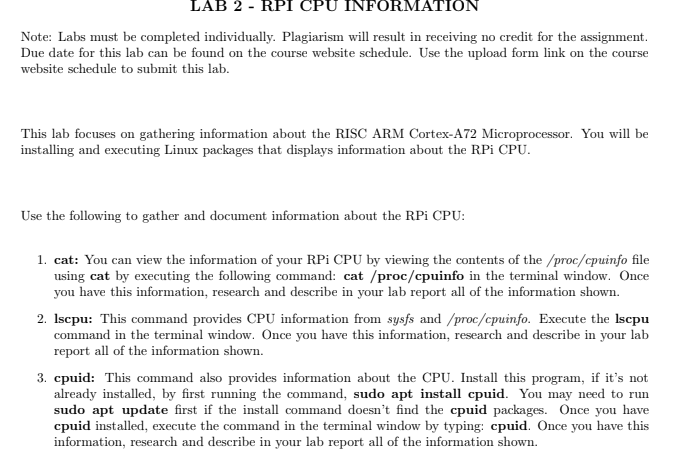
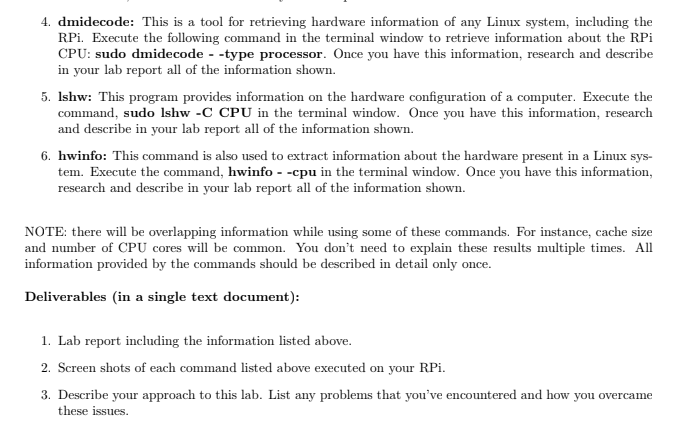
LAB 2 - RPI CPU INFORMATION Note: Labs must be completed individually. Plagiarism will result in receiving no credit for the assignment. Due date for this lab can be found on the course website schedule. Use the upload form link on the course website schedule to submit this lab. This lab focuses on gathering information about the RISC ARM Cortex-A72 Microprocessor. You will be installing and executing Linux packages that displays information about the RPi CPU. Use the following to gather and document information about the RPi CPU: 1. cat: You can view the information of your RPi CPU by viewing the contents of the /proc/cpuinfo file using cat by executing the following command: cat /proc/cpuinfo in the terminal window. Once you have this information, research and describe in your lab report all of the information shown. 2. Iscpu: This command provides CPU information from sysfs and /proc/cpuinfo. Execute the Iscpu command in the terminal window. Once you have this information, research and describe in your lab report all of the information shown. 3. cpuid: This command also provides information about the CPU. Install this program, if it's not already installed, by first running the command, sudo apt install cpuid. You may need to run sudo apt update first if the install command doesn't find the cpuid packages. Once you have cpuid installed, execute the command in the terminal window by typing: cpuid. Once you have this information, research and describe in your lab report all of the information shown. 4. dmidecode: This is a tool for retrieving hardware information of any Linux system, including the RPi. Execute the following command in the terminal window to retrieve information about the RPi CPU: sudo dmidecode --type processor. Once you have this information, research and describe in your lab report all of the information shown. 5. Ishw: This program provides information on the hardware configuration of a computer. Execute the command, sudo Ishw-C CPU in the terminal window. Once you have this information, research and describe in your lab report all of the information shown. 6. hwinfo: This command is also used to extract information about the hardware present in a Linux sys- tem. Execute the command, hwinfo - -cpu in the terminal window. Once you have this information, research and describe in your lab report all of the information shown. NOTE: there will be overlapping information while using some of these commands. For instance, cache size and number of CPU cores will be common. You don't need to explain these results multiple times. All information provided by the commands should be described in detail only once. Deliverables (in a single text document): 1. Lab report including the information listed above. 2. Screen shots of each command listed above executed on your RPi. 3. Describe your approach to this lab. List any problems that you've encountered and how you overcame these issues. LAB 2 - RPI CPU INFORMATION Note: Labs must be completed individually. Plagiarism will result in receiving no credit for the assignment. Due date for this lab can be found on the course website schedule. Use the upload form link on the course website schedule to submit this lab. This lab focuses on gathering information about the RISC ARM Cortex-A72 Microprocessor. You will be installing and executing Linux packages that displays information about the RPi CPU. Use the following to gather and document information about the RPi CPU: 1. cat: You can view the information of your RPi CPU by viewing the contents of the /proc/cpuinfo file using cat by executing the following command: cat /proc/cpuinfo in the terminal window. Once you have this information, research and describe in your lab report all of the information shown. 2. Iscpu: This command provides CPU information from sysfs and /proc/cpuinfo. Execute the Iscpu command in the terminal window. Once you have this information, research and describe in your lab report all of the information shown. 3. cpuid: This command also provides information about the CPU. Install this program, if it's not already installed, by first running the command, sudo apt install cpuid. You may need to run sudo apt update first if the install command doesn't find the cpuid packages. Once you have cpuid installed, execute the command in the terminal window by typing: cpuid. Once you have this information, research and describe in your lab report all of the information shown. 4. dmidecode: This is a tool for retrieving hardware information of any Linux system, including the RPi. Execute the following command in the terminal window to retrieve information about the RPi CPU: sudo dmidecode --type processor. Once you have this information, research and describe in your lab report all of the information shown. 5. Ishw: This program provides information on the hardware configuration of a computer. Execute the command, sudo Ishw-C CPU in the terminal window. Once you have this information, research and describe in your lab report all of the information shown. 6. hwinfo: This command is also used to extract information about the hardware present in a Linux sys- tem. Execute the command, hwinfo - -cpu in the terminal window. Once you have this information, research and describe in your lab report all of the information shown. NOTE: there will be overlapping information while using some of these commands. For instance, cache size and number of CPU cores will be common. You don't need to explain these results multiple times. All information provided by the commands should be described in detail only once. Deliverables (in a single text document): 1. Lab report including the information listed above. 2. Screen shots of each command listed above executed on your RPi. 3. Describe your approach to this lab. List any problems that you've encountered and how you overcame these issues
Step by Step Solution
There are 3 Steps involved in it

Get step-by-step solutions from verified subject matter experts
 Study Help