







Question: I need my Visual Basic code translated to C# code. Here is the VB code: Name of AddOn Group = GroupBox1 Name of place order
I need my Visual Basic code translated to C# code.
Here is the VB code:
Name of AddOn Group = GroupBox1
Name of place order button = btn_place_order
Public Class Form1
''Set addons text on form load
Private Sub Form1_Load(ByVal sender As System.Object, ByVal e As System.EventArgs) Handles MyBase.Load
GroupBox1.Text = "Add-on Item($.75 each)"
CheckBox1.Text = "Lettuce,Tomato and onion"
CheckBox2.Text = "Ketchup,mustered and Mayo "
CheckBox3.Text = "French Fries"
End Sub
'' method to clear addons
Sub clearAddOns()
CheckBox1.Checked = False
CheckBox2.Checked = False
CheckBox3.Checked = False
End Sub
''Method to clear Order total group
Sub clearTotals()
TextBox1.Text = ""
TextBox2.Text = ""
TextBox3.Text = ""
End Sub
'' Radio Button 1 check event handler (hamburger)
Private Sub RadioButton1_CheckedChanged(ByVal sender As System.Object, ByVal e As System.EventArgs) Handles RadioButton1.CheckedChanged
GroupBox1.Text = "Add-on Item($.75 each)"
CheckBox1.Text = "Lettuce,Tomato and onion"
CheckBox2.Text = "Ketchup,mustered and Mayo "
CheckBox3.Text = "French Fries"
'' clears addons on change of main course
clearAddOns()
End Sub
'' Radio Button 2 check event handler (Pizza)
Private Sub RadioButton2_CheckedChanged(ByVal sender As System.Object, ByVal e As System.EventArgs) Handles RadioButton2.CheckedChanged
GroupBox1.Text = "Add-on Item($.50 each)"
CheckBox1.Text = "Peperoni"
CheckBox2.Text = "Sauces "
CheckBox3.Text = "Olives"
'' clears addons on change of main course
clearAddOns()
End Sub
'' Radio Button 3 check event handler (Salad)
Private Sub RadioButton3_CheckedChanged(ByVal sender As System.Object, ByVal e As System.EventArgs) Handles RadioButton3.CheckedChanged
GroupBox1.Text = "Add-on Item($.25 each)"
CheckBox1.Text = "Croutons"
CheckBox2.Text = "Bacon bits"
CheckBox3.Text = "Bread sticks"
'' clears addons on change of main course
clearAddOns()
End Sub
'' Button Place order click event handler
Private Sub btn_place_order_Click(ByVal sender As System.Object, ByVal e As System.EventArgs) Handles btn_place_order.Click
'' variable declaration
Dim addon As Double
Dim mainc As Double
Dim subtotal As Double
Dim total As Double
Dim tax As Double
'' checks which main course selected sets price accordingly
If RadioButton1.Checked = True Then
mainc = 6.95
addon = 0.75
ElseIf RadioButton2.Checked = True Then
mainc = 5.95
addon = 0.5
ElseIf RadioButton3.Checked = True Then
mainc = 4.95
addon = 0.25
End If
'' sub total = main course if no add ons added
subtotal = mainc
'' if 1st add on added, add its price
If CheckBox1.Checked = True Then
subtotal = subtotal + addon
End If
'' if 2nd add on added, add its price
If CheckBox2.Checked = True Then
subtotal = subtotal + addon
End If
'' if 3rd add on added, add its price
If CheckBox3.Checked = True Then
subtotal = subtotal + addon
End If
'' calculate tax
tax = (7.75 / 100) * subtotal
'' calculate total
total = tax + subtotal
'' display subtotal, tax and Order total in textbox as string with 2 decimal place format
TextBox1.Text = subtotal.ToString
TextBox2.Text = tax.ToString("#.##")
TextBox3.Text = total.ToString("#.##")
End Sub
'' clears total on change of check box (true or false)
Private Sub CheckBox1_CheckedChanged(ByVal sender As System.Object, ByVal e As System.EventArgs) Handles CheckBox1.CheckedChanged
clearTotals()
End Sub
'' clears total on change of check box (true or false)
Private Sub CheckBox2_CheckedChanged(ByVal sender As System.Object, ByVal e As System.EventArgs) Handles CheckBox2.CheckedChanged
clearTotals()
End Sub
'' clears total on change of check box (true or false)
Private Sub CheckBox3_CheckedChanged(ByVal sender As System.Object, ByVal e As System.EventArgs) Handles CheckBox3.CheckedChanged
clearTotals()
End Sub
'' exit application on clicking exit button
Private Sub Button2_Click(ByVal sender As System.Object, ByVal e As System.EventArgs) Handles Button2.Click
Application.Exit()
End Sub
End Class
The requiremetns for the project is shown below:
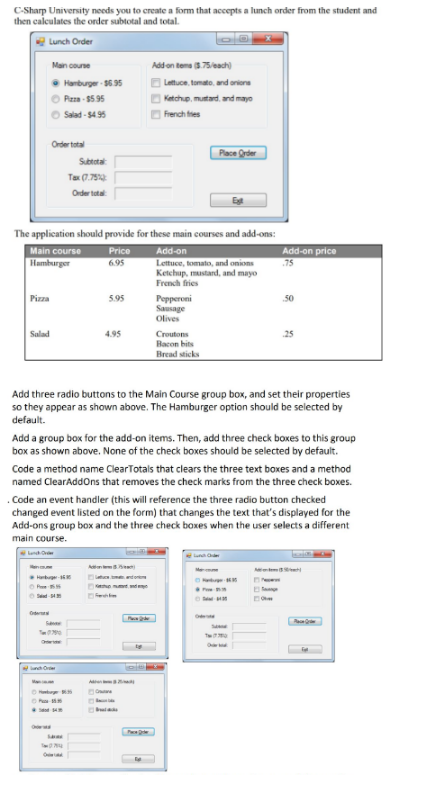
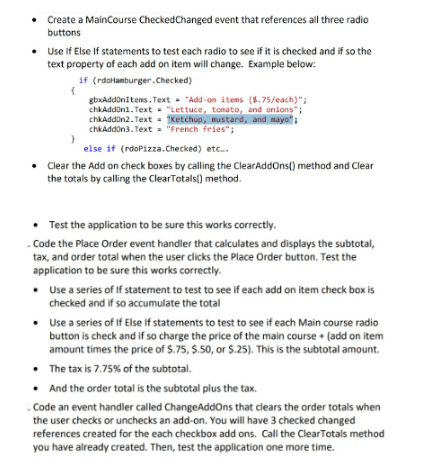
C-Sharp University needs you to create a form that accepts a lunch order from the student and then calculates the order subtotal and total. Lunch Order Main course Addon ters ($ 75each) Hamburger-$6 3 5Leftuce, tomato and anion Ketchup, mutard, and mayo Salad-$495 French fhes Order total Subtotal: Order tota The application should provide for these main courses and add-ons: Main course Add-on price 75 695 Lettuce, tomato, and onion Ketchup, mustand, and mayo French fries Pizza 5.95 50 Sausage Olives Salad 4.95 25 Croutons Bacon bits Bread sticks Add three radio buttons to the Main Course group box, and set their properties so they appear as shown above. The Hamburger option should be selected by default. Add a group box for the add-on items. Then, add three check boxes to this group box as shown above. None of the check boxes should be selected by default. Code a method name ClearTotals that clears the three text boxes and a method named ClearAddOns that removes the check marks from the three check boxes Code an event handler (this will reference the three radio button checked changed event listed on the form) that changes the text that's displayed for the Add-ons group box and the three check boxes when the user selects a different main course
Step by Step Solution
There are 3 Steps involved in it

Get step-by-step solutions from verified subject matter experts
 Study Help