







Question: I need some help in this Assignment. It's a Form on C#: Create the SalesForm Calculate Button Performs the calculation Adds the Quantity * Price
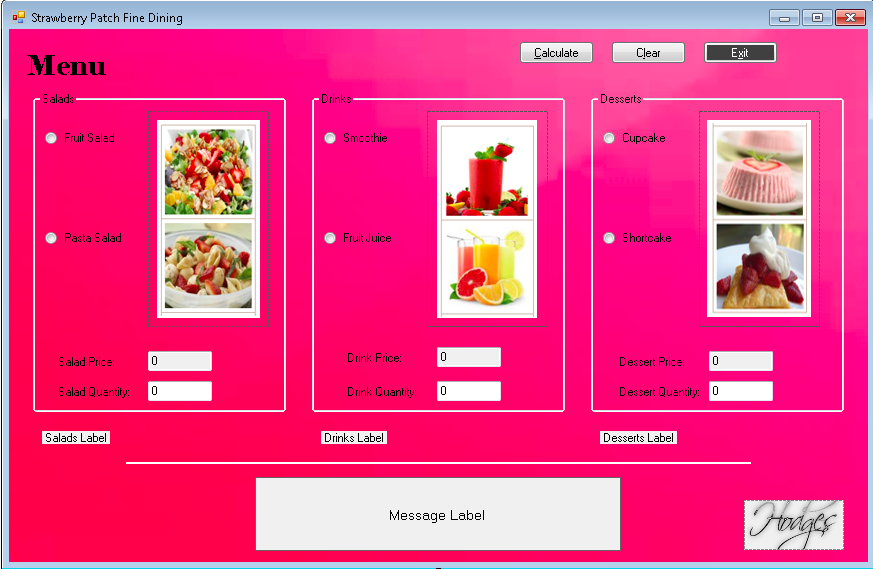
I need some help in this Assignment. It's a Form on C#:
- Create the SalesForm
- Calculate Button
- Performs the calculation
- Adds the Quantity * Price for each sub-menu item
- Displays the results in the MessageLabel (run the program to view the format)
- Performs the calculation
- Clear Button
- Deselects the each radio button
- Reset the quantity and price textboxes to zero (0)
- Clears the Message, Salad, Drink and Dessert labels
- Reset the focus to the Calculate button
- Exit Button
- Closes the form
- InputBox
- Executed from the Form Load event
- Accepts the user's name
- Fruit Salad Radio Button
- Price 9.95 (Format: Currency)
- Label
- Visible
- Displays the groupbox text selection and the radiobutton text
- Quantity
- has the focus
- text is selected
- Pasta Salad Radio Button
- Price 12 (Format: Currency)
- Label
- Visible
- Displays the groupbox text selection and the radiobutton text
- Quantity
- has the focus
- text is selected
- Smoothie Radio Button
- Price 4.95 (Format: Currency)
- Label
- Visible
- Displays the groupbox text selection and the radiobutton text
- Quantity
- has the focus
- text is selected
- Fruit Juice Radio Button
- Price 3.95 (Format: Currency)
- Label
- Visible
- Displays the groupbox text selection and the radiobutton text
- Quantity
- has the focus
- text is selected
- Cupcake Radio Button
- Price 3 (Format: Currency)
- Displayed in price Textbox
- Property should be Read-Only
- Label
- Visible
- Displays the groupbox text selection and the radiobutton text
- Quantity
- has the focus
- text is selected
- Price 3 (Format: Currency)
- Short Cake Radio Button
- Price 6 (Format: Currency)
- Label
- Visible
- Displays the groupbox text selection and the radiobutton text
- Quantity
- has the focus
- text is selected
- Drink Textbox, Dessert Textbox and Salad Textbox
- Quantity
- text is selected
- Quantity
- Calculate Button
Extra Credit Opportunity
You can receive extra credit for the following:
- Getting creative with the interface (up to 2 points)
- Examples: combinations of changing the background, improving the layout, formatting buttons, etc.
- You should overall update the interface design, so just changing the background to a different color is not enough to warrant extra credit
- Improving the code (up to 5 points)
- This could include adding exceptions, adding an event when the user hits the Enter key, setting type requirements (integer, double, etc.), or anything that updates how the program functions.
- This could include adding exceptions, adding an event when the user hits the Enter key, setting type requirements (integer, double, etc.), or anything that updates how the program functions.
Strawberry Patch Fine Dining o Calculate Clear Exit Menu Salads Drinks Desserts Fruit Salad Smoothie Cupcake Pasta Salad Fruit Juice Shortcake Drink Price: Salad Price Dessert Price:I Salad Quantity: 0 Drink Quantity: 0 Dessert Quantity: 0 Salads Label Drinks Label Desserts Label Message Label Strawberry Patch Fine Dining o Calculate Clear Exit Menu Salads Drinks Desserts Fruit Salad Smoothie Cupcake Pasta Salad Fruit Juice Shortcake Drink Price: Salad Price Dessert Price:I Salad Quantity: 0 Drink Quantity: 0 Dessert Quantity: 0 Salads Label Drinks Label Desserts Label Message Label
Step by Step Solution
There are 3 Steps involved in it

Get step-by-step solutions from verified subject matter experts
 Study Help