







Question: I need some help modifying and fixing my code so that I can get Stage 3 results working on the ARMlite simulator. i am encountering
I need some help modifying and fixing my code so that I can get Stage results working on the ARMlite simulator. i am
encountering errors when I try to run my code. Could you please assist me in identifying and resolving these issues? this is my code :
; Prompt for player's name
MOV R #promptName
STR RWriteString
MOV R #nameStorage
STR RReadString
STR RWriteString
MOV R #xA ; Load newline character
STRB RWriteChar ; Output newline
; number of matchsticks
playerInput:
MOV R #promptMatchsticks
STR RWriteString
LDR RInputNum
CMP R # ; Compare input with lower than
BLT Error ; If input is less than branch to Error
CMP R #
BGT Error
B counting
Error:
MOV R #errorMsg
STR RWriteString
B playerInput ; Repeat input process if there's an error
counting:
STR RWriteUnsignedNum ; Output valid matchstick count
MOV R #outputName ; Print player's name
STR RWriteString
STR RWriteString
MOV R #outputMatchsticks ; Print number of matchsticks
STR RWriteString
STR RWriteUnsignedNum
MOV R #Player ; to show results on screen
MOV R #ThereAre
MOV R #remaining
STR RWriteString
STR RWriteString
STR RWriteString
STR RWriteUnsignedNum
STR RWriteString
; Prompts the player to enter a number of matchsticks to remove
User:
STR RWriteString
STR RWriteString
MOV R #Promptq
STR RWriteString
; Take user's input
LDR RInputNum
CMP R # ; check if the input is between
BLT User
CMP R #
BGT User
CMP R R
BGT User
SUB R R R ; count the remaining matchsticks
STR RWriteString
STR RWriteString
STR RWriteString
STR RWriteUnsignedNum
STR RWriteString
; Check if game is over
CMP R #
BEQ endGame
B computerTurn
computerTurn:
MOV R #compTurnMsg
STR RWriteString
; Generate random number for computer's turn
BL Random ; Call random number generator
AND R R #x ; Mask to range
CMP R # ; Ensure it's at least
BNE validRand
ADD R R # ; If zero, make it
validRand:
CMP R R ; Check if random number exceeds remaining matchsticks
BLE validCompMove
MOV R R ; If so use remaining matchsticks
validCompMove:
SUB R R R ; Computer removes matchsticks
STR RWriteString
STR RWriteString
STR RWriteString
STR RWriteUnsignedNum
STR RWriteString
; Check if game is over
CMP R #
BEQ endGame
B User
endGame:
CMP R #
BEQ declareWinner
MOV R #drawMsg
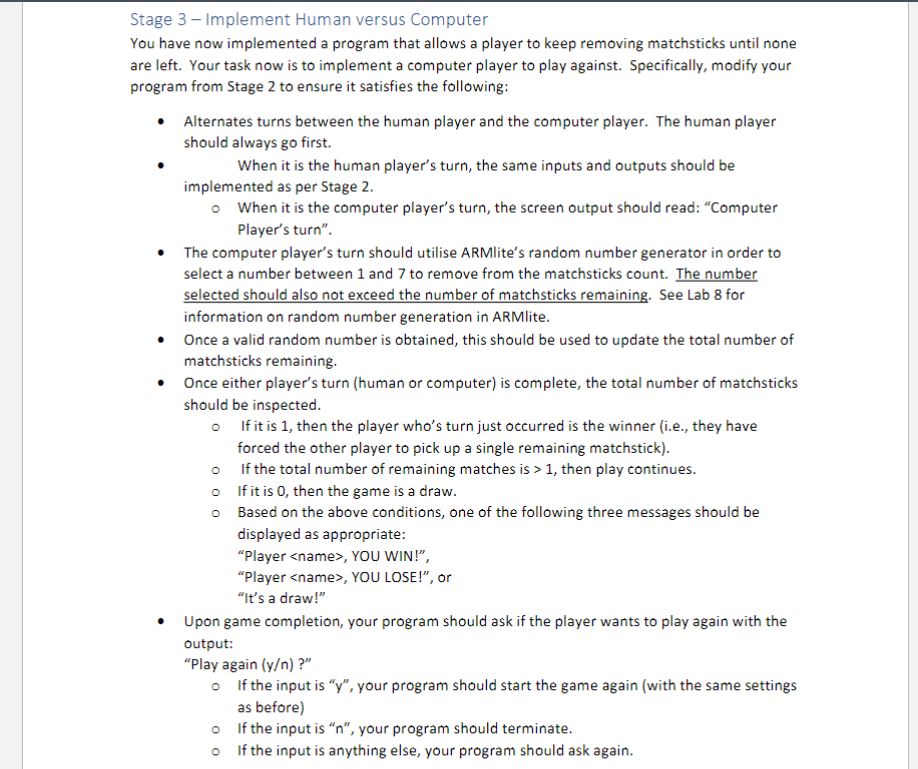
Stage Implement Human versus Computer
You have now implemented a program that allows a player to keep removing matchsticks until none
are left. Your task now is to implement a computer player to play against. Specifically, modify your
program from Stage to ensure it satisfies the following:
Alternates turns between the human player and the computer player. The human player
should always go first.
When it is the human player's turn, the same inputs and outputs should be
implemented as per Stage
When it is the computer player's turn, the screen output should read: "Computer
Player's turn".
The computer player's turn should utilise ARMlite's random number generator in order to
select a number between and to remove from the matchsticks count. The number
selected should also not exceed the number of matchsticks remaining. See Lab for
information on random number generation in ARMlite.
Once a valid random number is obtained, this should be used to update the total number of
matchsticks remaining.
Once either player's turn human or computer is complete, the total number of matchsticks
should be inspected.
If it is then the player who's turn just occurred is the winner ie they have
forced the other player to pick up a single remaining matchstick
If the total number of remaining matches is then play continues.
If it is then the game is a draw.
Based on the above conditions, one of the following three messages should be
displayed as appropriate:
"Player
Step by Step Solution
There are 3 Steps involved in it
1 Expert Approved Answer
Step: 1 Unlock

Question Has Been Solved by an Expert!
Get step-by-step solutions from verified subject matter experts
Step: 2 Unlock
Step: 3 Unlock
 Study Help