







Question: I need the answer with excel formula. FILE HOME INSERT PAGE LAYOUT FORMULAS DATA REVIEW VIEW Sign in Calibri 11 AA % M Paste BIU-
I need the answer with excel formula.
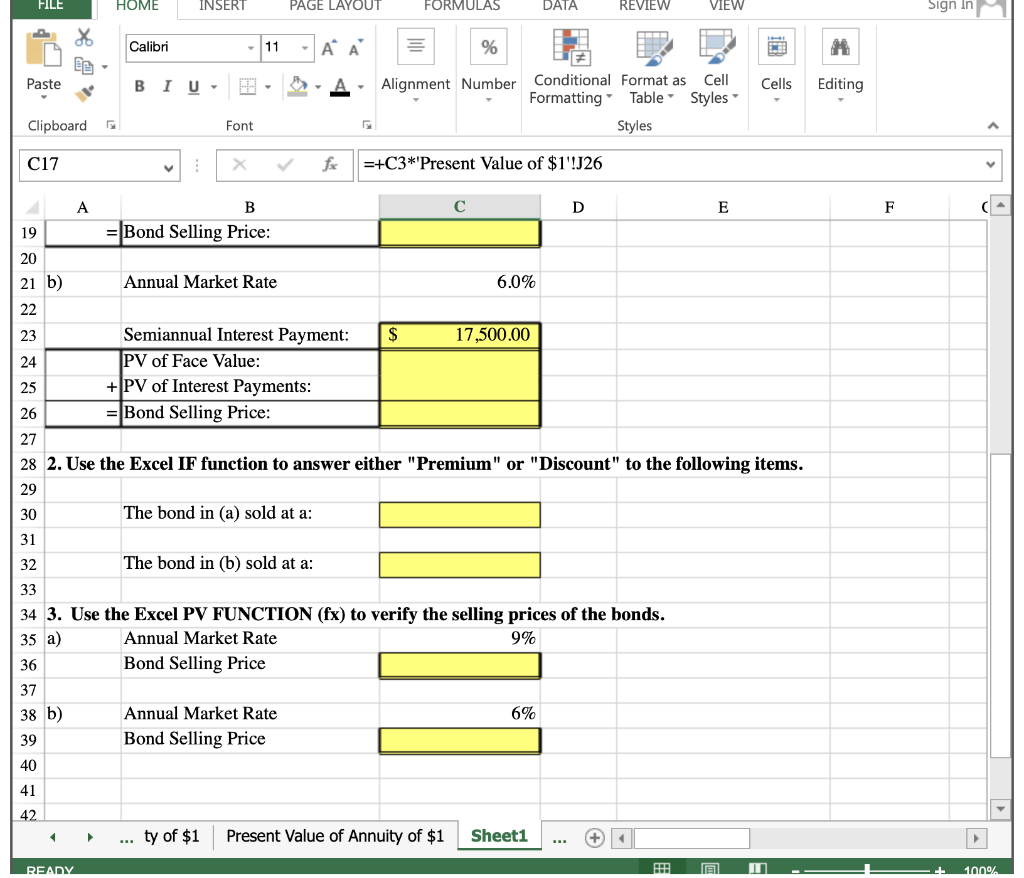
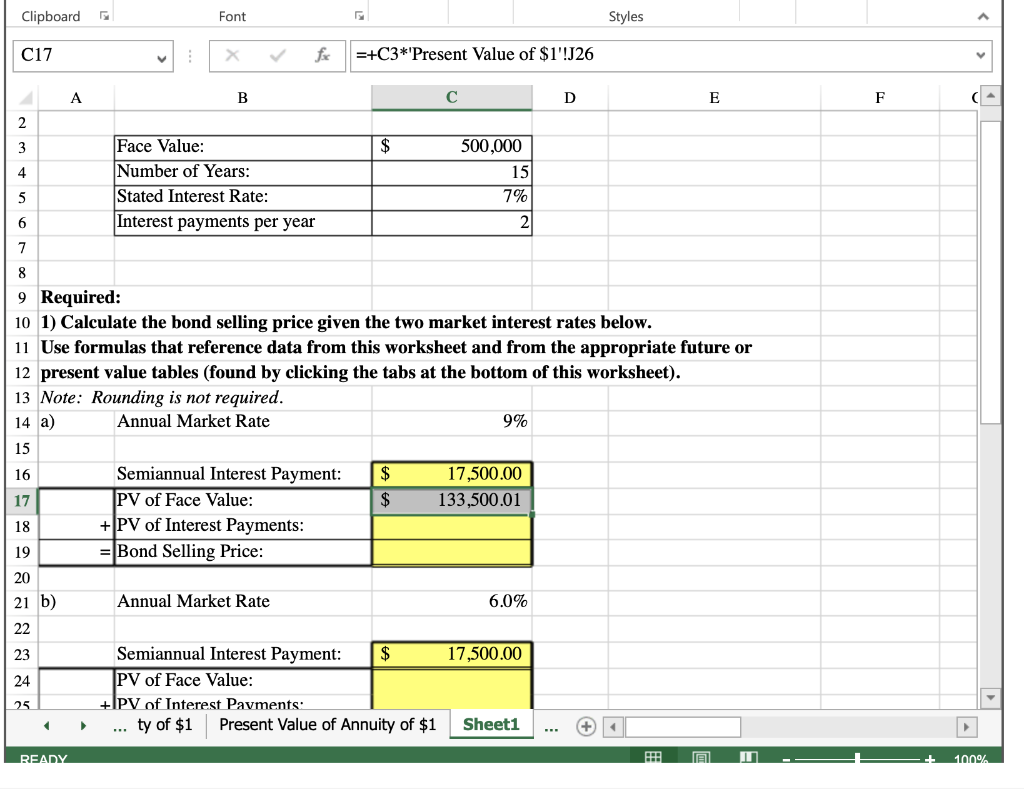
FILE HOME INSERT PAGE LAYOUT FORMULAS DATA REVIEW VIEW Sign in Calibri 11 AA % M Paste BIU- Cells Editing Alignment Number Conditional Format as Cell Formatting Table Styles Styles Clipboard Font C17 =+C3*'Present Value of $1'!J26 D E F B = Bond Selling Price: 19 20 21 b) Annual Market Rate 6.0% 22 23 Semiannual Interest Payment: $ 17,500.00 24 PV of Face Value: 25 + PV of Interest Payments: 26 = Bond Selling Price: 27 28 2. Use the Excel IF function to answer either "Premium" or "Discount" to the following items. 29 30 The bond in (a) sold at a: 31 32 The bond in (b) sold at a: 33 34 3. Use the Excel PV FUNCTION (fx) to verify the selling prices of the bonds. 35 a) Annual Market Rate 9% 36 Bond Selling Price 37 38 b) Annual Market Rate 6% 39 Bond Selling Price 40 41 42 ty of $1 Present Value of Annuity of $1 Sheet1 READY 1009/ Clipboard Font Styles C17 fr =+C3*'Present Value of $1'!J26 A B D E F 2 3 $ 4 Face Value: Number of Years: Stated Interest Rate: Interest payments per year 500,000 15 7% 5 6 2 7 8 9 Required: 10 1) Calculate the bond selling price given the two market interest rates below. 11 Use formulas that reference data from this worksheet and from the appropriate future or 12 present value tables (found by clicking the tabs at the bottom of this worksheet). 13 Note: Rounding is not required. 14 a) Annual Market Rate 9% 15 16 $ $ 17,500.00 133,500.01 17 Semiannual Interest Payment: PV of Face Value: + PV of Interest Payments: Bond Selling Price: 18 19 20 21 b) Annual Market Rate 6.0% 22 23 17,500.00 24 Semiannual Interest Payment: $ PV of Face Value: +PV of Interest Payments: Present Value of Annuity of $1 25 ... ty of $1 Sheet1 READY HE 1000%
Step by Step Solution
There are 3 Steps involved in it

Get step-by-step solutions from verified subject matter experts
 Study Help