







Question: i need the payback calculation (third box) The payback rule is the simplest capital budgeting technique, but unfortunately, Excel has no function to directly calculate
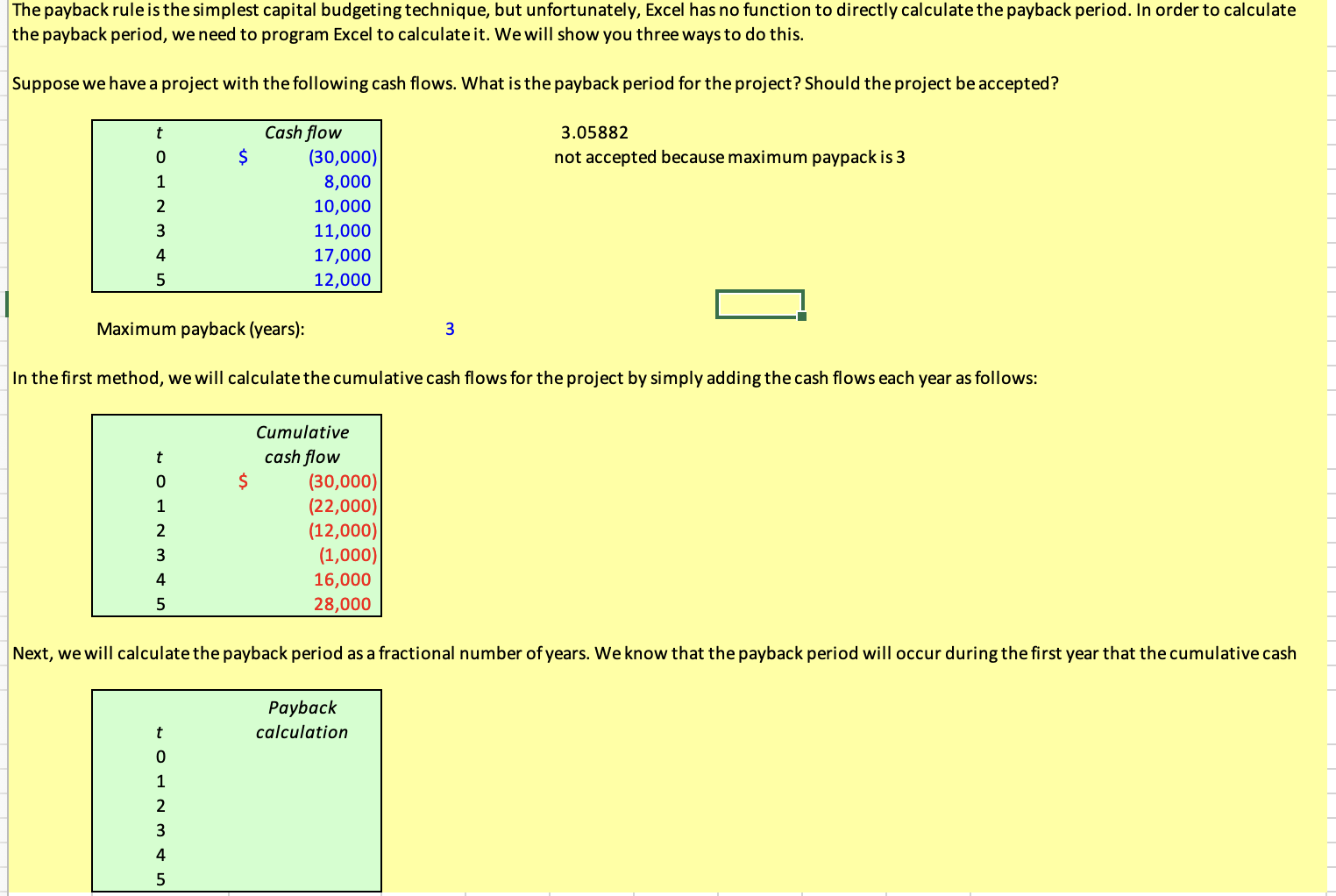 i need the payback calculation (third box)
The payback rule is the simplest capital budgeting technique, but unfortunately, Excel has no function to directly calculate the payback period. In order to calculate the payback period, we need to program Excel to calculate it. We will show you three ways to do this. Suppose we have a project with the following cash flows. What is the payback period for the project? Should the project be accepted? t 3.05882 not accepted because maximum paypack is 3 0 $ 1 2 Cash flow (30,000) 8,000 10,000 11,000 17,000 12,000 3 4 5 Maximum payback (years): 3 In the first method, we will calculate the cumulative cash flows for the project by simply adding the cash flows each year as follows: t 0 1 2 3 Cumulative cash flow $ (30,000) (22,000) (12,000) (1,000) 16,000 28,000 4 5 Next, we will calculate the payback period as a fractional number of years. We know that the payback period will occur during the first year that the cumulative cash Payback calculation t 0 1 2 3 4 5
Step by Step Solution
There are 3 Steps involved in it

Get step-by-step solutions from verified subject matter experts
 Study Help