Question: i need the program in c++ and i have given the the program point3d for this lab below . sorry, i cannot do that the
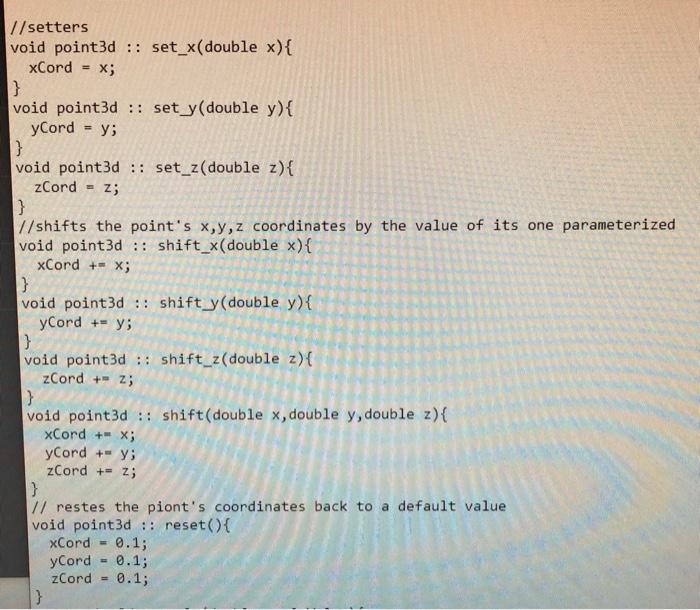
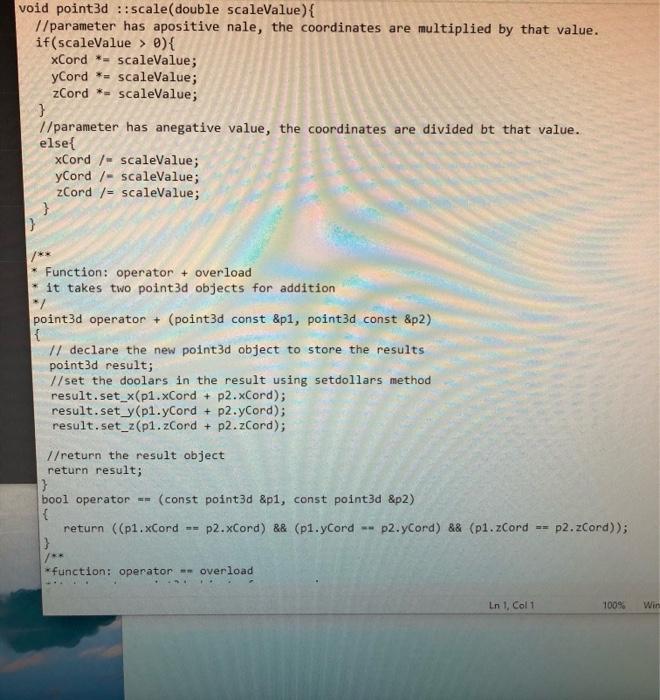
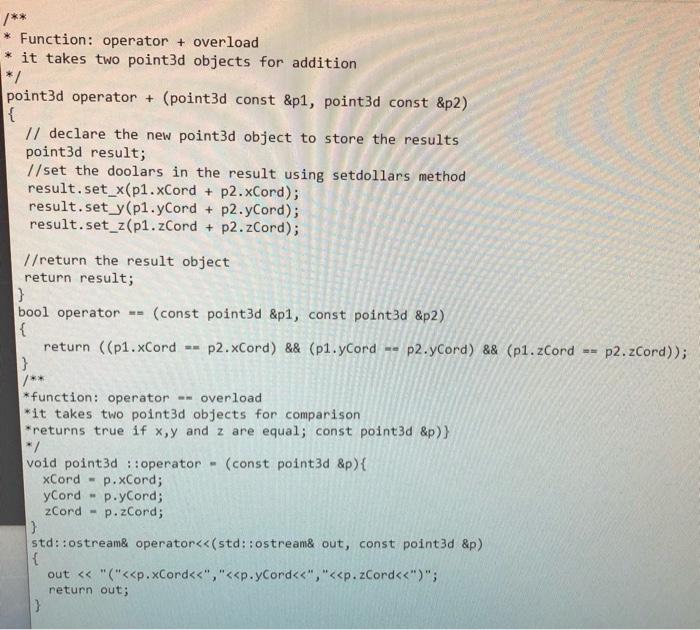
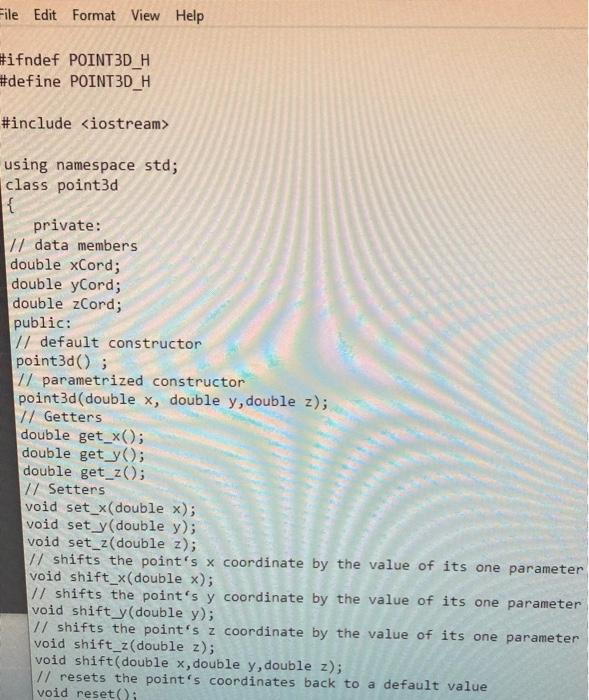
i need the program in c++ and i have given the the program point3d for this lab below .
sorry, i cannot do that the chegg does not allow me .
i cannot provide the code in text format bcz the chegg doesnt allow me
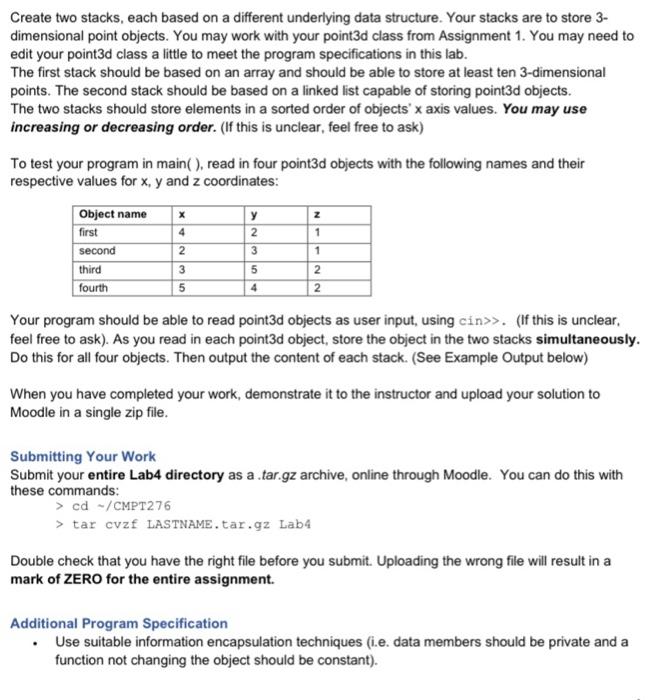
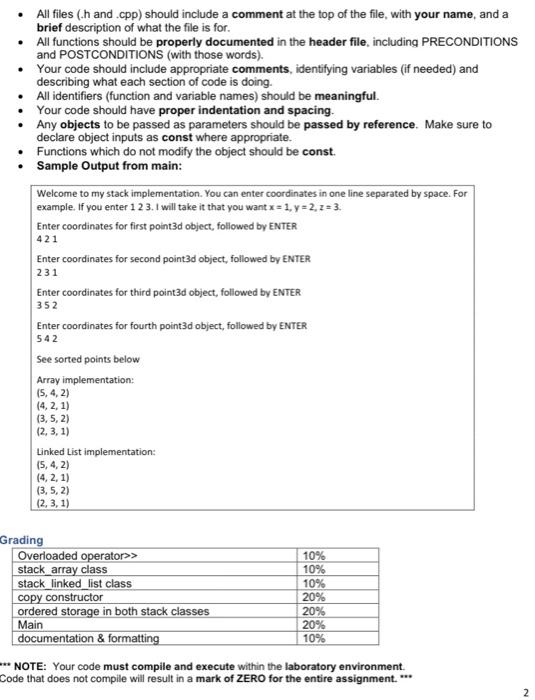
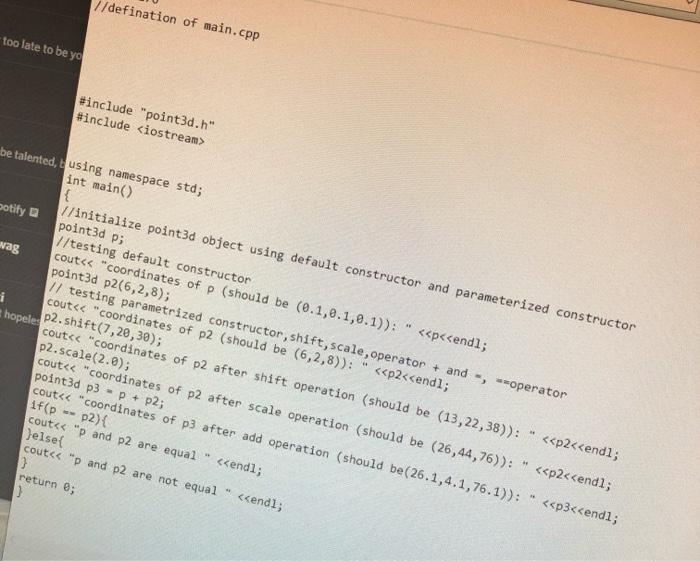
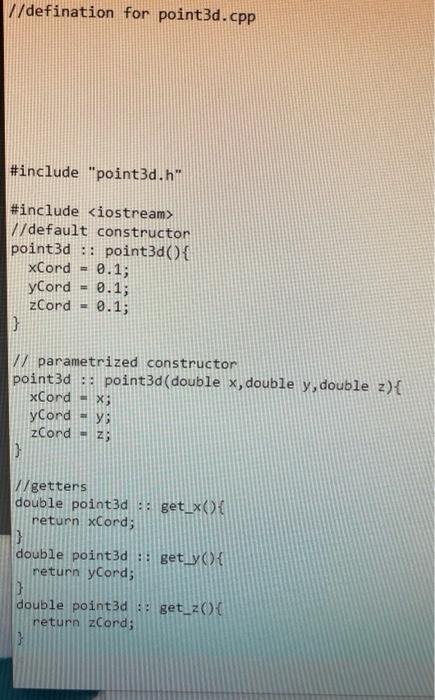
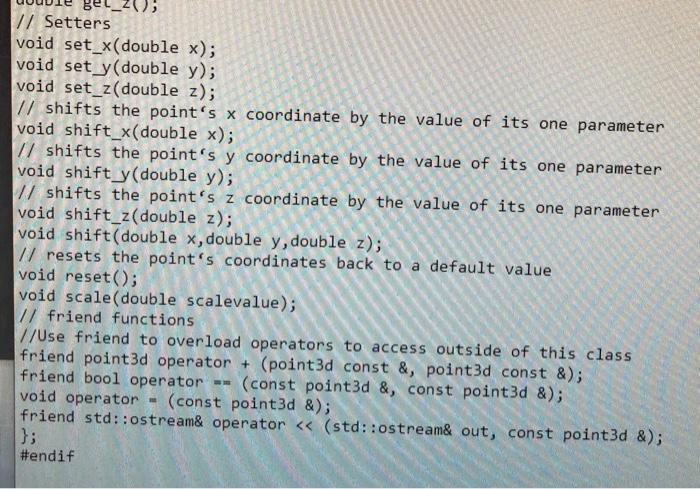
Create two stacks, each based on a different underlying data structure. Your stacks are to store 3- dimensional point objects. You may work with your point3d class from Assignment 1. You may need to edit your point3d class a little to meet the program specifications in this lab. The first stack should be based on an array and should be able to store at least ten 3-dimensional points. The second stack should be based on a linked list capable of storing point3d objects. The two stacks should store elements in a sorted order of objects' x axis values. You may use increasing or decreasing order. (If this is unclear, feel free to ask) To test your program in main(), read in four point3d objects with the following names and their respective values for x, y and z coordinates: Object name first Second third fourth 1 2 3 4 2 1 3 5 4 2 2 5 Your program should be able to read point3d objects as user input, using cin>>. (If this is unclear, feel free to ask). As you read in each point3d object, store the object in the two stacks simultaneously. Do this for all four objects. Then output the content of each stack. (See Example Output below) When you have completed your work, demonstrate it to the instructor and upload your solution to Moodle in a single zip file. Submitting Your Work Submit your entire Lab4 directory as a .tar.gz archive, online through Moodle. You can do this with these commands: > cd-/CMPT276 > tar cvzf LASTNAME.tar.gz Lab4 Double check that you have the right file before you submit. Uploading the wrong file will result in a mark of ZERO for the entire assignment. Additional Program Specification Use suitable information encapsulation techniques (i.e. data members should be private and a function not changing the object should be constant). All files (h and.cpp) should include a comment at the top of the file, with your name, and a brief description of what the file is for. All functions should be properly documented in the header file, including PRECONDITIONS and POSTCONDITIONS (with those words). Your code should include appropriate comments, identifying variables (if needed) and describing what each section of code is doing. All identifiers (function and variable names) should be meaningful. Your code should have proper indentation and spacing. Any objects to be passed as parameters should be passed by reference. Make sure to declare object inputs as const where appropriate. Functions which do not modify the object should be const. Sample Output from main: Welcome to my stack implementation. You can enter coordinates in one line separated by space. For example. If you enter 1 2 3. I will take it that you wantx= 1, y=2,2= 3. Enter coordinates for first point3d object, followed by ENTER 421 Enter coordinates for second point3d object, followed by ENTER 231 Enter coordinates for third point3d object, followed by ENTER 352 Enter coordinates for fourth point3d object, followed by ENTER 542 See sorted points below Array implementation: (5,4,2) (4.2.1) 13,5,2) (2,3,1) Linked List implementation: 15, 4,2) (4, 2, 1) (3, 5,2) (2, 3,1) Grading Overloaded operator>> 10% stack_array class 10% stack_linked_list class 10% copy constructor 20% ordered storage in both stack classes 20% Main 20% documentation & formatting 10% *** NOTE: Your code must compile and execute within the laboratory environment Code that does not compile will result in a mark of ZERO for the entire assignment. *** 2 //defination of main.cpp too late to be yo #include "point3d.h" #include i be talented, using namespace std; int main() { potify //initialize point3d object using default constructor and parameterized constructor point3d P; //testing default constructor wag cout 7/default constructon point3d :: point3d(){ xCord 0.1; yCord 0.1; zCord = 0.1; 3 parametrized constructor point3d : point3d(double x, double y, double z){ xCord = x; y Cord = y; zCord - z; } W/getters double point3d : get_x) return xCord; 3 double point3d :: get_yo{ return yCord; 3 double point3d ::get_20 return zCord; //setters void point3d :: set_x(double x){ xCord X; |} void point3d :: sety(double y){ yCord = y; } void point3d :: set_z(double z){ zCord Z; } //shifts the point's x,y,z coordinates by the value of its one parameterized void point3d :: shift_x(double x){ xCord += x; } void point3d :: shift y(double y){ y Cord += y; } void point3d :: shift_z(double z) { zCord +- z; } void point3d :: shift(double x,double y, double z){ xCord +- X; yCord += y; zCord += z; } 1/ restes the piont's coordinates back to a default value void point3d :: reset() { xCord 0.1; yCord = 0.1; zCord - 0.1; } void point3d :: scale( double scaleValue){ //parameter has apositive nale, the coordinates are multiplied by that value. if(scaleValue > 0){ xCord *- scaleValue; yCord * = scaleValue; zCord *= scaleValue; } 1/parameter has anegative value, the coordinates are divided bt that value. else{ xCord /-scaleValue; yCord /-scaleValue; zCord /= scaleValue; } } Function: operator + overload it takes two point3d objects for addition point3d operator + (point3d const &p1, point3d const &p2) // declare the new point3d object to store the results point3d result; // set the doolars in the result using setdollars method result.set_x(p1.xCord + p2.xCord); result.set y(pl.yCord + p2.yCord); result.set_z(p1.zCord + p2.zCord); //return the result object return result; } bool operator == (const point3d &p1, const point3d &p2) { return ((p1.xCord p2.xCord) && (p1.yCord p2.yCord) && (p1.Cord -- } p2.zCord)); *function: operator - overload In 1, Col 1 100% Wir /** * Function: operator + overload it takes two point3d objects for addition */ point3d operator + (point3d const &p1, point3d const &p2) { // declare the new point3d object to store the results point3d result; 1/set the doolars in the result using setdollars method result.set_x(p1.xCord + p2.xCord); result.set_y(p1.yCord + p2.yCord); result.set_z(p1.zCord + p2.zCord); //return the result object return result; p2.zCord)); bool operator -- (const point3d &p1, const point3d &p2) { return ((p1.xCord p2.xCord) && (p1.yCord -- p2.yCord) && (p1.zCord } /** *function: operator -- overload *it takes two point3d objects for comparison *returns true if x,y and z are equal; const point3d &p)} void point3d :: operator (const point3d &p){ xCord - p.xCord; yCord p.yCord; zCord - p.zCord; } std::ostream& operator using namespace std; class point3d { private: // data members double xCord; double yCord; double zCord; public: 1/ default constructor point3d(); 1/ parametrized constructor point3d(double x, double y, double z); // Getters double get_x(); double get y(); double get_z(); 17 Setters void set_x(double x); void sety(double y); void set_z(double z); 1/ shifts the point's x coordinate by the value of its one parameter void shift_x(double x); 1/ shifts the point's y coordinate by the value of its one parameter void shift_y(double y); 1/ shifts the point's z coordinate by the value of its one parameter oid shift_z(double z); void shift(double x, double y, double z); // resets the point's coordinates back to a default value void reset() // Setters void set_x(double x); void set y(double y); void set_z(double z); // shifts the point's x coordinate by the value of its one parameter void shift_x(double x); 11 shifts the point's y coordinate by the value of its one parameter void shift y(double y); 1/ shifts the point's z coordinate by the value of its one parameter void shift_z(double z); void shift(double x, double y, double z); // resets the point's coordinates back to a default value void reset(); void scale(double scalevalue); // friend functions //Use friend to overload operators to access outside of this class friend point3d operator + (point3d const &, point3d const &); friend bool operator (const point3d &, const point3d &); void operator (const point3d &); friend std::ostream& operator >. (If this is unclear, feel free to ask). As you read in each point3d object, store the object in the two stacks simultaneously. Do this for all four objects. Then output the content of each stack. (See Example Output below) When you have completed your work, demonstrate it to the instructor and upload your solution to Moodle in a single zip file. Submitting Your Work Submit your entire Lab4 directory as a .tar.gz archive, online through Moodle. You can do this with these commands: > cd-/CMPT276 > tar cvzf LASTNAME.tar.gz Lab4 Double check that you have the right file before you submit. Uploading the wrong file will result in a mark of ZERO for the entire assignment. Additional Program Specification Use suitable information encapsulation techniques (i.e. data members should be private and a function not changing the object should be constant). All files (h and.cpp) should include a comment at the top of the file, with your name, and a brief description of what the file is for. All functions should be properly documented in the header file, including PRECONDITIONS and POSTCONDITIONS (with those words). Your code should include appropriate comments, identifying variables (if needed) and describing what each section of code is doing. All identifiers (function and variable names) should be meaningful. Your code should have proper indentation and spacing. Any objects to be passed as parameters should be passed by reference. Make sure to declare object inputs as const where appropriate. Functions which do not modify the object should be const. Sample Output from main: Welcome to my stack implementation. You can enter coordinates in one line separated by space. For example. If you enter 1 2 3. I will take it that you wantx= 1, y=2,2= 3. Enter coordinates for first point3d object, followed by ENTER 421 Enter coordinates for second point3d object, followed by ENTER 231 Enter coordinates for third point3d object, followed by ENTER 352 Enter coordinates for fourth point3d object, followed by ENTER 542 See sorted points below Array implementation: (5,4,2) (4.2.1) 13,5,2) (2,3,1) Linked List implementation: 15, 4,2) (4, 2, 1) (3, 5,2) (2, 3,1) Grading Overloaded operator>> 10% stack_array class 10% stack_linked_list class 10% copy constructor 20% ordered storage in both stack classes 20% Main 20% documentation & formatting 10% *** NOTE: Your code must compile and execute within the laboratory environment Code that does not compile will result in a mark of ZERO for the entire assignment. *** 2 //defination of main.cpp too late to be yo #include "point3d.h" #include i be talented, using namespace std; int main() { potify //initialize point3d object using default constructor and parameterized constructor point3d P; //testing default constructor wag cout 7/default constructon point3d :: point3d(){ xCord 0.1; yCord 0.1; zCord = 0.1; 3 parametrized constructor point3d : point3d(double x, double y, double z){ xCord = x; y Cord = y; zCord - z; } W/getters double point3d : get_x) return xCord; 3 double point3d :: get_yo{ return yCord; 3 double point3d ::get_20 return zCord; //setters void point3d :: set_x(double x){ xCord X; |} void point3d :: sety(double y){ yCord = y; } void point3d :: set_z(double z){ zCord Z; } //shifts the point's x,y,z coordinates by the value of its one parameterized void point3d :: shift_x(double x){ xCord += x; } void point3d :: shift y(double y){ y Cord += y; } void point3d :: shift_z(double z) { zCord +- z; } void point3d :: shift(double x,double y, double z){ xCord +- X; yCord += y; zCord += z; } 1/ restes the piont's coordinates back to a default value void point3d :: reset() { xCord 0.1; yCord = 0.1; zCord - 0.1; } void point3d :: scale( double scaleValue){ //parameter has apositive nale, the coordinates are multiplied by that value. if(scaleValue > 0){ xCord *- scaleValue; yCord * = scaleValue; zCord *= scaleValue; } 1/parameter has anegative value, the coordinates are divided bt that value. else{ xCord /-scaleValue; yCord /-scaleValue; zCord /= scaleValue; } } Function: operator + overload it takes two point3d objects for addition point3d operator + (point3d const &p1, point3d const &p2) // declare the new point3d object to store the results point3d result; // set the doolars in the result using setdollars method result.set_x(p1.xCord + p2.xCord); result.set y(pl.yCord + p2.yCord); result.set_z(p1.zCord + p2.zCord); //return the result object return result; } bool operator == (const point3d &p1, const point3d &p2) { return ((p1.xCord p2.xCord) && (p1.yCord p2.yCord) && (p1.Cord -- } p2.zCord)); *function: operator - overload In 1, Col 1 100% Wir /** * Function: operator + overload it takes two point3d objects for addition */ point3d operator + (point3d const &p1, point3d const &p2) { // declare the new point3d object to store the results point3d result; 1/set the doolars in the result using setdollars method result.set_x(p1.xCord + p2.xCord); result.set_y(p1.yCord + p2.yCord); result.set_z(p1.zCord + p2.zCord); //return the result object return result; p2.zCord)); bool operator -- (const point3d &p1, const point3d &p2) { return ((p1.xCord p2.xCord) && (p1.yCord -- p2.yCord) && (p1.zCord } /** *function: operator -- overload *it takes two point3d objects for comparison *returns true if x,y and z are equal; const point3d &p)} void point3d :: operator (const point3d &p){ xCord - p.xCord; yCord p.yCord; zCord - p.zCord; } std::ostream& operator using namespace std; class point3d { private: // data members double xCord; double yCord; double zCord; public: 1/ default constructor point3d(); 1/ parametrized constructor point3d(double x, double y, double z); // Getters double get_x(); double get y(); double get_z(); 17 Setters void set_x(double x); void sety(double y); void set_z(double z); 1/ shifts the point's x coordinate by the value of its one parameter void shift_x(double x); 1/ shifts the point's y coordinate by the value of its one parameter void shift_y(double y); 1/ shifts the point's z coordinate by the value of its one parameter oid shift_z(double z); void shift(double x, double y, double z); // resets the point's coordinates back to a default value void reset() // Setters void set_x(double x); void set y(double y); void set_z(double z); // shifts the point's x coordinate by the value of its one parameter void shift_x(double x); 11 shifts the point's y coordinate by the value of its one parameter void shift y(double y); 1/ shifts the point's z coordinate by the value of its one parameter void shift_z(double z); void shift(double x, double y, double z); // resets the point's coordinates back to a default value void reset(); void scale(double scalevalue); // friend functions //Use friend to overload operators to access outside of this class friend point3d operator + (point3d const &, point3d const &); friend bool operator (const point3d &, const point3d &); void operator (const point3d &); friend std::ostream& operator









 Study Help