



Question: I NEED THIS FAST I Packet Tracer ( 4 to 5 screenshots ) with a screenshot of: ( c Router 1 show standby brief (
I NEED THIS FAST I Packet Tracer to screenshots with a screenshot of: c
Router
show standby brief see both in picture below
Router
show standby brief see both in picture below
PC
Tracert command from PC to PC
One with everything hooked up correctly
One with cord missing and route changed see both in picture below
I... ocumentation to the topology
t use the same numbers used here
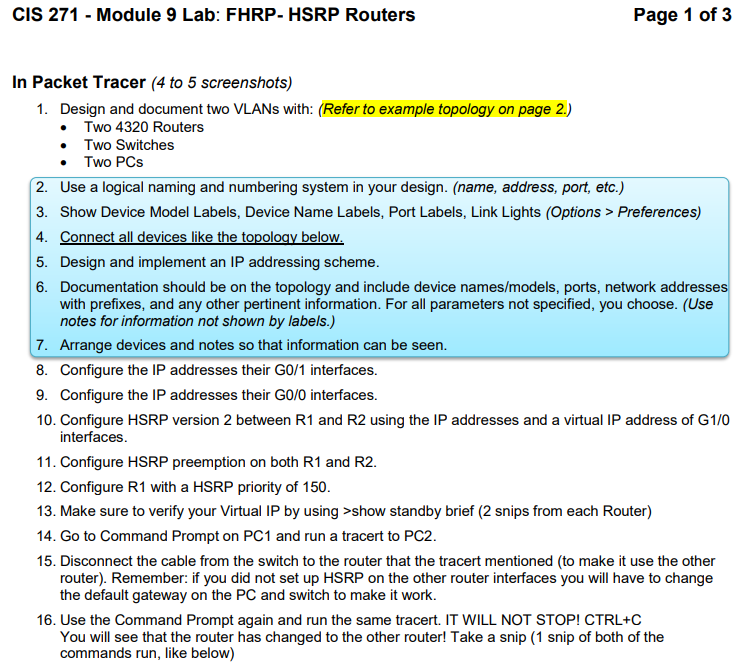
Design and document two VLANs with: Refer to example topology on page
Two Routers
Two Switches
Two PCs
Use a logical naming and numbering system in your design. name address, port, etc.
Show Device Model Labels, Device Name Labels, Port Labels, Link Lights Options Preferences
Connect all devices like the topology below.
Design and implement an IP addressing scheme.
Documentation should be on the topology and include device namesmodels ports, network addresses
with prefixes, and any other pertinent information. For all parameters not specified, you choose. Use
notes for information not shown by labels.
Arrange devices and notes so that information can be seen.
Configure the IP addresses their G interfaces.
Configure the IP addresses their G interfaces.
Configure HSRP version between R and R using the IP addresses and a virtual IP address of G
interfaces.
Configure HSRP preemption on both R and R
Configure R with a HSRP priority of
Make sure to verify your Virtual IP by using show standby brief snips from each Router
Go to Command Prompt on PC and run a tracert to PC
Disconnect the cable from the switch to the router that the tracert mentioned to make it use the other
router Remember: if you did not set up HSRP on the other router interfaces you will have to change
the default gateway on the PC and switch to make it work.
Use the Command Prompt again and run the same tracert. IT WILL NOT STOP! CTRLC
You will see that the router has changed to the other router! Take a snip snip of both of the
commands run, like below
Step by Step Solution
There are 3 Steps involved in it
1 Expert Approved Answer
Step: 1 Unlock

Question Has Been Solved by an Expert!
Get step-by-step solutions from verified subject matter experts
Step: 2 Unlock
Step: 3 Unlock