







Question: I need this in SQL, please. this is the DW example. -- CUSTOMERS_COPY CREATE TABLE CUSTOMERS_COPY AS SELECT CUSTOMER_ID, CUST_FIRST_NAME, CUST_LAST_NAME, NLS_LANGUAGE, NLS_TERRITORY, CREDIT_LIMIT, CUST_EMAIL,
I need this in SQL, please.
this is the DW example.
-- CUSTOMERS_COPY CREATE TABLE CUSTOMERS_COPY AS SELECT CUSTOMER_ID, CUST_FIRST_NAME, CUST_LAST_NAME, NLS_LANGUAGE, NLS_TERRITORY, CREDIT_LIMIT, CUST_EMAIL, ACCOUNT_MGR_ID, CUST_GEO_LOCATION, DATE_OF_BIRTH, MARITAL_STATUS, GENDER, INCOME_LEVEL FROM OE.CUSTOMERS;
-- ORDERS_COPY CREATE TABLE ORDERS_COPY AS SELECT * FROM OE.ORDERS;
-- T_DATE CREATE TABLE T_ORDER_DATE AS SELECT DISTINCT TO_DATE(TO_CHAR(ORDER_DATE, 'DD-MON-YYYY')) ORDER_DATE from OE.ORDERS;
CREATE TABLE T_DATE ( ID_DATE NUMBER(5), ORDER_DATE DATE, Day_No NUMBER(1), Day_Name CHAR(10), Month_NO NUMBER(2), Month_Name CHAR(10), Quarter NUMBER(1), YYear NUMBER(4), CONSTRAINT PK_ID_DATE PRIMARY KEY (ID_DATE));
CREATE SEQUENCE SEQ_ID_DATE START WITH 10000;
INSERT INTO T_DATE SELECT SEQ_ID_DATE.NEXTVAL, ORDER_DATE, TO_NUMBER(TO_CHAR(ORDER_DATE,'D')), TO_CHAR(ORDER_DATE,'Day'), TO_NUMBER(TO_CHAR(ORDER_DATE,'MM')), TO_CHAR(ORDER_DATE,'MONTH'), TO_NUMBER(TO_CHAR(ORDER_DATE,'Q')), TO_NUMBER(TO_CHAR(ORDER_DATE,'YYYY')) FROM T_ORDER_DATE;
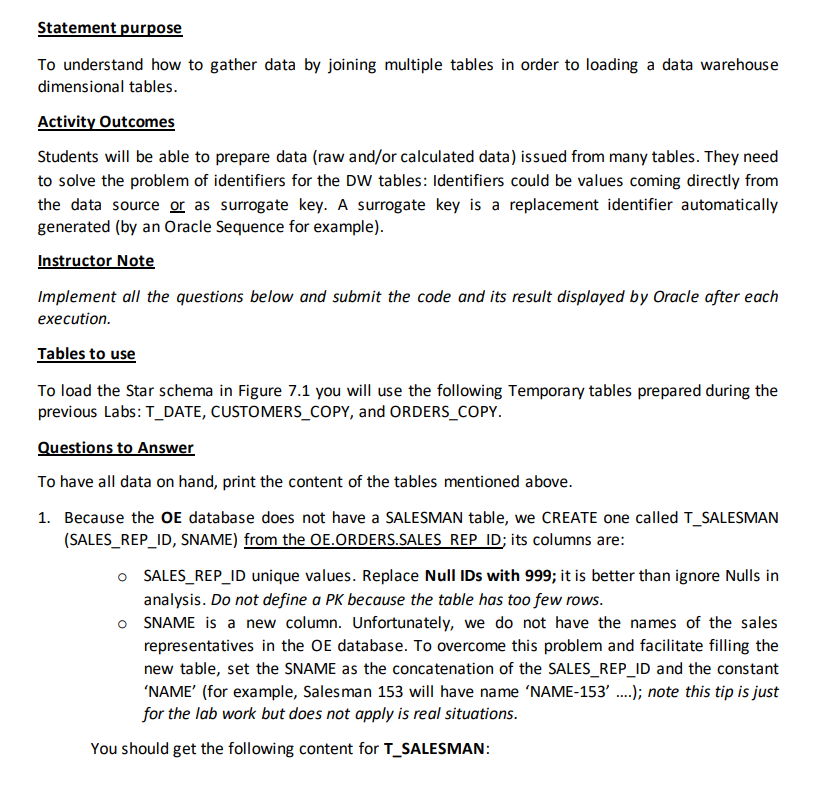
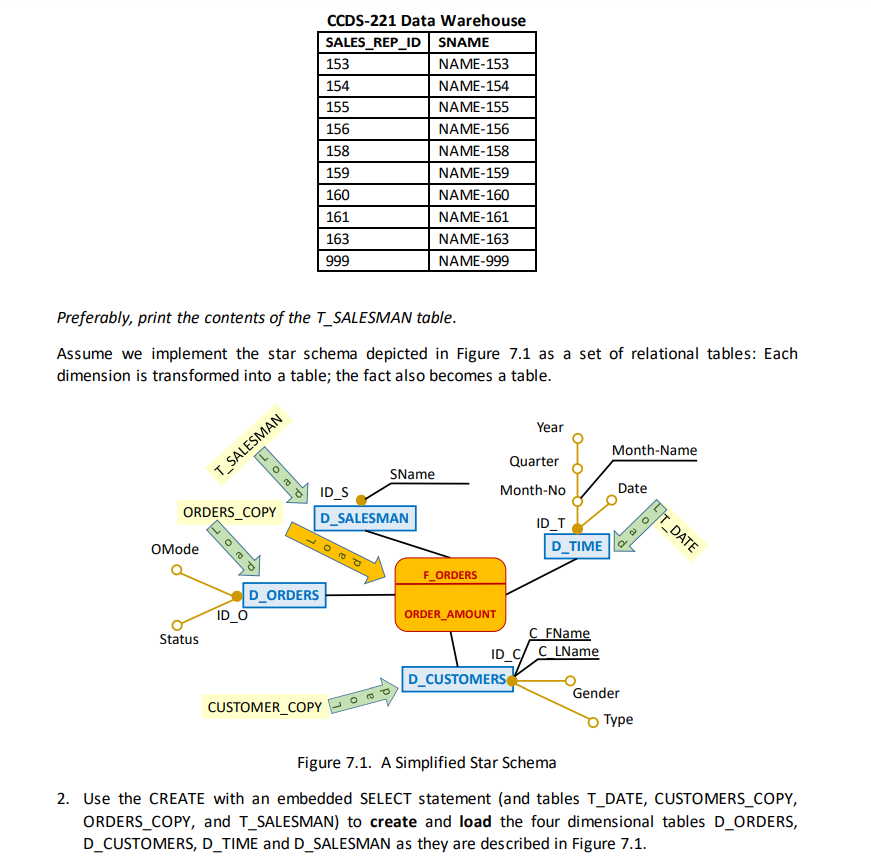
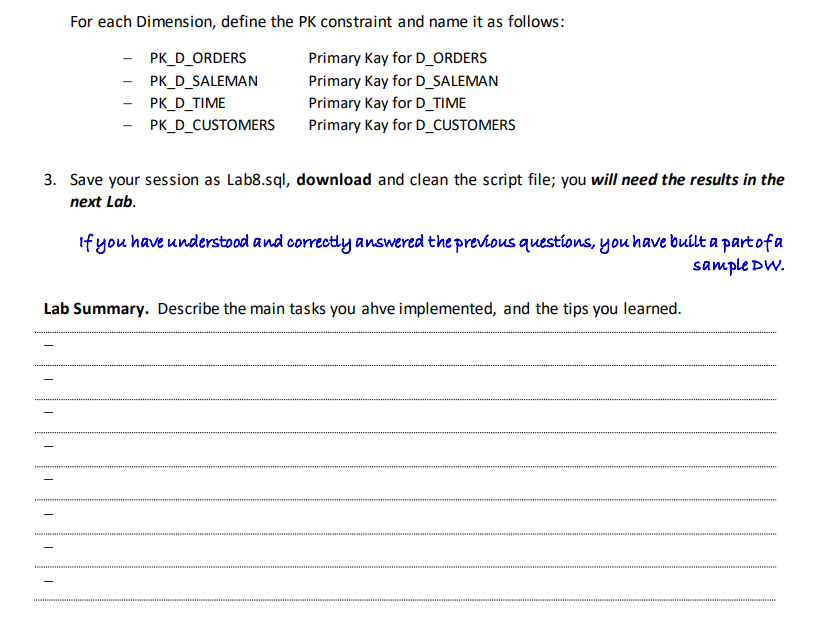
Statement purpose To understand how to gather data by joining multiple tables in order to loading a data warehouse dimensional tables. Activity Outcomes Students will be able to prepare data (raw and/or calculated data) issued from many tables. They need to solve the problem of identifiers for the DW tables: Identifiers could be values coming directly from the data source or as surrogate key. A surrogate key is a replacement identifier automatically generated (by an Oracle Sequence for example). Instructor Note Implement all the questions below and submit the code and its result displayed by Oracle after each execution. Tables to use To load the Star schema in Figure 7.1 you will use the following Temporary tables prepared during the previous Labs: T_DATE, CUSTOMERS_COPY, and ORDERS_COPY. Questions to Answer To have all data on hand, print the content of the tables mentioned above. 1. Because the OE database does not have a SALESMAN table, we CREATE one called T_SALESMAN (SALES_REP_ID, SNAME) from the OE.ORDERS.SALES REP ID; its columns are: OSALES_REP_ID unique values. Replace Null IDs with 999; it is better than ignore Nulls in analysis. Do not define a PK because the table has too few rows. OSNAME is a new column. Unfortunately, we do not have the names of the sales representatives in the OE database. To overcome this problem and facilitate filling the new table, set the SNAME as the concatenation of the SALES_REP_ID and the constant 'NAME' (for example, Salesman 153 will have name 'NAME-153' ....); note this tip is just for the lab work but does not apply is real situations. You should get the following content for T_SALESMAN: CCDS-221 Data Warehouse SALES_REP_IDSNAME 153 NAME-153 154 NAME-154 155 NAME-155 156 NAME-156 158 NAME-158 159 NAME-159 160 NAME-160 161 NAME-161 163 NAME-163 999 NAME-999 Preferably, print the contents of the T_SALESMAN table. Assume we implement the star schema depicted in Figure 7.1 as a set of relational tables: Each dimension is transformed into a table; the fact also becomes a table. Year Month-Name T_SALESMAN Quarter Month-No SName ID_S D_SALESMAN Date ORDERS_COPY T_DATE ID_T D_TIME OMode F_ORDERS D_ORDERS ID_O Status ORDER_AMOUNT C FName ID C C LName D_CUSTOMERS Gender Type CUSTOMER_COPY Figure 7.1. A Simplified Star Schema 2. Use the CREATE with an embedded SELECT statement (and tables T_DATE, CUSTOMERS_COPY, ORDERS_COPY, and T_SALESMAN) to create and load the four dimensional tables D_ORDERS, D_CUSTOMERS, D_TIME and D_SALESMAN as they are described in Figure 7.1. For each Dimension, define the PK constraint and name it as follows: - PK_D_ORDERS Primary Kay for D_ORDERS PK_D_SALEMAN Primary Kay for D_SALEMAN PK_D_TIME Primary Kay for D_TIME PK_D_CUSTOMERS Primary Kay for D_CUSTOMERS 3. Save your session as Lab8.sql, download and clean the script file; you will need the results in the next Lab. If you have understood and correctly answered the previous questions, you have built a part of a sample DW. Lab Summary. Describe the main tasks you ahve implemented, and the tips you learned. Statement purpose To understand how to gather data by joining multiple tables in order to loading a data warehouse dimensional tables. Activity Outcomes Students will be able to prepare data (raw and/or calculated data) issued from many tables. They need to solve the problem of identifiers for the DW tables: Identifiers could be values coming directly from the data source or as surrogate key. A surrogate key is a replacement identifier automatically generated (by an Oracle Sequence for example). Instructor Note Implement all the questions below and submit the code and its result displayed by Oracle after each execution. Tables to use To load the Star schema in Figure 7.1 you will use the following Temporary tables prepared during the previous Labs: T_DATE, CUSTOMERS_COPY, and ORDERS_COPY. Questions to Answer To have all data on hand, print the content of the tables mentioned above. 1. Because the OE database does not have a SALESMAN table, we CREATE one called T_SALESMAN (SALES_REP_ID, SNAME) from the OE.ORDERS.SALES REP ID; its columns are: OSALES_REP_ID unique values. Replace Null IDs with 999; it is better than ignore Nulls in analysis. Do not define a PK because the table has too few rows. OSNAME is a new column. Unfortunately, we do not have the names of the sales representatives in the OE database. To overcome this problem and facilitate filling the new table, set the SNAME as the concatenation of the SALES_REP_ID and the constant 'NAME' (for example, Salesman 153 will have name 'NAME-153' ....); note this tip is just for the lab work but does not apply is real situations. You should get the following content for T_SALESMAN: CCDS-221 Data Warehouse SALES_REP_IDSNAME 153 NAME-153 154 NAME-154 155 NAME-155 156 NAME-156 158 NAME-158 159 NAME-159 160 NAME-160 161 NAME-161 163 NAME-163 999 NAME-999 Preferably, print the contents of the T_SALESMAN table. Assume we implement the star schema depicted in Figure 7.1 as a set of relational tables: Each dimension is transformed into a table; the fact also becomes a table. Year Month-Name T_SALESMAN Quarter Month-No SName ID_S D_SALESMAN Date ORDERS_COPY T_DATE ID_T D_TIME OMode F_ORDERS D_ORDERS ID_O Status ORDER_AMOUNT C FName ID C C LName D_CUSTOMERS Gender Type CUSTOMER_COPY Figure 7.1. A Simplified Star Schema 2. Use the CREATE with an embedded SELECT statement (and tables T_DATE, CUSTOMERS_COPY, ORDERS_COPY, and T_SALESMAN) to create and load the four dimensional tables D_ORDERS, D_CUSTOMERS, D_TIME and D_SALESMAN as they are described in Figure 7.1. For each Dimension, define the PK constraint and name it as follows: - PK_D_ORDERS Primary Kay for D_ORDERS PK_D_SALEMAN Primary Kay for D_SALEMAN PK_D_TIME Primary Kay for D_TIME PK_D_CUSTOMERS Primary Kay for D_CUSTOMERS 3. Save your session as Lab8.sql, download and clean the script file; you will need the results in the next Lab. If you have understood and correctly answered the previous questions, you have built a part of a sample DW. Lab Summary. Describe the main tasks you ahve implemented, and the tips you learned
Step by Step Solution
There are 3 Steps involved in it

Get step-by-step solutions from verified subject matter experts
 Study Help