



Question: I need this script to SEARCH employee by SSN and EDIT employee information in the format provided. Now you will continue to employ the list
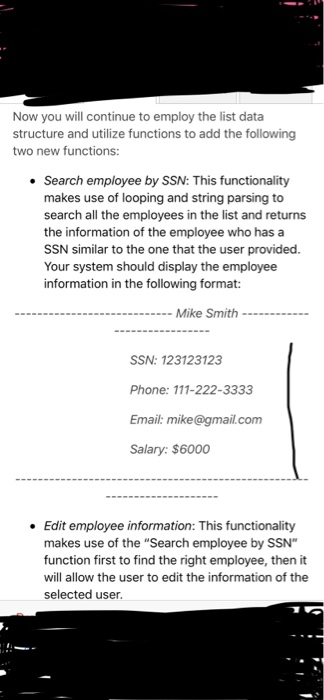
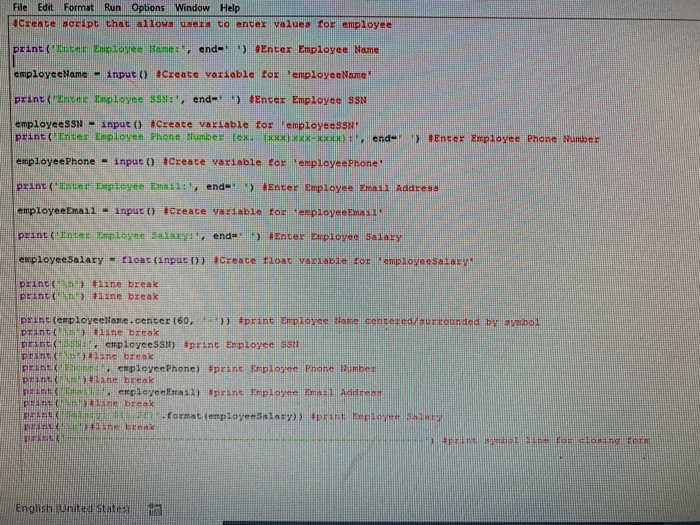
Now you will continue to employ the list data structure and utilize functions to add the following two new functions: Search employee by SSN: This functionality makes use of looping and string parsing to search all the employees in the list and returns the information of the employee who has a SSN similar to the one that the user provided. Your system should display the employee information in the following format: Mike Smith... SSN: 123123123 Phone: 111-222-3333 Email: mike@gmail.com Salary: $6000 Edit employee information: This functionality makes use of the "Search employee by SSN" function first to find the right employee, then it will allow the user to edit the information of the selected user File Edit Format Run Options Window Help Create scrpt that alioMS sT to enter valuea foz employee print ('linter Employee tan mm., end-') #Enter Employee Name employecName input 0 tCreate variable for 'employecName employeeSSN-input() #Create variable for employeessar print( Enter Employee Phone Number tex xxx xxx- ot end-, ') #Enter Employee Phone Number employeePhone - input o Creace variable for employeep hone employeeEmail . input() #crea ce variable for . employe Eman, print ('Enter Employee Salary:, end-' .) #Encer Employee salary enployeeSalary loat (input 0) Create float variable fof empoveesalacyh print (-Am! ) #11ne break print (nn') tiine break print (employeeName . center (60, ) #print Employee Name centered stirreunded by print(,ni') #2ane break DrincKTsemploycesSh) Sprint Erpicyee ss pzint (aan break print K: Rhi4mm nte, lhimbe The #laneenpeakeePhone) #print Employee Pho tant(rip!) print
Step by Step Solution
There are 3 Steps involved in it

Get step-by-step solutions from verified subject matter experts