







Question: I need to change the guessing frame code to keep history of the users wrong guesses. Below youll find the code already build i just
I need to change the guessing frame code to keep history of the users wrong guesses.
Below youll find the code already build i just need that minor change
//GuessingGame.java
import java.io.BufferedReader;
import java.io.File;
import java.io.FileNotFoundException;
import java.io.FileReader;
import java.io.FileWriter;
import java.io.IOException;
import java.io.PrintWriter;
import javax.swing.JOptionPane;
public class GuessingGame {
private static final String FILE_NAME = "guessGameScores.txt";
// Instance variables
private int secret;
private boolean won;
private int guess;
private int low;
private int high;
private int lowest;
private int highest;
private boolean firstHigh, firstLow;
private int count;
/**
* Constructor
*/
public GuessingGame() {
low = 1;
high = 100;
count = 0;
}
/**
* Parameterized constructor
*
* @param lowEnd
* - lowest value
* @param highEnd
* - highest value
*/
public GuessingGame(int lowEnd, int highEnd) {
low = lowEnd;
high = highEnd;
count = 0;
}
/**
* This method generates a secret number and asks the user to guess it.
*/
public void playGame() {
lowest = high + 1;
highest = low - 1;
firstHigh = true;
firstLow = true;
won = false;
guess = 0;
generateSecretNumber();
}
/**
* Checks whether user guess is correct
*
* @param guess
* - user's guess
*/
public boolean check(int guess) {
this.guess = guess;
count++;
if (checkOutsideRange()) {
JOptionPane.showMessageDialog(null, "Outside range!");
return false;
}
if (checkIfWon()) {
JOptionPane.showMessageDialog(null, "You won!");
comparePerformance();
return true;
}
JOptionPane.showMessageDialog(null, checkTooHighLow());
return false;
}
public void comparePerformance() {
// Check whether the file exists
File file = new File(FILE_NAME);
if (file.exists()) {
// Read file to get the previous score
int previous_count = 0;
try {
BufferedReader br = new BufferedReader(new FileReader(file));
String line = br.readLine();
previous_count = Integer.parseInt(line);
// Close file
br.close();
} catch (FileNotFoundException fnfe) {
System.out.println(fnfe.getMessage());
} catch (IOException ioe) {
System.out.println(ioe.getMessage());
}
// Display performance
if (previous_count > count) {
JOptionPane.showMessageDialog(null, "You performed better than previous game!");
} else {
JOptionPane.showMessageDialog(null, "You performed worse than previous game!");
}
}
// Write current score to the file
try {
PrintWriter pw = new PrintWriter(new FileWriter(file));
// Write score
pw.write(String.valueOf(count));
// Close writer
pw.close();
} catch (FileNotFoundException fnfe) {
System.out.println(fnfe.getMessage());
} catch (IOException ioe) {
System.out.println(ioe.getMessage());
}
}
/**
* This method generates a secret number between low and high
*/
public void generateSecretNumber() {
secret = (int) (Math.random() * (high - low + 1) + low);
System.out.println("Shhhhhh, secret is : " + secret);
}
/**
* This method checks whether the user has guessed correctly
*
* @return - Returns tru if user guess is correct, false otherwise
*/
public boolean checkIfWon() {
if (guess == secret) {
return true;
} else {
return false;
}
}
/**
* This method checks whether user guess is higher or lower than the secret
* number.
*
* @return - Returns a string whether the guess is higher or lower than the
* secret number
*/
public String checkTooHighLow() {
String temp = "";
if (guess > secret) {
temp = "Too high!";
if (firstHigh) {
highest = guess;
firstHigh = false;
} else if (guess >= highest) {
JOptionPane.showMessageDialog(null, "You were already told " + highest + " is too high!");
} else {
highest = guess;
}
} else if (guess
temp = "Too low!";
if (firstLow) {
lowest = guess;
firstLow = false;
} else if (guess
JOptionPane.showMessageDialog(null, "You were already told " + lowest + " is too low!");
} else {
lowest = guess;
}
}
return temp;
}
/**
* This method checks whether the user guess is out of range
*
* @return - Returns true if user guess is outside range, false otherwise
*/
public boolean checkOutsideRange() {
if (guess high) {
return true;
}
return false;
}
public static void main(String[] args) {
GuessingGame gg = new GuessingGame(50, 150);
gg.playGame();
}
}
//GuessFrame.java
import java.awt.BorderLayout;
import java.awt.Frame;
import java.awt.GridLayout;
import java.awt.Label;
import java.awt.Panel;
import java.awt.TextField;
import java.awt.event.ActionEvent;
import java.awt.event.ActionListener;
import java.awt.event.WindowAdapter;
import java.awt.event.WindowEvent;
public class GuessFrame extends Frame {
/**
* Constructor
*/
public GuessFrame() {
this(1, 100);
}
/**
* Constructor
*
* @param min
* - min value
* @param max
* - max value
*/
public GuessFrame(int min, int max) {
setSize(500, 100);
setTitle("Guessing Game");
addWindowListener(new WindowAdapter() {
public void windowClosing(WindowEvent we) {
System.exit(0);
}
});
add(new GuessPanel(min, max), BorderLayout.CENTER);
setVisible(true);
}
public static void main(String[] args) {
if (args.length == 2) {
new GuessFrame(Integer.parseInt(args[0]), Integer.parseInt(args[1]));
} else {
new GuessFrame();
}
}
}
class GuessPanel extends Panel implements ActionListener {
// Instance variables
private Label label;
private TextField tf;
private GuessingGame game;
/**
* Constructor
*/
public GuessPanel(int min, int max) {
super();
setLayout(new GridLayout(3, 1));
// Add prompt label
add(new Label("Guess a number (" + min + "-" + max + "): "));
label = new Label();
tf = new TextField();
tf.addActionListener(this);
add(label);
add(tf);
// Create game
game = new GuessingGame(min, max);
// Start game
game.playGame();
}
public void actionPerformed(ActionEvent ae) {
int guess = Integer.parseInt(tf.getText());
tf.setText("");
label.setText(String.valueOf(guess));
// Check user guess
if (game.check(guess)) // If user won, exit the game
System.exit(0);
}
}
SAMPLE OUTPUTs:
Command line arguments:
java GuessFrame 1 150

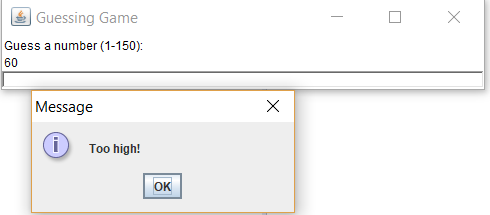
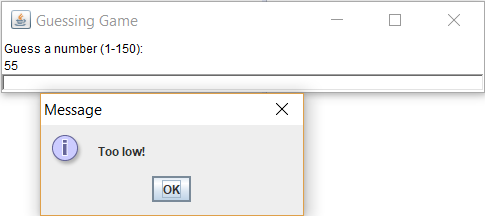
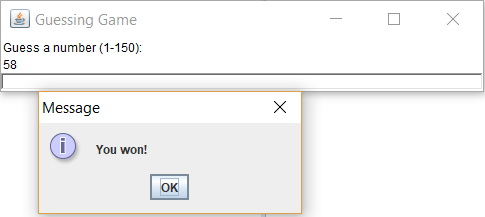
File "guessGameScores.txt" content for the above run

Guessing Game Guess a number (1-150)
Step by Step Solution
There are 3 Steps involved in it

Get step-by-step solutions from verified subject matter experts
 Study Help