







Question: I need to create a VBA in excel using if/then statements Instructions: 1. Sove frequently your work using the macro enabledworkbook type. If you lose
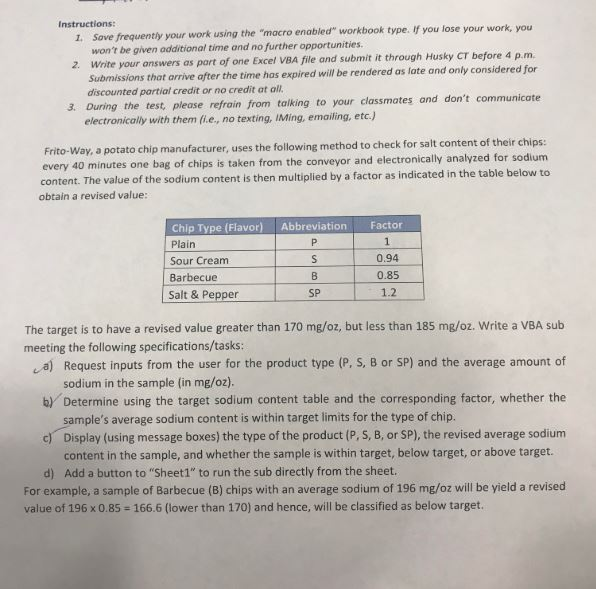
I need to create a VBA in excel using if/then statements
Instructions: 1. Sove frequently your work using the "macro enabled"workbook type. If you lose your work, you won't be given additional time and no further opportunities. 2. Write your answers as part of one Excel VBA file and submit it through Husky CT before 4 p.m. Submissions that arrive after the time has expired will be rendered as late and only considered for discounted partial credit or no credit at all. 3. During the test, please refrain from talking to your classmates and don't communicate electronically with them fi.e., no texting, Ming, emailing, etc.) Frito-Way, a potato chip manufacturer, uses the following method to check for salt content of their chips: every 40 minutes one bag of chips is taken from the conveyor and electronically analyzed for sodium content. The value of the sodium content is then multiplied by a factor as indicated in the table below to obtain a revised value: Abbreviation Factor Chip Type (Flavor) Plain Sour Cream Barbecue Salt & Pepper S 0.94 0.85 1.2 SP The target is to have a revised value greater than 170 mg/oz, but less than 185 mg/oz. Write a VBA sub meeting the following specifications/tasks: a) Request inputs from the user for the product type (P, S, B or SP) and the average amount of sodium in the sample (in mg/02). b) Determine using the target sodium content table and the corresponding factor, whether the sample's average sodium content is within target limits for the type of chip. c) Display (using message boxes) the type of the product (P, S, B, or SP), the revised average sodium content in the sample, and whether the sample is within target, below target, or above target. d) Add a button to "Sheet1" to run the sub directly from the sheet. For example, a sample of Barbecue (B) chips with an average sodium of 196 mg/oz will be yield a revised value of 196 x 0.85 = 166.6 (lower than 170) and hence, will be classified as below target. Instructions: 1. Sove frequently your work using the "macro enabled"workbook type. If you lose your work, you won't be given additional time and no further opportunities. 2. Write your answers as part of one Excel VBA file and submit it through Husky CT before 4 p.m. Submissions that arrive after the time has expired will be rendered as late and only considered for discounted partial credit or no credit at all. 3. During the test, please refrain from talking to your classmates and don't communicate electronically with them fi.e., no texting, Ming, emailing, etc.) Frito-Way, a potato chip manufacturer, uses the following method to check for salt content of their chips: every 40 minutes one bag of chips is taken from the conveyor and electronically analyzed for sodium content. The value of the sodium content is then multiplied by a factor as indicated in the table below to obtain a revised value: Abbreviation Factor Chip Type (Flavor) Plain Sour Cream Barbecue Salt & Pepper S 0.94 0.85 1.2 SP The target is to have a revised value greater than 170 mg/oz, but less than 185 mg/oz. Write a VBA sub meeting the following specifications/tasks: a) Request inputs from the user for the product type (P, S, B or SP) and the average amount of sodium in the sample (in mg/02). b) Determine using the target sodium content table and the corresponding factor, whether the sample's average sodium content is within target limits for the type of chip. c) Display (using message boxes) the type of the product (P, S, B, or SP), the revised average sodium content in the sample, and whether the sample is within target, below target, or above target. d) Add a button to "Sheet1" to run the sub directly from the sheet. For example, a sample of Barbecue (B) chips with an average sodium of 196 mg/oz will be yield a revised value of 196 x 0.85 = 166.6 (lower than 170) and hence, will be classified as below target
Step by Step Solution
There are 3 Steps involved in it

Get step-by-step solutions from verified subject matter experts
 Study Help