







Question: I need to create this java project in Netbeans and I'm having trouble with it. It needs to look like the image directly under the
I need to create this java project in Netbeans and I'm having trouble with it. It needs to look like the image directly under the "Project 15-1" title in the screenshot. 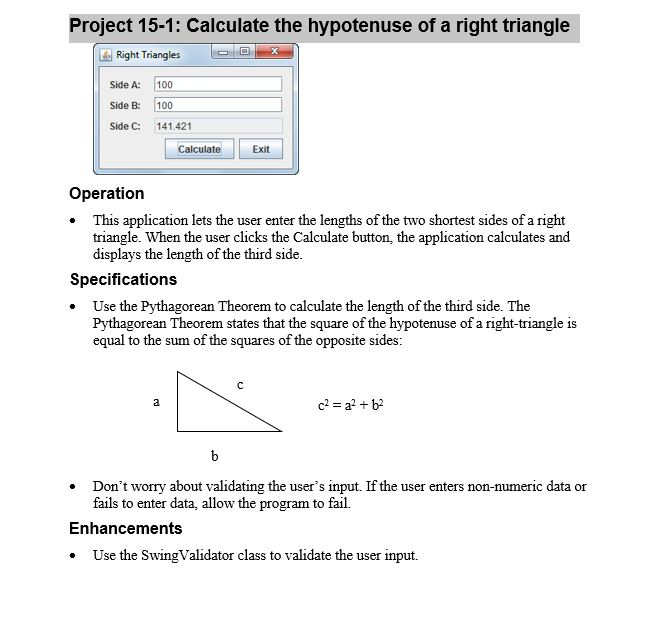
I need the code for this and it is very important that it looks as close to the screenshot as possible.
Project 15-1: Calculate the hypotenuse of a right triangle Right Triangles 0 Side A: 100 Side B:100 Side C: 141.421 Calculate Exit Operation This application lets the user enter the lengths of the two shortest sides of a right triangle. When the user clicks the Calculate button, the application calculates and displays the length of the third side. Specifications Use the Pythagorean Theorem to calculate the length of the third side. The gorean Theorem states that the square of the hypotenuse of a right-triangle is equal to the sum of the squares of the opposite sides: c2 = a2 + b2 Don't worry about validating the user's input. If the user enters non-numeric data or fails to enter data, allow the program to fail. Enhancements Use the SwingValidator class to validate the user input
Step by Step Solution
There are 3 Steps involved in it

Get step-by-step solutions from verified subject matter experts
 Study Help