







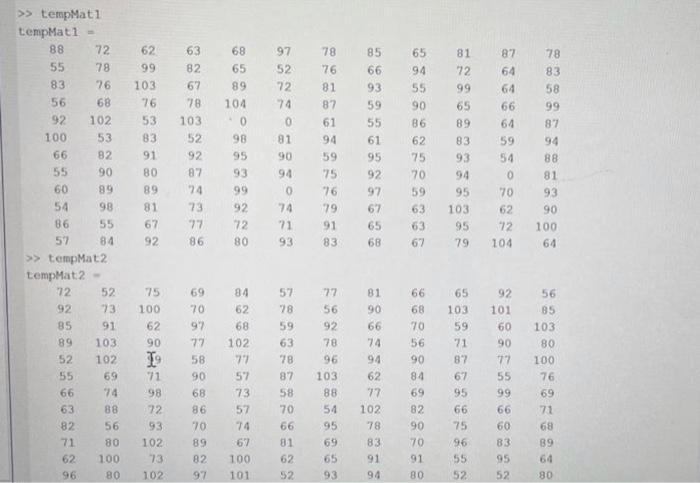
Question: I NEED TO USE MATLAB FORMAT Two matrices have been added to your workspace: tempMat1 tempMat2 The matrices each contain temperature values that are measured
Two matrices have been added to your workspace:
tempMat1
tempMat2
The matrices each contain temperature values that are measured in deg C.
Use the matrices to answer the questions below.
Do NOT use loops or selection structures.
Q2, Part A:
Write the command(s) to calculate the mean of all non-zero elements of tempMatl.
Assign the result to a variable named partA.
02, Part B:
Write the command to display your result in Part A to the nearest tenth while following professional communication expectations.
Q2, Part C:
Write the command(s) to replace each 0 in tempMat1 with your result in Part A. Do not hardcode the numeric value (s) of the location of any 0.
Q2, Part D:
Write the command (s) that will calculate how many elements in tempMatl are between 76 and 83, inclusive of both 76 and 83.
Assign the result to a variable named part.
Part E.
Create a logical array where the only true elements correspond to the locations where one or both of the following are true:
tempMat1 is greater than 78
tempMat2 minus 10 is greater than or equal to 65
> tempMat1 tempMat1 = 8855835692100665560548657727876681025382908998558462991037653839180898167926382677810352928774737786686589104098959399927280975272740819094074719378768187619459757679918385669359556195929767656865945590866275705963636781729965898393949510395798764646664595407062721047883589987948881939010064 >) tempMat2 LempMat? - 729285895255666382716296527391103102697486568010080751006290197198729310273102697097775890688670898297846268102775773577467100101577859637887587066816252775692789610388549569659381906674946277102788391946668705690846982907091806510359718767956675965552921016090775599666083955256851038010076697168896480
Step by Step Solution
There are 3 Steps involved in it

Get step-by-step solutions from verified subject matter experts
 Study Help