







Question: I need to write a code in c++ I have the example output of the actual output but I have no clue from where to
I need to write a code in c++ I have the example output of the actual output but I have no clue from where to begin coding.
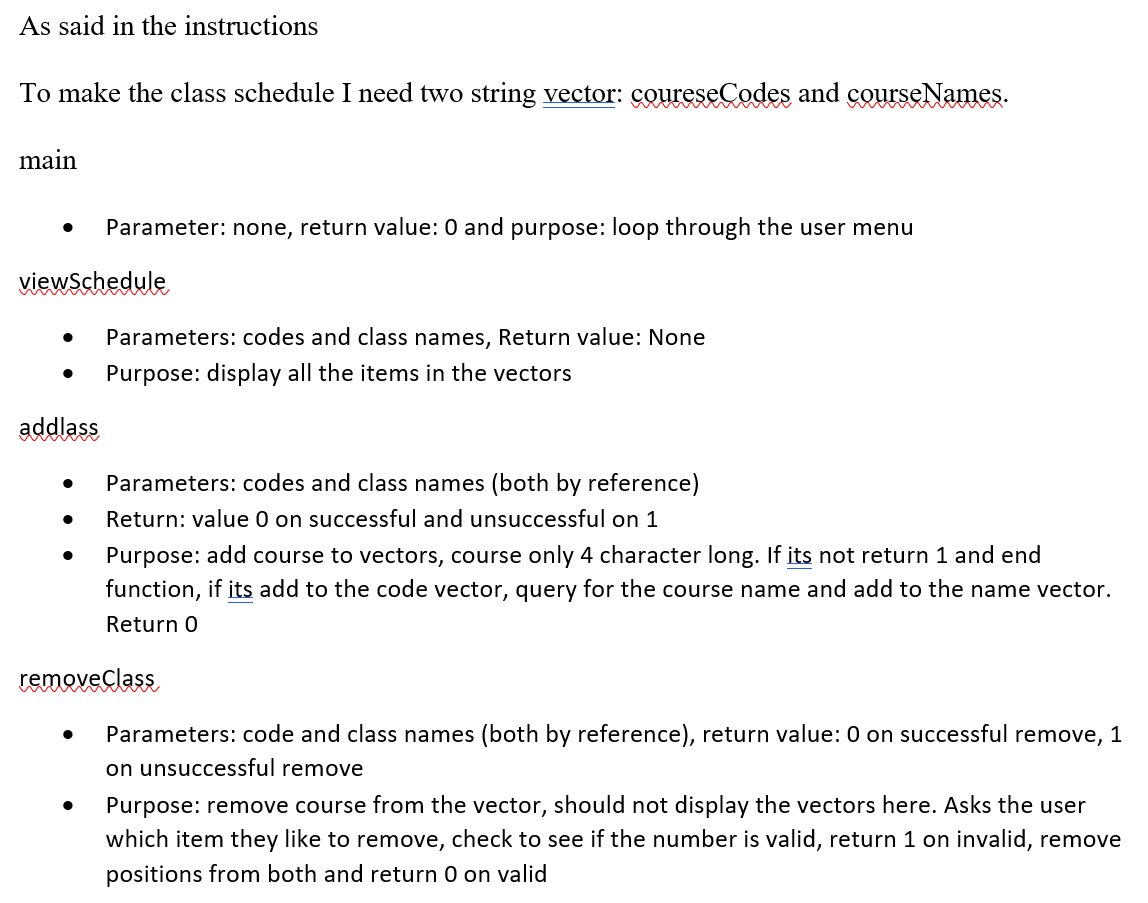
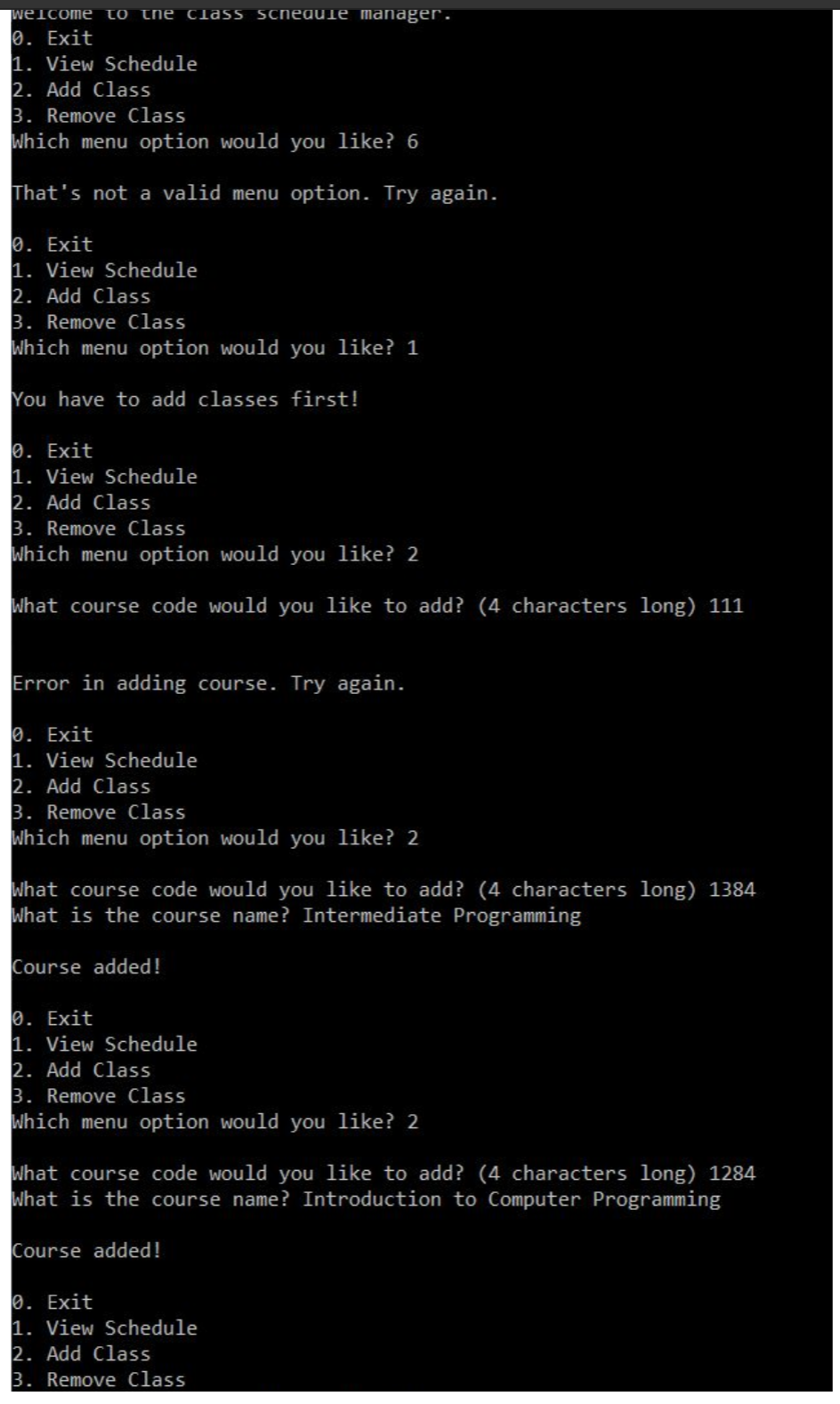
As said in the instructions To make the class schedule I need two string vector: coureseCodes and courseNames. main Parameter: none, return value: 0 and purpose: loop through the user menu viewSchedule Parameters: codes and class names, Return value: None Purpose: display all the items in the vectors addlass Parameters: codes and class names (both by reference) Return: value 0 on successful and unsuccessful on 1 Purpose: add course to vectors, course only 4 character long. If its not return 1 and end function, if its add to the code vector, query for the course name and add to the name vector. Return 0 removeClass Parameters: code and class names (both by reference), return value: 0 on successful remove, 1 on unsuccessful remove Purpose: remove course from the vector, should not display the vectors here. Asks the user which item they like to remove, check to see if the number is valid, return 1 on invalid, remove positions from both and return 0 on valid welcome to the class schedule manager. 10. Exit 1. View Schedule 2. Add Class 3. Remove Class Which menu option would you like? 6 That's not a valid menu option. Try again. 0. Exit 1. View Schedule 2. Add Class 3. Remove Class Which menu option would you like? 1 You have to add classes first! 0. Exit 1. View Schedule 2. Add Class 3. Remove Class Which menu option would you like? 2 What course code would you like to add? (4 characters long) 111 Error in adding course. Try again. 0. Exit 1. View Schedule 2. Add Class 3. Remove Class Which menu option would you like? 2 What course code would you like to add? (4 characters long) 1384 What is the course name? Intermediate Programming Course added! 0. Exit 1. View Schedule 2. Add Class 3. Remove Class Which menu option would you like? 2 What course code would you like to add? (4 characters long) 1284 What is the course name? Introduction to Computer Programming Course added! 0. Exit 1. View Schedule 2. Add Class 3. Remove Class As said in the instructions To make the class schedule I need two string vector: coureseCodes and courseNames. main Parameter: none, return value: 0 and purpose: loop through the user menu viewSchedule Parameters: codes and class names, Return value: None Purpose: display all the items in the vectors addlass Parameters: codes and class names (both by reference) Return: value 0 on successful and unsuccessful on 1 Purpose: add course to vectors, course only 4 character long. If its not return 1 and end function, if its add to the code vector, query for the course name and add to the name vector. Return 0 removeClass Parameters: code and class names (both by reference), return value: 0 on successful remove, 1 on unsuccessful remove Purpose: remove course from the vector, should not display the vectors here. Asks the user which item they like to remove, check to see if the number is valid, return 1 on invalid, remove positions from both and return 0 on valid welcome to the class schedule manager. 10. Exit 1. View Schedule 2. Add Class 3. Remove Class Which menu option would you like? 6 That's not a valid menu option. Try again. 0. Exit 1. View Schedule 2. Add Class 3. Remove Class Which menu option would you like? 1 You have to add classes first! 0. Exit 1. View Schedule 2. Add Class 3. Remove Class Which menu option would you like? 2 What course code would you like to add? (4 characters long) 111 Error in adding course. Try again. 0. Exit 1. View Schedule 2. Add Class 3. Remove Class Which menu option would you like? 2 What course code would you like to add? (4 characters long) 1384 What is the course name? Intermediate Programming Course added! 0. Exit 1. View Schedule 2. Add Class 3. Remove Class Which menu option would you like? 2 What course code would you like to add? (4 characters long) 1284 What is the course name? Introduction to Computer Programming Course added! 0. Exit 1. View Schedule 2. Add Class 3. Remove Class
Step by Step Solution
There are 3 Steps involved in it

Get step-by-step solutions from verified subject matter experts
 Study Help