







Question: I need to write Java code to get this output. Use JTextArea. and I need to increase the size up to 20pt but start from
I need to write Java code to get this output. Use JTextArea. and I need to increase the size up to 20pt but start from 18 using JButtons. and also add JCheckBox and JComboBox
this is the fonts that I have to use Serif, Sans-serif or Monospaced.
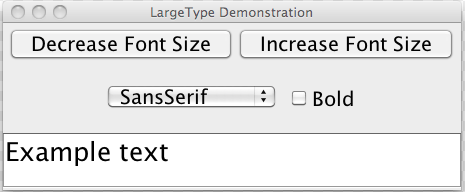
This is requeirements:
2 pt: properly exhibits right logic, i.e., readable and compliable coding
2 pt: properly realizes a text area for user input
2 pt: properly realizes a font list for user selection
2 pt: properly realizes a bold typeset check box and two buttons of font size adjustment
2 pt: properly realizes display change in response to user request
extra credit: allowing user to select colors for text and background by the use of a JColorChooser dialog.
This is what I wrote so far: Please finish my Java program.
import java.awt.*; import java.awt.event.ActionEvent; import java.awt.event.ActionListener; import java.awt.event.WindowAdapter; import java.awt.event.WindowEvent; import javax.swing.*; import java.awt.event.ActionEvent; public class Main extends JFrame implements ActionListener { String input = JOptionPane.showInputDialog("Enter Input:"); JTextArea fontLabel = new JTextArea(input, 5, 30); private JComboBox fontComboBox; public Main() { setTitle("ComboBoxTest"); setSize(300, 200); addWindowListener(new WindowAdapter() { public void windowClosing(WindowEvent e) { System.exit(0); } }); fontComboBox = new JComboBox(); fontComboBox.setEditable(true); fontComboBox.addItem("Serif"); fontComboBox.addItem("SansSerif"); fontComboBox.addItem("Monospaced"); fontComboBox.addActionListener(this); ActionListener listener = new ActionListener() { @Override public void actionPerformed(ActionEvent event) { int mode = 0; if (bold.isSelected()) mode+=Font.BOLD; if (italic.isSelected()) mode+=Font.ITALIC; } }; JPanel p = new JPanel(); p.add(fontComboBox); getContentPane().add(p, "North"); getContentPane().add(fontLabel, "Center"); //getContentPane().add(bold); } public void actionPerformed(ActionEvent evt) { JComboBox source = (JComboBox) evt.getSource(); String item = (String) source.getSelectedItem(); fontLabel.setFont(new Font(item, Font.PLAIN, 12)); } public static void main(String[] args) { JFrame frame = new Main(); frame.show(); } private JCheckBox bold; private JCheckBox italic; } LargeType Demonstration Decrease Font Size Increase Font Size SansSerif Bold Example text
Step by Step Solution
There are 3 Steps involved in it

Get step-by-step solutions from verified subject matter experts
 Study Help