







Question: I only need a flowchart not the code itself that can guide me on how the code should work Sample Input File: Collins, Bill Allen,
I only need a flowchart not the code itself that can guide me on how the code should work
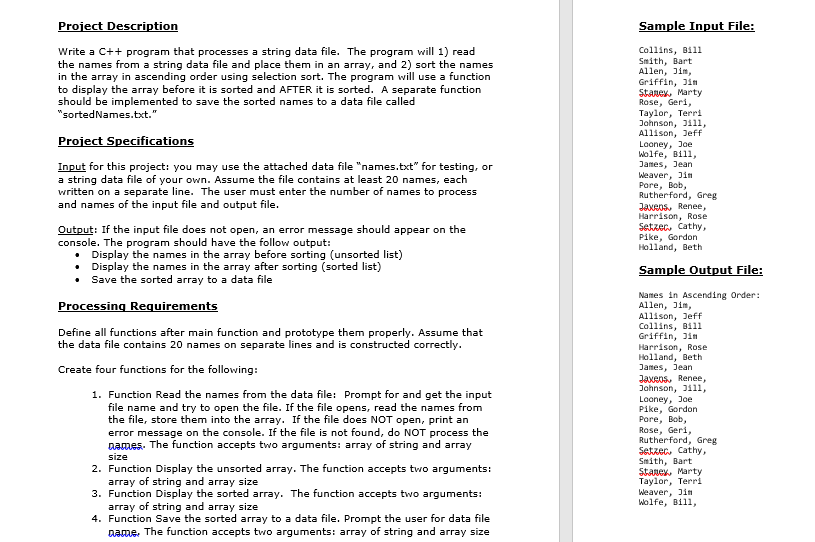
Sample Input File: Collins, Bill Allen, 3im, escription Write a C++ program that processes a string data file. The program will 1) read the names from a string data file and place them in an array, and 2) sort the names in the array in ascending order using selection sort. The program will use a function to display the array before it is sorted and AFTER it is sorted. A separate function should be implemented to save the sorted names to a data file called "sortedNames.txt." 2 Griffin, Jin Taylor, Terri Jahnson, 0111, roiect Specifications Wolfe, Bi11, Input for this project: you may use the attached data file "names.txt" for testing, or a string data file of your own. Assume the file contains at least 20 names, each written on a separate line. The user must enter the number of names to process and names of the input file and output file Harrison, Rose Output: If the input file does not open, an error message should appear on the console. The program should have the follow output: Holland, Beth Sample Out Names in Ascending Order: Display the names in the array before sorting (unsorted list) Display the names in the array after sorting (sorted list) Save the sorted array to a data file rocessing Requirements Define all functions after main function and prototype them properly. Assume that the data file contains 20 names on separate lines and is constructed correctly Allison, Collins, Bill Griffin, Jin Harrison, Rose Create four functions for the following: 1. Function Read the names from the data file: Prompt for and get the input file name and try to open the file. If the file opens, read the names from the file, store them into the array. If the file does NOT open, print an error message on the console. If the file is not found, do NOT process the names. The function accepts two arguments: array of string and array 2. Function Display the unsorted array. The function accepts two arguments: 3. Function Display the sorted array. The function accepts two arguments: 4. Function Save the sorted array to a data file. Prompt the user for data file array of string and array size array of string and array size name. Te function accepts two arguments: array of string and array size Taylor, Terri Wolfe, Bill
Step by Step Solution
There are 3 Steps involved in it

Get step-by-step solutions from verified subject matter experts
 Study Help