







Question: I REALLY NEED HELP I'M USING JAVA AND I'VE ALSO ATTACHED WHAT I'VE TRIED The purpose of the GUI is to control the ChatServer class
I REALLY NEED HELP I'M USING JAVA AND I'VE ALSO ATTACHED WHAT I'VE TRIED
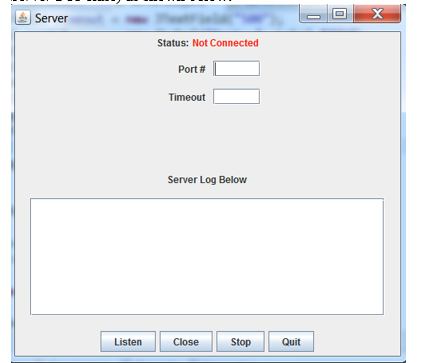
The purpose of the GUI is to control the ChatServer class (see ChatServer section below for a complete description) You will need to add the following private data field to the ServerGUI class:
private ChatServer server;
This server datafield should be instantiated within the ServerGUI constructor using its default constructor.
If the user presses the Listen JButton without the port# or timeout entered (both should be entered), display Port Number/timeout not entered before pressing Listen in the Server Log JTextArea.
If the user presses the Close or Stop JButton before the server is successfully started (i.e., the Listen button has not been pressed), display Server not currently started in the Server Log JTextArea.
The ServerGUI applications shuts down (and the GUI closes) if the user presses the Quit JButton at any time.
Once the port# and timeout has been successfully entered into the GUI, pressing the Listen JButton results in the following:
Invoke the listen service method on the ChatServer private data field (server).
Change the status Label to display Listening and color it Green (this should be done in the serverStarted hook method of the ChatServer class).
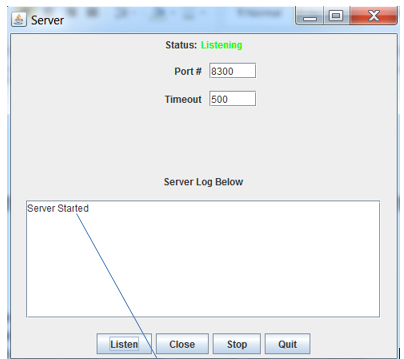
The message Server Started should be displayed in the log JTextArea by the serverStarted hook method of the ChatServer class(see ChatServer section below)
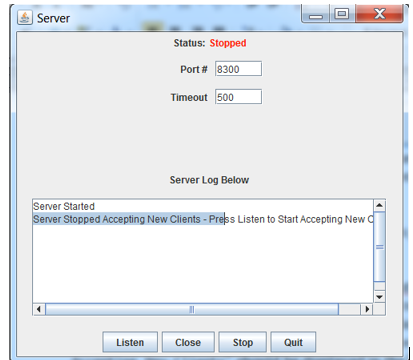
Pressing the Stop JButton (assuming Listen button has been previously pressed) will result in the following steps:
Invoke the stopListening service method on the ChatServer private data field (server).
Change the status JLabel to display Stopped and color it Red (this should be done in the ChatServers serverStopped method).
The message Server Stopped Accepting New Clients - Press Listen to Start Accepting New Clients should be displayed in the log JTextArea by the serverStopped hook method of the ChatServer class (see ChatServer section below).
The stop service method prevents the Server from accepting any new clients. The previously accepted servers are however processed as before.
An example of the GUI after pressing Stop is shown below:
Pressing the Close JButton (assuming Listen button has been previously pressed) will result in the following steps:
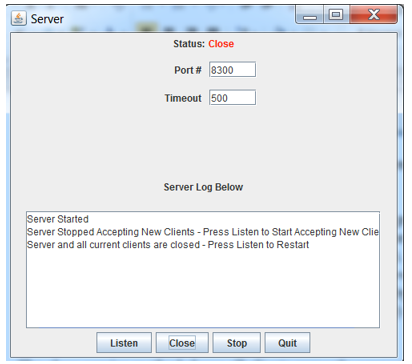
Invoke the close service method on the ChatServer private data field (server).
Change the status Label to display Close and color it Red (the status JLabel should be changed in the ChatServers serverClosed method).
The message Server and all current clients are closed - Press Listen to Restart should be displayed in the log JTextArea by the serverClosed hook method of the ChatServer class (see ChatServer section below)
The close service method closes all clients currently connected to the server. The Server will need to press Listen to restart and begin accepting clients again. An example of the GUI after pressing Close JButton is shown below:
ChatServer
Implement a class named ChatServer (must extend AbstractServer) that implements the Server portion of the Chat System. The ChatServer should declare the following private data fields:
private JTextArea log; //Corresponds to JTextArea of ServerGUI
private JLabel status; //Corresponds to the JLabel of ServerGUI
Implement the following methods for the ChatServer class
public ChatServer()
Constructor for ChatServer class.
public void setLog(JTextArea log)
Setter for JTextArea originally declared and implemented in the ServerGUI class.
public void setStatus(JLabel status)
Setter for JLabel status area declared and implemented in the ServerGUI class.
public void handleMessageFromClient(Object arg0, ConnectionToClient arg1)
Slot method from AbstractServer class. For now, just display the following message to the Console: Message from Client Received
public void listeningException(Throwable exception)
Hook method that is invoked whenever an Exception occurs while the ChatServer is in the process of accepting a client. Display the message associated with the parameter exception in the log JTextArea of the ServerGUI whenever this method is invoked.
This method will be invoked when a non-Java client attempts to connect to the ChatServer For example, trying to connect a Web Browser to the ChatServer results in the following display:
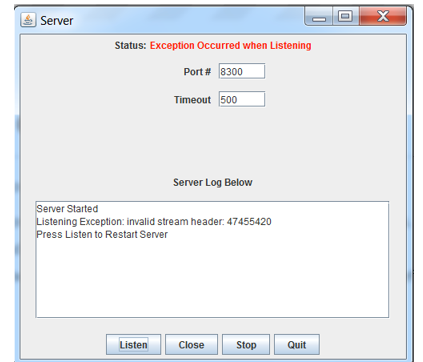
Also display the informational message that the user should press Listen again to restart the server. The status JLabel should also be set to Exception Occurred when Listening colored to red.
public void serverStarted()
Hook method for ChatServer. Display the message Server Started to the log JTextArea. Also sets the JLabel status to Listening and is colored green.
public void serverStopped()
Hook method for ChatServer. Display the message Server Stopped Accepting New Clients - Press Listen to Start Accepting New Clients to the log JTextArea. Also sets the JLabel status to Stopped and is colored red.
public void serverClosed()
Hook method for ChatServer. Display the message Server and all current clients are closed - Press Listen to Restart to the log JTextArea. Also sets the JLabel status to Close and is colored red.
public void clientConnected(ConnectionToClient client)
Hook method for ChatServer. For now, just display the message Client connected to the log JTextArea.
chatServer
import java.awt.Color; import java.io.IOException; import java.net.InetAddress;
import javax.swing.JLabel; import javax.swing.JTextArea;
import ocsf.server.AbstractServer; import ocsf.server.ConnectionToClient;
public class ChatServer extends AbstractServer { private JTextArea log; //Corresponds to JTextArea of ServerGUI private JLabel status; //Corresponds to the JLabel of ServerGUI public ChatServer() { super(12345); } public void setLog(JTextArea log) { this.log = log;
} public void setStatus(JLabel status) { this.status = status; } public void handleMessageFromClient(Object arg0, ConnectionToClient arg1) { // TODO Auto-generated method stub System.out.println("Message from Client Received"); InetAddress address = arg1.getInetAddress(); System.out.println("Client Info:" + arg1.toString()); try { arg1.sendToClient("Hello Client"); } catch (IOException e) { // TODO Auto-generated catch block e.printStackTrace(); } } public void listeningException(Throwable exception) { System.out.println(exception); exception.printStackTrace(); } public void serverStarted() { String out = "Server Started"; log.setText(out); status.setText("Connected"); status.setForeground(Color.green); System.out.println("Server Started"); }
public void serverStopped() { String out = "Server Stopped Accepting New Clients - Press Listen to Start Accepting New Clients"; log.setText(out); status.setText("Stopped"); status.setForeground(Color.RED); } public void serverClosed() { String out = "Server and all current clients are closed - Press Listen to Restart"; log.setText(out); status.setText("Closed"); status.setForeground(Color.RED); } public void clientConnected(ConnectionToClient client) { log.setText("Client Connected"); } }
ServerGUI
package lab2out;
import java.awt.*; import java.awt.event.*; import java.io.IOException;
import javax.swing.*;
import lab2out.ChatServer;
public class ServerGUI extends JFrame { //Data Fields go here private JLabel status;// private String[] labels = {"Port #", "Timeout"}; private JTextField[] textFields = new JTextField[labels.length]; private JTextArea log; private JPanel top,bottom,center; private JButton close; private JButton listen; private JButton quit; private JButton stop; private ChatServer server;
//Methods go here
public ServerGUI(String title) { int i = 0; this.setTitle(title); this.setDefaultCloseOperation(JFrame.EXIT_ON_CLOSE); server = new ChatServer();
// all three different panel i created top = new JPanel(); bottom = new JPanel(); center = new JPanel(); close = new JButton("Close"); listen = new JButton("Listen"); quit = new JButton("Quit"); stop = new JButton("Stop"); for(int count = 0; count if (textFields[0].getText().equals("") || (textFields[1].getText().equals(""))) { String t = "Port Number/timeout not entered before pressing Listen"; log.setText(t); } else { try { server.listen(); server.serverStarted(); } catch (IOException e) { // TODO Auto-generated catch block e.printStackTrace(); } } } }); status = new JLabel("Status : ",JLabel.CENTER); JLabel jl = new JLabel("Not Connected",JLabel.CENTER); jl.setForeground(Color.RED); top = new JPanel(new GridLayout(4,2,5,5)); //top.setLayout(new GridLayout(4,3)); top.add(status); top.add(jl); top.add(new JLabel(labels[0],JLabel.CENTER)); top.add(textFields[0]); top.add(new JLabel(labels[1],JLabel.CENTER)); top.add(textFields[1]); // for the scroll bar text area center = new JPanel(new GridLayout(2,1)); //center = new JPanel(new GridLayout(2,2,10,10)); center.add(new JLabel("Server Log Below",JLabel.CENTER)); log = new JTextArea(5,30); log.setLineWrap(true); log.setEditable(true); log.setVisible(true); center.add(log); JScrollPane scroll = new JScrollPane (log, JScrollPane.VERTICAL_SCROLLBAR_ALWAYS, JScrollPane.HORIZONTAL_SCROLLBAR_ALWAYS); center.add(scroll); bottom.add(listen); bottom.add(close); bottom.add(stop); bottom.add(quit); this.add(bottom,BorderLayout.SOUTH); this.add(top,BorderLayout.NORTH); this.add(center,BorderLayout.CENTER); this.setSize(500,500); //this.pack(); this.setVisible(true); } public JTextField getTextFieldAt(int index) { return textFields[index]; } public JLabel getStatus(){ return status; } public JTextArea getLog(){ return log; } public static void main(String[] args) { new ServerGUI(args[0]); } }
Step by Step Solution
There are 3 Steps involved in it

Get step-by-step solutions from verified subject matter experts
 Study Help