







Question: i really need help with an expert on this microsoft Access please. i really need help with an expert on this microsoft Access please. Group
i really need help with an expert on this microsoft Access please.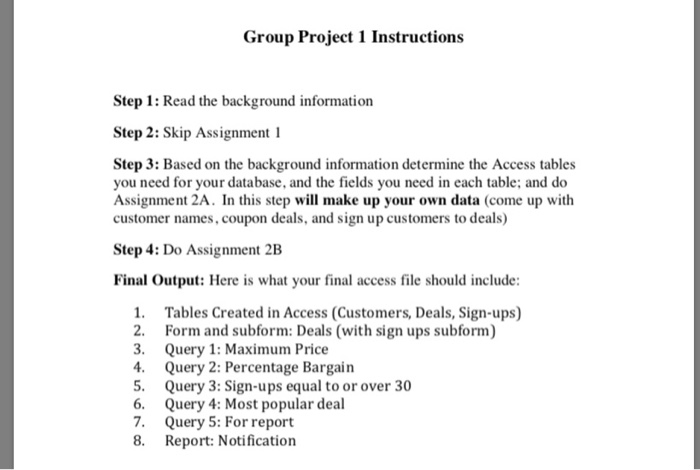
 i really need help with an expert on this microsoft Access please.
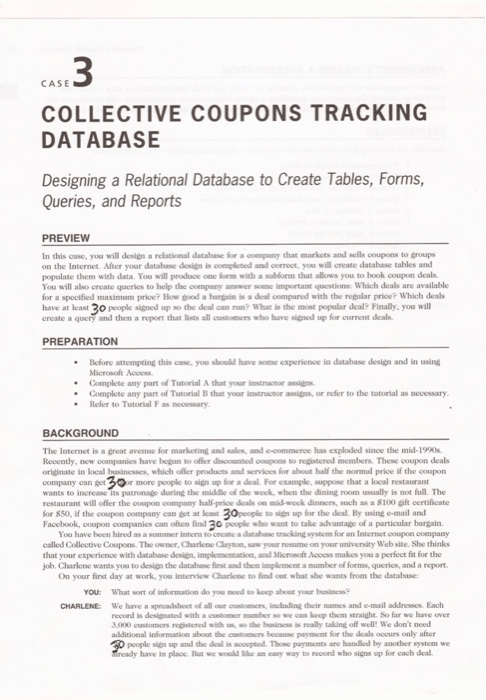
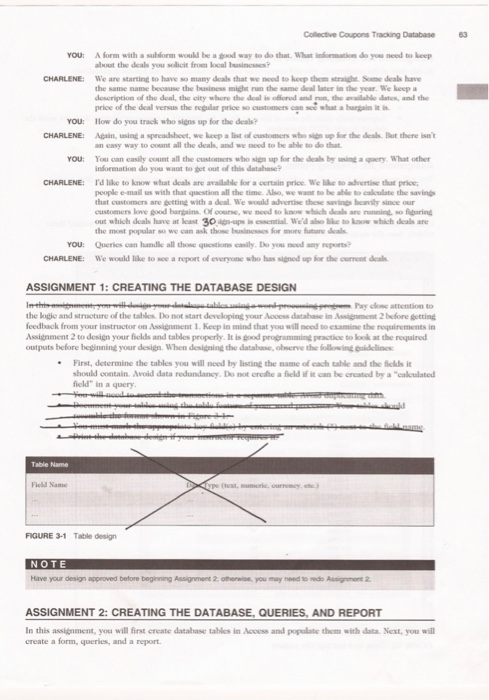
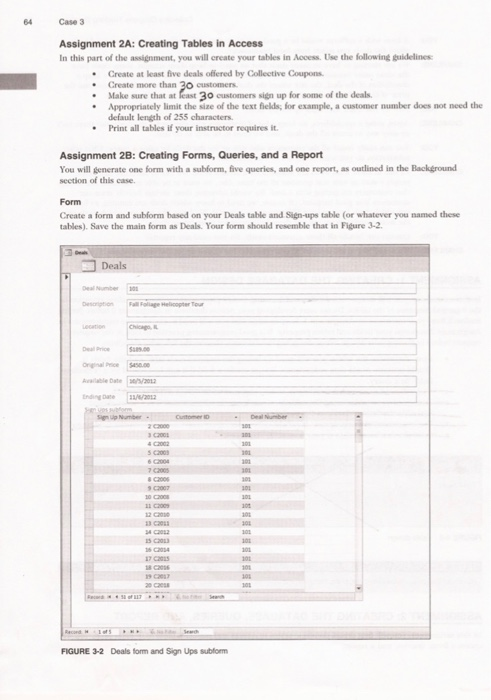
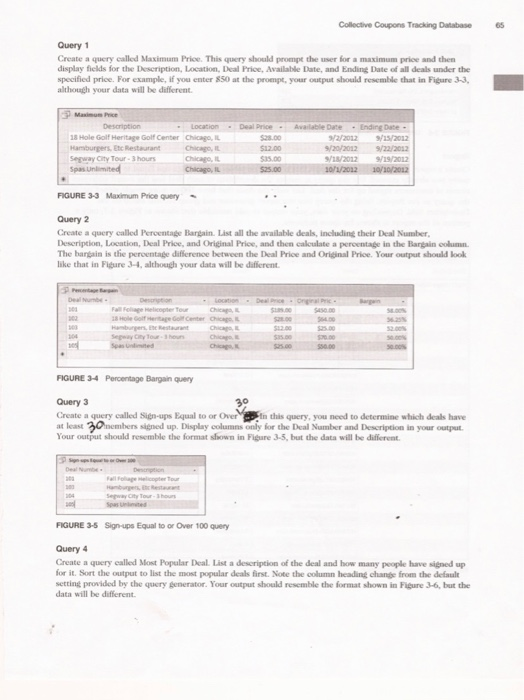
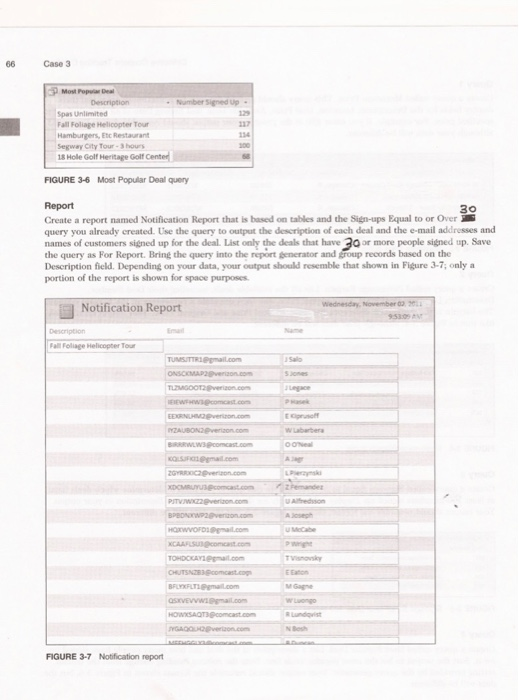
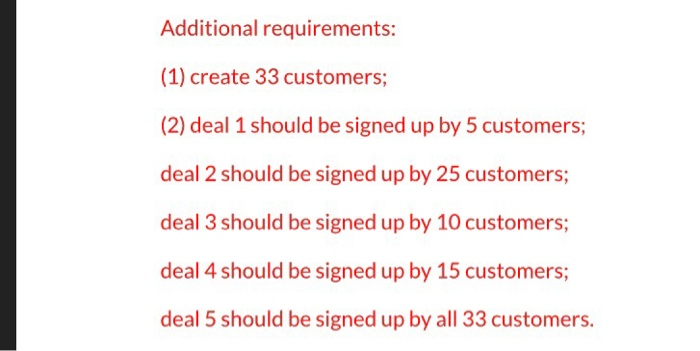
Group Project 1 Instructions Step 1: Read the background information Step 2: Skip Assignment 1 Step 3: Based on the background information determine the Access tables you need for your database, and the fields you need in each table; and do Assignment 2A. In this step will make up your own data (come up with customer names, coupon deals, and sign up customers to deals) Step 4: Do Assignment 2B Final Output: Here is what your final access file should include: 1. Tables Created in Access (Customers, Deals, Sign-ups) 2. Form and subform: Deals (with sign ups subform) 3. Query 1: Maximum Price 4. Query 2: Percentage Bargain 5. Query 3: Sign-ups equal to or over 30 6. Query 4: Most popular deal 7. Query 5: For report 8. Report: Notification CASE 3 COLLECTIVE COUPONS TRACKING DATABASE Designing a Relational Database to Create Tables, Forms, Queries, and Reports PREVIEW In this case, you will design a relational database for a company that markets and sells coupons to groups on the Internet. After your database desition is completed and correct, you will create database tables and populate them with data. You will produce one form with a subform that allows you to book coupon deals You will also create queries to help the company answer some important questions which deals are available for a specified maximum price? How good a bargain is a deal compared with the regular price? Which deals have at least 30 people signed up so the deal can run? What is the most popular deal? Finally, you will create a query and then a report that lists all customers who have signed up for current deals. PREPARATION Before attempting this case, you should have some experience in database design and in using Microsoft Access Complete any part of Tutorial that your instructor assins Complete any part of Tutorial that your instructor assigns, or refer to the tutorial as necessary. Refer to Tutorial as necessary BACKGROUND The Internet is a great avenue for marketing and sales and commerce has exploded since the mid-1990s. Recently, new companies have begun to other discounted coupons to registered members. These coupon deals originate in local businesses, which offer products and services for about half the normal price if the coupon company can get 30r more people to sign up for a deal. For example, suppose that a local restaurant wants to increase its patronage during the middle of the week, when the dining room usually is not full. The restaurant will offer the coupon company half-price deals on mid-week dinners, such as a $100 gift certificate for 850, if the coupon company can set at least 30 people to sign up for the deal. By using e-mail and Facebook, coupon companies can often find 30 people who want to take advantage of a particular bargain. You have been hired as a summer inter to create a database tracking system for an Internet coupon company called Collective Coupons. The owner, Charlene Clayton, sow your resume on your university Web site. She thinks that your experience with database design, implementation, and Microsoft Access makes you a perfect fit for the job. Charlene wants you to design the database first and the implement a number of forms, queries, and a report On your first day at work, you interview Charlene to find out what she wants from the database: YOU: What sort of information do you need to keep about your business? CHARLENE: We have a spreadsheet of all our customers, including their names and e-mail addresses. Each record is designated with a customer so we can keep them straight. So far we have over 3,000 customers with the business is really taking off well! We don't need additional information about the customers because payment for the deals occurs only after so people sien up and the deal is opeed. These payments are handled by another wystem we ready have in place. But we woke my way to record who sign up for each deal 63 Collective Coupons Tracking Database You: A form with a suborm would be a good way to do that. What informatice do you need to keep CHARLENE: We are starting to have so many deals that we need to keep them straight. Some deals have the same name because the business might run the same dal later in the year. We keep description of the deal, the city where the deal is offered and run the available dates, and the price of the deal versus the regular prices customers can see what a hangin it is YOU: How do you track who sign up for the deals? CHARLENE: Again, using a spreadsheet, we keep a list of customers who sen up for the deals. But there isn't an easy way to count all the deals, and we need to be able to do that You: You can easily count all the customers who sign up for the deals by using a query What other information do you want to get out of this database? CHARLENE: I like to know what deals are available for a certain price. We like to advertise that price: people e-mail us with that question all the time. Also, we want to be able to calculate the savings that customers are getting with a deal. We would advertise these sevis heavily since our customers love food burgins. Of course, we need to know which deals are running so figuring out which deals have at least 30-ups is essential. We'd like to know which deals are the most popular so we can ask those businesses for more future deale YOU: Queries can handle all these questions casily. Do you need any reports CHARLENE: We would like to see a report of everyone who has signed up for the current deals ASSIGNMENT 1: CREATING THE DATABASE DESIGN In the million-totables Pay close attention to the logic and structure of the tables. Do not start developing your Access database in Assignment 2 before getting feedback from your instructor on Assignment 1. Keep in mind that you will need to examine the requirements in Assignment 2 to design your fields and tables properly. It is good programming practice to look at the required outputs before beginning your design. When designing the database, observe the following guidelines First, determine the tables you will need by listing the name of cach table and the fields it should contain. Avoid data redundancy. Do not credite a field of it can be created by a "calculated field" in a query Table Name FieldName Xpe test. mumerie.currency ete) FIGURE 3-1 Table design NOTE Have your design approved before beginning Assignment 2 otherwise, you may need to rede Assigment 2 ASSIGNMENT 2: CREATING THE DATABASE, QUERIES, AND REPORT In this assignment, you will first create database tables in Access and populate them with data. Next, you will create a form, queries, and a report 64 Case 3 Assignment 2A: Creating Tables in Access In this part of the assignment, you will create your tables in Access. Use the following guidelines Create at least five deals offered by Collective Coupons Create more than 30 customers. Make sure that at least 30 customers sign up for some of the deals. Appropriately limit the size of the text fields, for example, a customer number does not need the default length of 255 characters. Print all tables if your instructor requires it. Assignment 2B: Creating Forms, Queries, and a Report You will generate one form with a subform, five queries, and one report, as outlined in the Background section of this case Form Create a form and subform based on your Deals table and Sign-ups table (or whatever you named these tables). Save the main form as Deals. Your form should resemble that in Figure 3-2. Deals Deal Number 1 Fall Follage Helicopter Tour Chic inte Number - 101 101 101 303 & Co 30 GOGH 101 203 103 101 15 2014 17 2015 101 100 103 100 FIGURE 3-2 Deals form and Sign Ups subform Collective Coupons Tracking Database Query 1 Create a query called Maximum Price. This query should prompt the user for a maximum price and then display fields for the Description, Location, Deal Price Available Date, and Ending Date of all deals under the specified price. For example, if you enter $50 at the prompt, your output should resemble that in Figure 3-3, although your data will be different. Maximum Price Description - Location - Deal Price Available Date - Ending Dade. 18 Hole Golf Heritage Golf Center Chicago, IL $28.00 9/2/2012 9/25/2012 Hamburgers, Etc Restaurant Chicago, IL $12.00 9/20/2012 9/22/2012 Segway City Tour 3 hours Chicago, IL $15.00 9/10/2012 9/19/2012 Spas Unlimited Chicago, IL $25.00 10/1/2012 10/10/2012 FIGURE 3-3 Maximum Price Query Query 2 Create a query called Percentage Bargain. List all the available deals, including their Deal Number, Description, Location, Deal Price, and Original Price, and then calculate a percentage in the Bargain column The bargain is the percentage difference between the Deal Price and Original Price. Your output should look like that in Figure 3-4, although your data will be different. Deal Numbe Location Deal orice orginal Price Fall Foliage Helicopter Tour 33 Hole Golf Heritage Golf Center Chic Hamburgers in het Sepay you shou Chicas $50.00 50.00 FIGURE 34 Percentage Bargain query Query 3 Create a query called Sign-ups Equal to or Over in this query, you need to determine which deals have at least 30 members signed up, Display columns only for the Deal Number and Description in your output Your output should resemble the format shown in Figure 3-5, bu ll be different Fall Face Tour FIGURE 3-5 Sign ups Equal to or Over 100 query Query 4 Create a query called Most Popular Deal. Lista description of the deal and how many people have signed up for it. Sort the output to list the most popular deals first. Note the column heading change from the default setting provided by the query generator. Your output should resemble the format shown in Figure 3-6, but the data will be different. 66 Case 3 Most Popular Deal Description Number Signed Up - Spas Unlimited Fall Foliage Helicopter Tour 112 Hamburgers, Etc Restaurant 114 Segway City Tour 3 hours 18 Hole Golf Heritage Golf Center FIGURE 3-6 Most Popular Deal query Report 30 Create a report named Notification Report that is based on tables and the Sign-ups Equal to or Over query you already created. Use the query to output the description of each deal and the e-mail addresses and names of customers signed up for the deal. List only the deals that have 30 or more people signed up. Save the query as For Report. Bring the query into the report generator and group records based on the Description field. Depending on your data, your output should resemble that shown in Figure 3-7; only a portion of the report is shown for space purposes. Wednesday, November Et Wabarbera OON Notification Report Description Fall Follage Helicopter Tour TUMSTTRI.com ONSCOM.com TANGOO 2on.com comcast.com EENUHD verzon.com ZAUBONGO.com SIRRRLWS.comcast.com KOLICI.com ZORROC Dron.com XOCMIRUYUB.comcast.com PATVJWXZ2on.com BPBDNW2zon.com HOXWOFDail.com NCAALSUB.comcast.com TOHDOKAVI.com CHUTZ comcast.com BFLEXFLTL mall.com OSXVEVVail.com HOWSAQTcomcast.com JGADO Delon.com Ajo U Mebe Toky Gagne wLogo Ne FIGURE 3-7 Notification report Additional requirements: (1) create 33 customers; (2) deal 1 should be signed up by 5 customers; deal 2 should be signed up by 25 customers; deal 3 should be signed up by 10 customers; deal 4 should be signed up by 15 customers; deal 5 should be signed up by all 33 customers. Group Project 1 Instructions Step 1: Read the background information Step 2: Skip Assignment 1 Step 3: Based on the background information determine the Access tables you need for your database, and the fields you need in each table; and do Assignment 2A. In this step will make up your own data (come up with customer names, coupon deals, and sign up customers to deals) Step 4: Do Assignment 2B Final Output: Here is what your final access file should include: 1. Tables Created in Access (Customers, Deals, Sign-ups) 2. Form and subform: Deals (with sign ups subform) 3. Query 1: Maximum Price 4. Query 2: Percentage Bargain 5. Query 3: Sign-ups equal to or over 30 6. Query 4: Most popular deal 7. Query 5: For report 8. Report: Notification CASE 3 COLLECTIVE COUPONS TRACKING DATABASE Designing a Relational Database to Create Tables, Forms, Queries, and Reports PREVIEW In this case, you will design a relational database for a company that markets and sells coupons to groups on the Internet. After your database desition is completed and correct, you will create database tables and populate them with data. You will produce one form with a subform that allows you to book coupon deals You will also create queries to help the company answer some important questions which deals are available for a specified maximum price? How good a bargain is a deal compared with the regular price? Which deals have at least 30 people signed up so the deal can run? What is the most popular deal? Finally, you will create a query and then a report that lists all customers who have signed up for current deals. PREPARATION Before attempting this case, you should have some experience in database design and in using Microsoft Access Complete any part of Tutorial that your instructor assins Complete any part of Tutorial that your instructor assigns, or refer to the tutorial as necessary. Refer to Tutorial as necessary BACKGROUND The Internet is a great avenue for marketing and sales and commerce has exploded since the mid-1990s. Recently, new companies have begun to other discounted coupons to registered members. These coupon deals originate in local businesses, which offer products and services for about half the normal price if the coupon company can get 30r more people to sign up for a deal. For example, suppose that a local restaurant wants to increase its patronage during the middle of the week, when the dining room usually is not full. The restaurant will offer the coupon company half-price deals on mid-week dinners, such as a $100 gift certificate for 850, if the coupon company can set at least 30 people to sign up for the deal. By using e-mail and Facebook, coupon companies can often find 30 people who want to take advantage of a particular bargain. You have been hired as a summer inter to create a database tracking system for an Internet coupon company called Collective Coupons. The owner, Charlene Clayton, sow your resume on your university Web site. She thinks that your experience with database design, implementation, and Microsoft Access makes you a perfect fit for the job. Charlene wants you to design the database first and the implement a number of forms, queries, and a report On your first day at work, you interview Charlene to find out what she wants from the database: YOU: What sort of information do you need to keep about your business? CHARLENE: We have a spreadsheet of all our customers, including their names and e-mail addresses. Each record is designated with a customer so we can keep them straight. So far we have over 3,000 customers with the business is really taking off well! We don't need additional information about the customers because payment for the deals occurs only after so people sien up and the deal is opeed. These payments are handled by another wystem we ready have in place. But we woke my way to record who sign up for each deal 63 Collective Coupons Tracking Database You: A form with a suborm would be a good way to do that. What informatice do you need to keep CHARLENE: We are starting to have so many deals that we need to keep them straight. Some deals have the same name because the business might run the same dal later in the year. We keep description of the deal, the city where the deal is offered and run the available dates, and the price of the deal versus the regular prices customers can see what a hangin it is YOU: How do you track who sign up for the deals? CHARLENE: Again, using a spreadsheet, we keep a list of customers who sen up for the deals. But there isn't an easy way to count all the deals, and we need to be able to do that You: You can easily count all the customers who sign up for the deals by using a query What other information do you want to get out of this database? CHARLENE: I like to know what deals are available for a certain price. We like to advertise that price: people e-mail us with that question all the time. Also, we want to be able to calculate the savings that customers are getting with a deal. We would advertise these sevis heavily since our customers love food burgins. Of course, we need to know which deals are running so figuring out which deals have at least 30-ups is essential. We'd like to know which deals are the most popular so we can ask those businesses for more future deale YOU: Queries can handle all these questions casily. Do you need any reports CHARLENE: We would like to see a report of everyone who has signed up for the current deals ASSIGNMENT 1: CREATING THE DATABASE DESIGN In the million-totables Pay close attention to the logic and structure of the tables. Do not start developing your Access database in Assignment 2 before getting feedback from your instructor on Assignment 1. Keep in mind that you will need to examine the requirements in Assignment 2 to design your fields and tables properly. It is good programming practice to look at the required outputs before beginning your design. When designing the database, observe the following guidelines First, determine the tables you will need by listing the name of cach table and the fields it should contain. Avoid data redundancy. Do not credite a field of it can be created by a "calculated field" in a query Table Name FieldName Xpe test. mumerie.currency ete) FIGURE 3-1 Table design NOTE Have your design approved before beginning Assignment 2 otherwise, you may need to rede Assigment 2 ASSIGNMENT 2: CREATING THE DATABASE, QUERIES, AND REPORT In this assignment, you will first create database tables in Access and populate them with data. Next, you will create a form, queries, and a report 64 Case 3 Assignment 2A: Creating Tables in Access In this part of the assignment, you will create your tables in Access. Use the following guidelines Create at least five deals offered by Collective Coupons Create more than 30 customers. Make sure that at least 30 customers sign up for some of the deals. Appropriately limit the size of the text fields, for example, a customer number does not need the default length of 255 characters. Print all tables if your instructor requires it. Assignment 2B: Creating Forms, Queries, and a Report You will generate one form with a subform, five queries, and one report, as outlined in the Background section of this case Form Create a form and subform based on your Deals table and Sign-ups table (or whatever you named these tables). Save the main form as Deals. Your form should resemble that in Figure 3-2. Deals Deal Number 1 Fall Follage Helicopter Tour Chic inte Number - 101 101 101 303 & Co 30 GOGH 101 203 103 101 15 2014 17 2015 101 100 103 100 FIGURE 3-2 Deals form and Sign Ups subform Collective Coupons Tracking Database Query 1 Create a query called Maximum Price. This query should prompt the user for a maximum price and then display fields for the Description, Location, Deal Price Available Date, and Ending Date of all deals under the specified price. For example, if you enter $50 at the prompt, your output should resemble that in Figure 3-3, although your data will be different. Maximum Price Description - Location - Deal Price Available Date - Ending Dade. 18 Hole Golf Heritage Golf Center Chicago, IL $28.00 9/2/2012 9/25/2012 Hamburgers, Etc Restaurant Chicago, IL $12.00 9/20/2012 9/22/2012 Segway City Tour 3 hours Chicago, IL $15.00 9/10/2012 9/19/2012 Spas Unlimited Chicago, IL $25.00 10/1/2012 10/10/2012 FIGURE 3-3 Maximum Price Query Query 2 Create a query called Percentage Bargain. List all the available deals, including their Deal Number, Description, Location, Deal Price, and Original Price, and then calculate a percentage in the Bargain column The bargain is the percentage difference between the Deal Price and Original Price. Your output should look like that in Figure 3-4, although your data will be different. Deal Numbe Location Deal orice orginal Price Fall Foliage Helicopter Tour 33 Hole Golf Heritage Golf Center Chic Hamburgers in het Sepay you shou Chicas $50.00 50.00 FIGURE 34 Percentage Bargain query Query 3 Create a query called Sign-ups Equal to or Over in this query, you need to determine which deals have at least 30 members signed up, Display columns only for the Deal Number and Description in your output Your output should resemble the format shown in Figure 3-5, bu ll be different Fall Face Tour FIGURE 3-5 Sign ups Equal to or Over 100 query Query 4 Create a query called Most Popular Deal. Lista description of the deal and how many people have signed up for it. Sort the output to list the most popular deals first. Note the column heading change from the default setting provided by the query generator. Your output should resemble the format shown in Figure 3-6, but the data will be different. 66 Case 3 Most Popular Deal Description Number Signed Up - Spas Unlimited Fall Foliage Helicopter Tour 112 Hamburgers, Etc Restaurant 114 Segway City Tour 3 hours 18 Hole Golf Heritage Golf Center FIGURE 3-6 Most Popular Deal query Report 30 Create a report named Notification Report that is based on tables and the Sign-ups Equal to or Over query you already created. Use the query to output the description of each deal and the e-mail addresses and names of customers signed up for the deal. List only the deals that have 30 or more people signed up. Save the query as For Report. Bring the query into the report generator and group records based on the Description field. Depending on your data, your output should resemble that shown in Figure 3-7; only a portion of the report is shown for space purposes. Wednesday, November Et Wabarbera OON Notification Report Description Fall Follage Helicopter Tour TUMSTTRI.com ONSCOM.com TANGOO 2on.com comcast.com EENUHD verzon.com ZAUBONGO.com SIRRRLWS.comcast.com KOLICI.com ZORROC Dron.com XOCMIRUYUB.comcast.com PATVJWXZ2on.com BPBDNW2zon.com HOXWOFDail.com NCAALSUB.comcast.com TOHDOKAVI.com CHUTZ comcast.com BFLEXFLTL mall.com OSXVEVVail.com HOWSAQTcomcast.com JGADO Delon.com Ajo U Mebe Toky Gagne wLogo Ne FIGURE 3-7 Notification report Additional requirements: (1) create 33 customers; (2) deal 1 should be signed up by 5 customers; deal 2 should be signed up by 25 customers; deal 3 should be signed up by 10 customers; deal 4 should be signed up by 15 customers; deal 5 should be signed up by all 33 customers
Step by Step Solution
There are 3 Steps involved in it

Get step-by-step solutions from verified subject matter experts
 Study Help