







Question: I really need help with this project. Please MICRoSOFT ACCESS PROJECT Background information: The Board of Directors has accepted your recommendations for the new esktop
I really need help with this project. Please
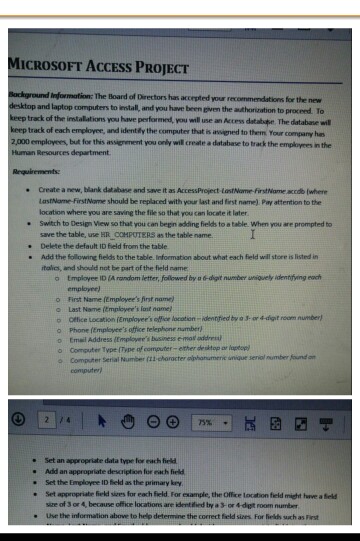
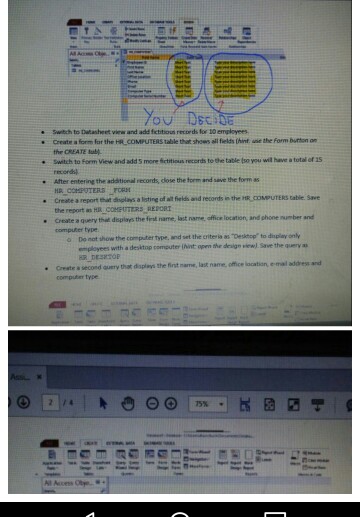
MICRoSOFT ACCESS PROJECT Background information: The Board of Directors has accepted your recommendations for the new esktop and laptop computers to instal, and you have been given the authorization to proceed. To keep track of the installations you have performend, you well use an Access datalspe The database wil keep track of each employer, and identily the computer thut is awiened to them Your company hes 2,000 employees, but for this assignement you only wil create a database to track the employees in the Human Resources department e Create a new, blank database and save it as AccessProject-LostNome FirstName accdb (where LastName-FirstNome should be replaced with your last and first name) Pay attention to the location where you are saving the file so that you can locate it later save the table, use HR COMPUTERS as the table name Add the following fields to the table. Information about what each feld will store is listed in . Switch to Design View so that you can begn addling fields to a table. When you are prompted to e Delete the default ID field from the table italics, and should not be part of the field name o tmployee ID (A random letter, followed by a6-igit number nsiquely idenrifving each employee) o First Name [Employee's first name) o Last Name (Emplovee's last name ?cetice Location (Employer's office locaten-denried by g Jor 4dgit ream number) Phone (Employer's office telephone number) o Email Address Emplover's business e mal address ?Cornuter Typt (Type of computer-ether deshtop ar laptop o Computer Serial Number (t1 choracter alphonumenie unique seniol mumber found on computer 75% Set an appropriate data type for each field Add an appropriate description for each field . . Set the Employee ID field as the primary kry e Set appropriabe field sizes for each field For esample, the Office location field might have a ield size of 3 or 4, because office locations are identified by a 3- or 4-digt room number e Use the information above to help determine the correct field sizes For fieldh such as ist MICRoSOFT ACCESS PROJECT Background information: The Board of Directors has accepted your recommendations for the new esktop and laptop computers to instal, and you have been given the authorization to proceed. To keep track of the installations you have performend, you well use an Access datalspe The database wil keep track of each employer, and identily the computer thut is awiened to them Your company hes 2,000 employees, but for this assignement you only wil create a database to track the employees in the Human Resources department e Create a new, blank database and save it as AccessProject-LostNome FirstName accdb (where LastName-FirstNome should be replaced with your last and first name) Pay attention to the location where you are saving the file so that you can locate it later save the table, use HR COMPUTERS as the table name Add the following fields to the table. Information about what each feld will store is listed in . Switch to Design View so that you can begn addling fields to a table. When you are prompted to e Delete the default ID field from the table italics, and should not be part of the field name o tmployee ID (A random letter, followed by a6-igit number nsiquely idenrifving each employee) o First Name [Employee's first name) o Last Name (Emplovee's last name ?cetice Location (Employer's office locaten-denried by g Jor 4dgit ream number) Phone (Employer's office telephone number) o Email Address Emplover's business e mal address ?Cornuter Typt (Type of computer-ether deshtop ar laptop o Computer Serial Number (t1 choracter alphonumenie unique seniol mumber found on computer 75% Set an appropriate data type for each field Add an appropriate description for each field . . Set the Employee ID field as the primary kry e Set appropriabe field sizes for each field For esample, the Office location field might have a ield size of 3 or 4, because office locations are identified by a 3- or 4-digt room number e Use the information above to help determine the correct field sizes For fieldh such as ist
Step by Step Solution
There are 3 Steps involved in it

Get step-by-step solutions from verified subject matter experts
 Study Help