





Question: I. Requirements 1. Using Java language and Eclipse IDE environment, please create a functional calculator similar to the following. Name the Eclipse Project as _Assignment2.
 I. Requirements 1. Using Java language and Eclipse IDE environment, please

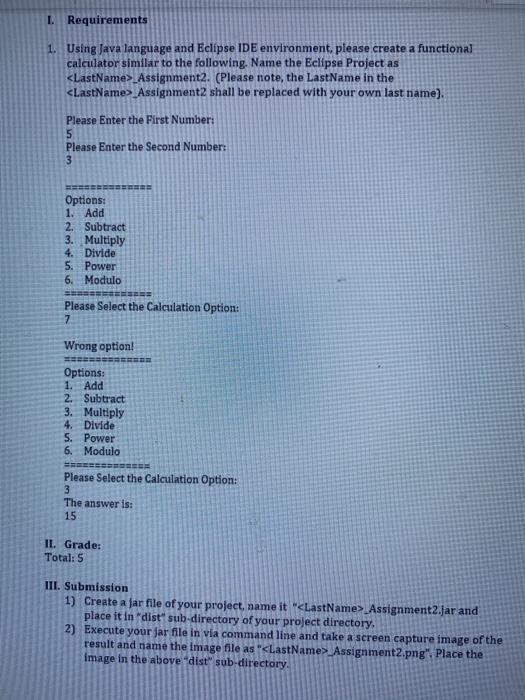
I. Requirements 1. Using Java language and Eclipse IDE environment, please create a functional calculator similar to the following. Name the Eclipse Project as _Assignment2. (Please note, the LastName in the Assignment2 shall be replaced with your own last name). Please Enter the First Number: 5 Please enter the Second Number: 3 Options: 1. Add 2. Subtract 3. Multiply 4. Divide 5. Power 6. Modulo Please Select the Calculation Option: 7 Wrong option! Options: 1. Add 2. Subtract 3. Multiply 4. Divide 5. Power 6. Modulo Please Select the Calculation Option: 3 The answer is: 15 II. Grade: Total: 5 III. Submission 1) Create a far file of your project, name it " Assignment2.jar and place it in "dist sub-directory of your project directory. 2) Execute your jar file in via command line and take a screen capture image of the result and name the image file as " Assignment2.png". Place the image in the above "dist sub-directory

Step by Step Solution

There are 3 Steps involved in it

1 Expert Approved Answer
Step: 1 Unlock blur-text-image
Question Has Been Solved by an Expert!

Get step-by-step solutions from verified subject matter experts

Step: 2 Unlock
Step: 3 Unlock

Students Have Also Explored These Related Databases Questions!