







Question: i Specify the column types or set show_col_types = FALSE to qui {r} library(7ubridate) #New Variable with the day of the week daily_show %>%
i Specify the column types or set show_col_types
=FALSE to qui\
{r}\ library(7ubridate)\ #New Variable with the day of the week\ daily_show
%>%\ mutate (Show = ??? (Show)
%>%\ mutate (Show_day = ???(Show, labe 1=TRUE))%>%\ group_by(show_day)
%>%\ summarise (count_wkday
=n())\ Warning: There was 1 warning in mutate() .\ i Tn arnument." "show
=vmar (show)"\ 26:24\ Chunk 2 :
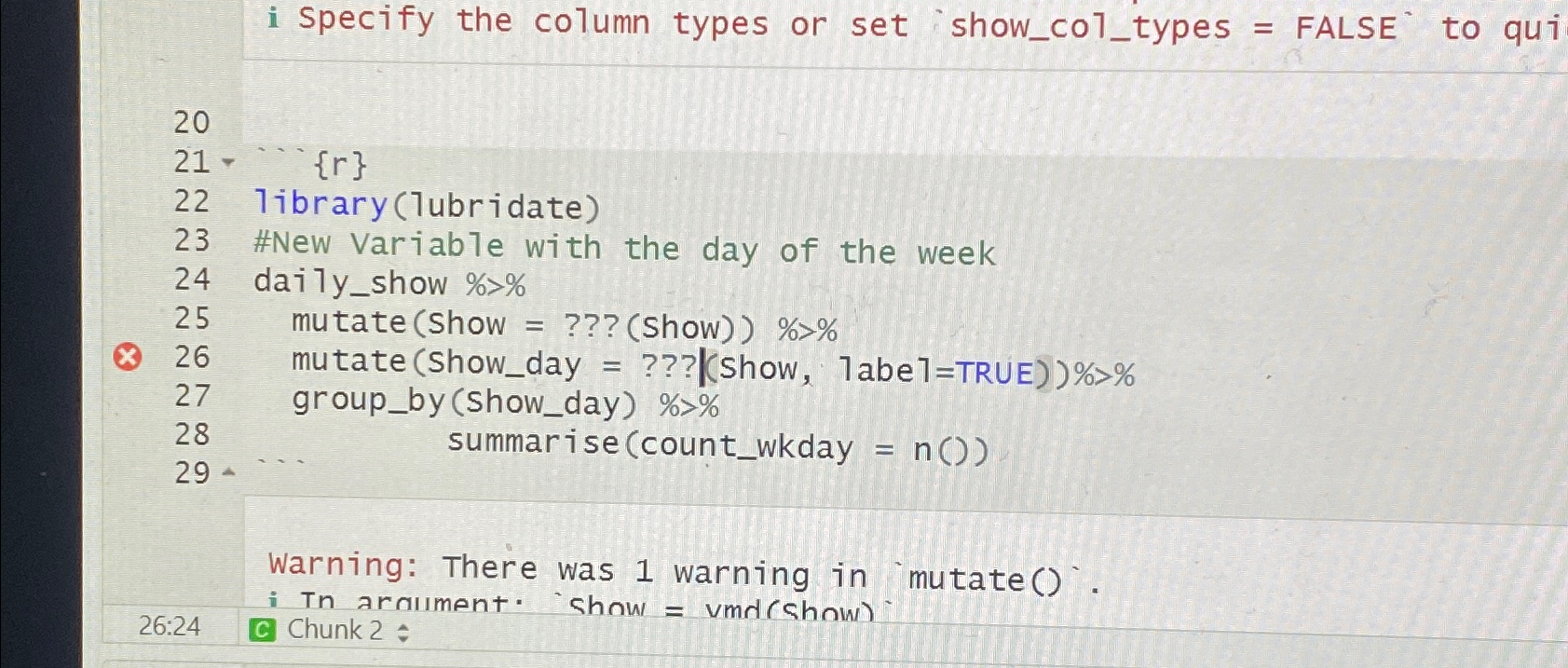
i specify the column types or set show_col_types = FALSE to qui {r} library(1ubridate) \#New Variable with the day of the week daily_show %>% mutate (Show = ??? (Show)) %>% mutate (Show_day = ???(Show, 1 abe 1= TRUE) )%>% group_by(Show_day) %>% summarise (count_wkday =n()) Warning: There was 1 warning in mutate(). i Tn araument." 'show = vma (Show). 26:24 Chunk 2: i specify the column types or set show_col_types = FALSE to qui {r} library(1ubridate) \#New Variable with the day of the week daily_show %>% mutate (Show = ??? (Show)) %>% mutate (Show_day = ???(Show, 1 abe 1= TRUE) )%>% group_by(Show_day) %>% summarise (count_wkday =n()) Warning: There was 1 warning in mutate(). i Tn araument." 'show = vma (Show). 26:24 Chunk 2
Step by Step Solution
There are 3 Steps involved in it
To fix the errors in your R code you need to replace the placeholders marked with with appropriate f... View full answer

Get step-by-step solutions from verified subject matter experts
 Study Help