







Question: I tried to run the following code from Chapter 8.11, Problem 7PE of Assembly Language for x86 Processors to find the Greatest Common Denominator of
I tried to run the following code from Chapter 8.11, Problem 7PE of Assembly Language for x86 Processors to find the Greatest Common Denominator of a series of numbers using the Euclidean Algorithm.
__________________________________________
TITLE Greatest Common Divisor (gcd.asm)
; This program clears the screen, finds the GCD of
; different integer pairs and then display the results
; on screen
INCLUDE Irvine32.inc
.data
str1 BYTE "The GCD is: ",0
.code
main PROC
; calls the procedures
call Clrscr ; clears the screen
; finds the GCD of (5, 20)
push 5
push 20
call Recursive_GCD ; procedure call
mov edx,OFFSET str1
call WriteString ; writes str1
call WriteDec ; writes GCD in EAX
call Crlf
call Crlf
exit
main ENDP
Recursive_GCD PROC USES eax ebx edx
; finds the gcd of two numbers using recursion
; Receives: [ebp+12] = dividend, [ebp+8] = divisor
; Returns: EAX= GCD
; The procedure considers the numbers are absolute values themselves
push ebp
mov ebp,esp ; assigns stack
; pointers
mov eax,[ebp+12] ; EAX: dividend
mov ebx,[ebp+8] ; EBX: divisor
; calculate the remainder using DIV instruction
mov edx,0 ; EDX stores the
; remainder
div ebx ; EAX: quotient, EDX: remainder
cmp edx,0 ; if remainder=0,
; stop the loop
ja L1 ; else continue
mov eax,ebx ; sets the final GCD in EAX
jmp L2
L1:
; change the dividend and divisor
mov eax,ebx
mov ebx,edx
call Recursive_GCD ; recursive call
L2:
pop ebp
ret 8 ; free the used
; stack space
Recursive_GCD ENDP
END main
__________________________________________
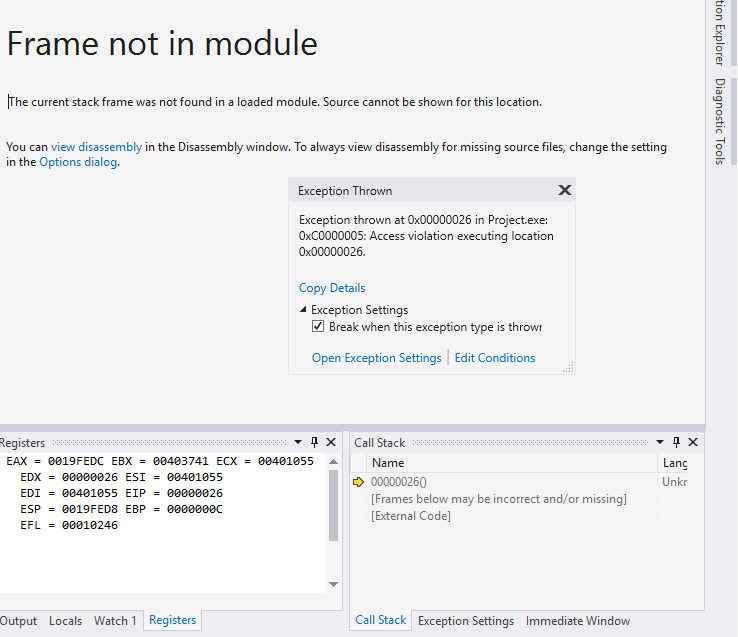
The problem is that by the time I reach the line "ret 8" an exception is thrown and I get the following error:
I'm NOT asking for a new program, I'm just asking for a fix to this existing program that still uses assembly language, Includes Irvine32.inc and no other extensions, runs on Visual Studio (it's what the book associates with), and nothing more. If it isn't identical to the formatting or the original problem, it is wrong by default, so no Java, or Python, or anything of the sort. If you can prove your solution right by running it as well, that would be fantastic.
Frame not in module The current stack frame was not found in a loaded module. Source cannot be shown for this location. You can view disassembly in the Disassembly window. To always view disassembly for missing source files, change the setting in the Options dialog. Exception Thrown Exception thrown at 0x00000026 in Project.exe: 0xC0000005: Access violation executing location Copy Details Exception Settings Break when this exception type is throw Open Exception Settings Edit Conditions egisters EAX = 0019FEDC EBX = 00403741 ECX = 00401055 Call Stack Name 000000260 [Frames below may be incorrect and/or missing] External Code] Lang Unkr EDX = 00000026 ESI = 00401055 EDI = 00401055 EIP = 00000026 ESP = 00|9FED8 EBP = 0000000C EFL = 00010246 Output Locals Watch 1 Registers Call Stack Exception Settings Immediate Window Frame not in module The current stack frame was not found in a loaded module. Source cannot be shown for this location. You can view disassembly in the Disassembly window. To always view disassembly for missing source files, change the setting in the Options dialog. Exception Thrown Exception thrown at 0x00000026 in Project.exe: 0xC0000005: Access violation executing location Copy Details Exception Settings Break when this exception type is throw Open Exception Settings Edit Conditions egisters EAX = 0019FEDC EBX = 00403741 ECX = 00401055 Call Stack Name 000000260 [Frames below may be incorrect and/or missing] External Code] Lang Unkr EDX = 00000026 ESI = 00401055 EDI = 00401055 EIP = 00000026 ESP = 00|9FED8 EBP = 0000000C EFL = 00010246 Output Locals Watch 1 Registers Call Stack Exception Settings Immediate Window
Step by Step Solution
There are 3 Steps involved in it

Get step-by-step solutions from verified subject matter experts
 Study Help