







Question: i use this code to get it above: /* * To change this license header, choose License Headers in Project Properties. * To change this
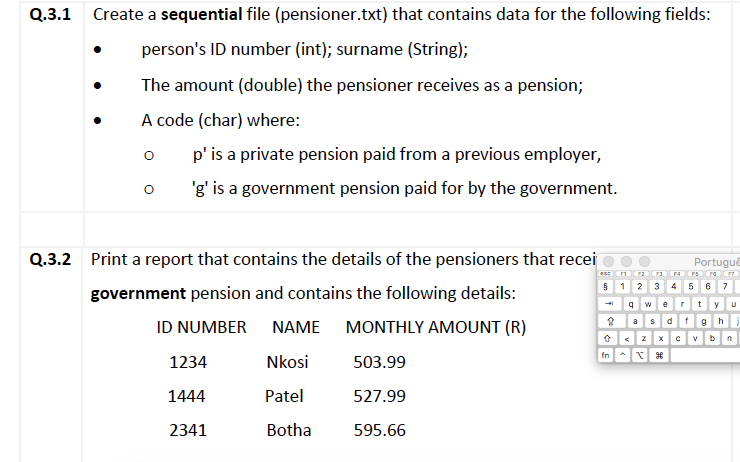
i use this code to get it above:
/* * To change this license header, choose License Headers in Project Properties. * To change this template file, choose Tools | Templates * and open the template in the editor. */ package pension;
import java.io.File; import java.io.FileNotFoundException; import java.util.Scanner;
/** * * @author macbookair */ public class Pension {
/** * @param args the command line arguments */ // we have created a final static String variable that will store the pensioner.txt file path private static final String PENSIONER_FILE_PATH = "pensioner.txt";
public static void main(String[] args) {
// creating a reference to file File inputFile = new File(PENSIONER_FILE_PATH);
try {
// using scanner class to read the file line by line Scanner scanner = new Scanner(inputFile);
// printing the header System.out.println(String.format("%-20s %-20s%-20s", "ID NUMBER", "NAME", "MONTHLY PAYMENT (R)"));
while (scanner.hasNext()) {
// reading the file line by line String readLine = scanner.nextLine();
// we are splitting the line by space to get the individual tokens String[] details = readLine.split("\\s+");
// the first token will have the id String id = details[0];
// the second token will have the name String name = details[1];
// the 3rd token will have the pension amount String pension = details[2];
// the 4th token will have the type - government or private String type = details[3];
// only when the type is of g we are printing the row if (type.equalsIgnoreCase("g")) {
System.out.println(String.format(" %-20s%-20s%-20s", id, name, pension));
}
}
// once we have read all the files we are closing the scanner object scanner.close();
} catch (FileNotFoundException e) {
// if the file is not found at the available path we print the message and exit out of the program System.out.println("FILE NOT AVAILABLE IN THE PATH: " + PENSIONER_FILE_PATH);
}
}
}
//but didnt work in my macbook also i a m using netbeans not eclipse, help me i NEED THIS TODAY. On the other hand, eclipse work perfectly in windows
Q.3.1 Create a sequential file (pensioner.txt) that contains data for the following fields: person's ID number (int); surname (String); The amount (double) the pensioner receives as a pension; A code (char) where: o p' is a private pension paid from a previous employer, o 'g' is a government pension paid for by the government Print a report that contains the details of the pensioners that recei government pension and contains the following details: Q.3.2 Portugu 5 1 2 3 4 5 67 ID NUMBER NAME MONTHLY AMOUNT (R) Nkos 503.99 Pate 527.99 Botha 595.66 1234 1444 2341
Step by Step Solution
There are 3 Steps involved in it

Get step-by-step solutions from verified subject matter experts
 Study Help