







Question: I want to create a clickable tree diagram using: (javascript ,Css,Html) And when you click like this the conditions : I want the same look
I want to create a clickable tree diagram using: (javascript ,Css,Html) 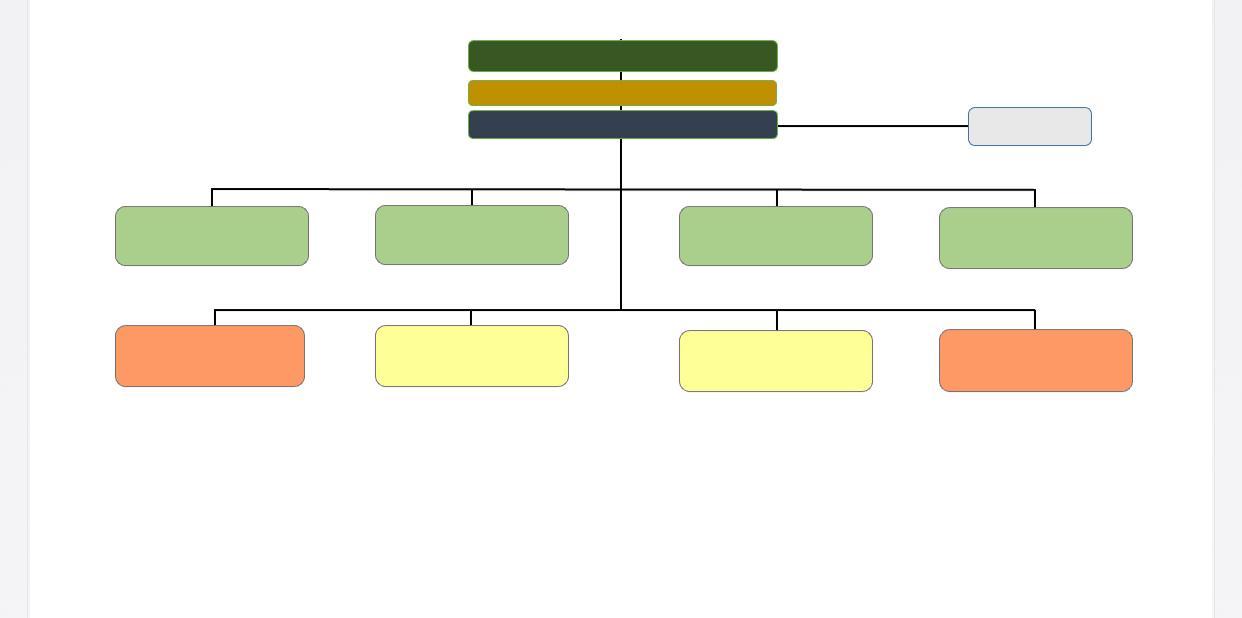 And when you click like this
 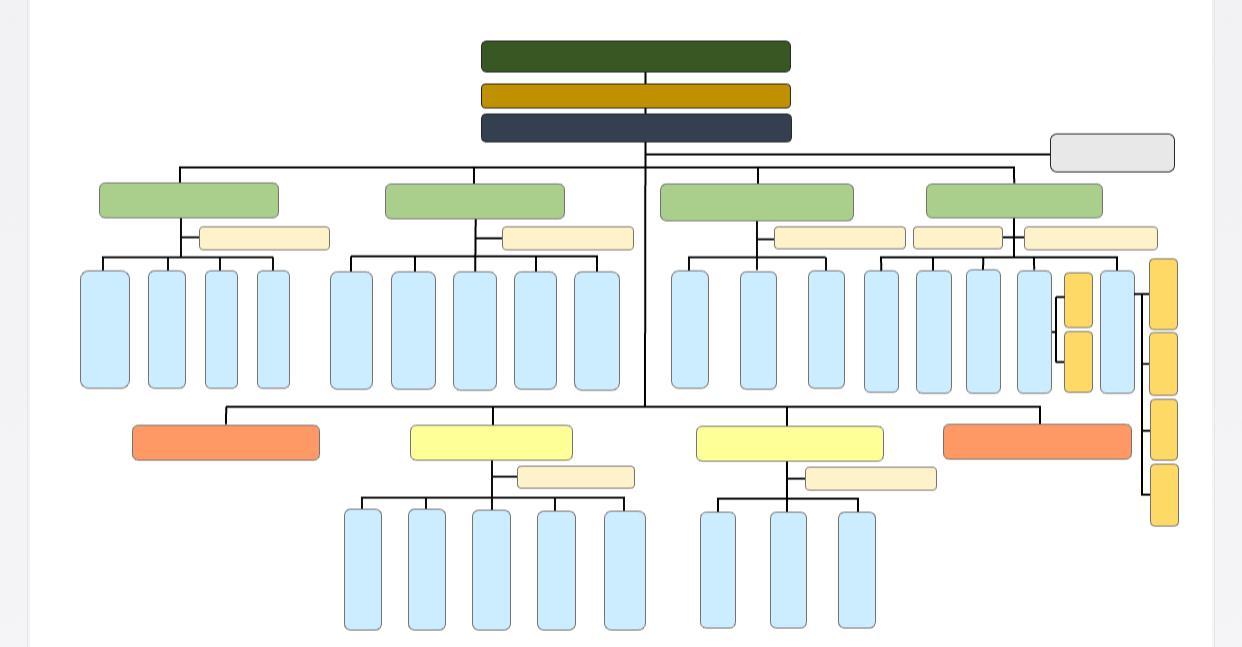 the conditions : I want the same look requested, please
-------------------------------------------------
I do not want the answer that you have pasted below. I want the answer to be the same as requested, please
-------------------------------------------------
.node circle { fill: #fff; stroke: steelblue; stroke-width: 3px; }
.node text { font: 12px sans-serif; }
.link { fill: none; stroke: #ccc; stroke-width: 2px; }
var treeData = [ { "name": "Top Level", "parent": "null", "children": [ { "name": "Level 2: A", "parent": "Top Level", "children": [ { "name": "Son of A", "parent": "Level 2: A" }, { "name": "Daughter of A", "parent": "Level 2: A" } ] }, { "name": "Level 2: B", "parent": "Top Level" } ] } ];
// ************** Generate the tree diagram ***************** var margin = {top: 20, right: 120, bottom: 20, left: 120}, width = 960 - margin.right - margin.left, height = 500 - margin.top - margin.bottom; var i = 0, duration = 750, root;
var tree = d3.layout.tree() .size([height, width]);
var diagonal = d3.svg.diagonal() .projection(function(d) { return [d.y, d.x]; });
var svg = d3.select("body").append("svg") .attr("width", width + margin.right + margin.left) .attr("height", height + margin.top + margin.bottom) .append("g") .attr("transform", "translate(" + margin.left + "," + margin.top + ")");
root = treeData[0]; root.x0 = height / 2; root.y0 = 0; update(root);
d3.select(self.frameElement).style("height", "500px");
function update(source) {
// Compute the new tree layout. var nodes = tree.nodes(root).reverse(), links = tree.links(nodes);
// Normalize for fixed-depth. nodes.forEach(function(d) { d.y = d.depth * 180; });
// Update the nodes var node = svg.selectAll("g.node") .data(nodes, function(d) { return d.id || (d.id = ++i); });
// Enter any new nodes at the parent's previous position. var nodeEnter = node.enter().append("g") .attr("class", "node") .attr("transform", function(d) { return "translate(" + source.y0 + "," + source.x0 + ")"; }) .on("click", click);
nodeEnter.append("circle") .attr("r", 1e-6) .style("fill", function(d) { return d._children ? "lightsteelblue" : "#fff"; });
nodeEnter.append("text") .attr("x", function(d) { return d.children || d._children ? -13 : 13; }) .attr("dy", ".35em") .attr("text-anchor", function(d) { return d.children || d._children ? "end" : "start"; }) .text(function(d) { return d.name; }) .style("fill-opacity", 1e-6);
// Transition nodes to their new position. var nodeUpdate = node.transition() .duration(duration) .attr("transform", function(d) { return "translate(" + d.y + "," + d.x + ")"; });
nodeUpdate.select("circle") .attr("r", 10) .style("fill", function(d) { return d._children ? "lightsteelblue" : "#fff"; });
nodeUpdate.select("text") .style("fill-opacity", 1);
// Transition exiting nodes to the parent's new position. var nodeExit = node.exit().transition() .duration(duration) .attr("transform", function(d) { return "translate(" + source.y + "," + source.x + ")"; }) .remove();
nodeExit.select("circle") .attr("r", 1e-6);
nodeExit.select("text") .style("fill-opacity", 1e-6);
// Update the links var link = svg.selectAll("path.link") .data(links, function(d) { return d.target.id; });
// Enter any new links at the parent's previous position. link.enter().insert("path", "g") .attr("class", "link") .attr("d", function(d) { var o = {x: source.x0, y: source.y0}; return diagonal({source: o, target: o}); });
// Transition links to their new position. link.transition() .duration(duration) .attr("d", diagonal);
// Transition exiting nodes to the parent's new position. link.exit().transition() .duration(duration) .attr("d", function(d) { var o = {x: source.x, y: source.y}; return diagonal({source: o, target: o}); }) .remove();
// Stash the old positions for transition. nodes.forEach(function(d) { d.x0 = d.x; d.y0 = d.y; }); }
// Toggle children on click. function click(d) { if (d.children) { d._children = d.children; d.children = null; } else { d.children = d._children; d._children = null; } update(d); }
17 TI 17 TI
Step by Step Solution
There are 3 Steps involved in it

Get step-by-step solutions from verified subject matter experts
 Study Help